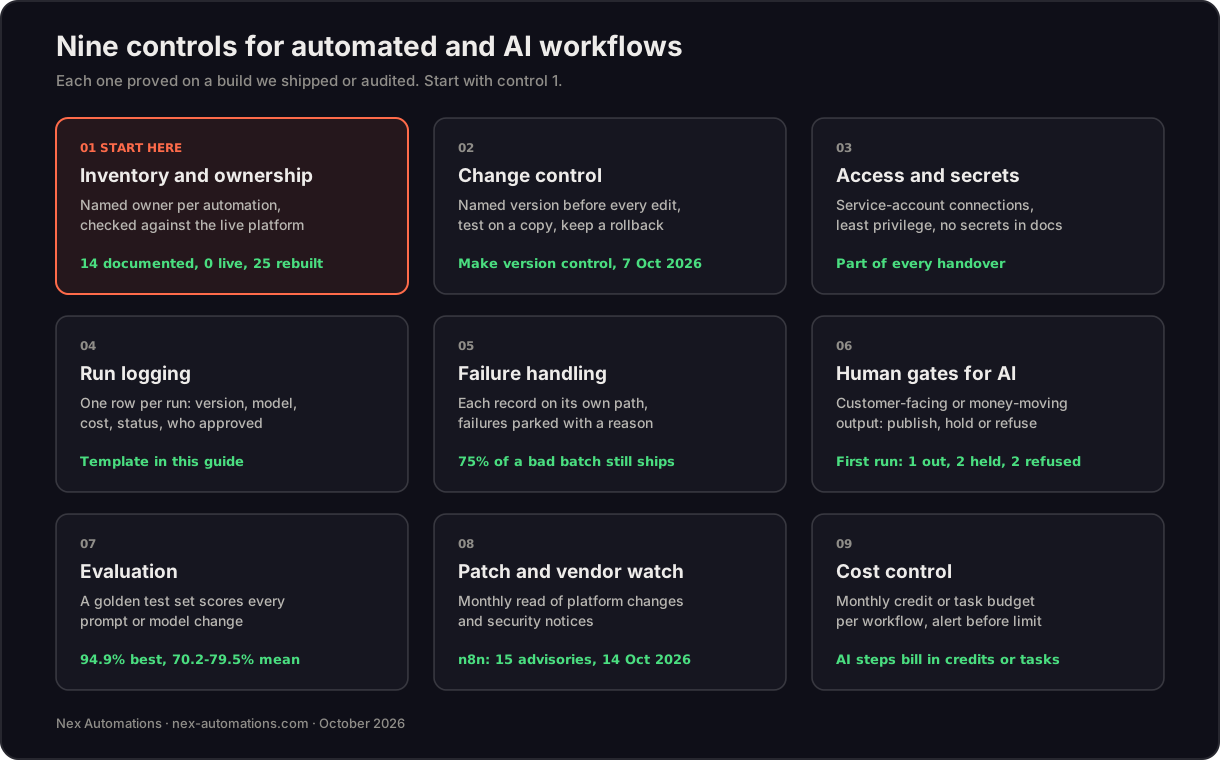
Short answer. Companies that run automation safely use nine controls: an inventory with a named owner per automation, checked against the live platform; change control; service-account connections; a log row for every run; failures parked with a reason; a human gate before AI output reaches a customer or moves money; an evaluation set for every AI step; a monthly patch review; and a cost budget. None of them is a product you buy. They are habits built into how each workflow is designed.
This guide is written for founders, operations leads and leadership teams who already run automations on Make, n8n, Zapier or Power Automate and now have AI steps inside them. Every control below comes from a system we built or audited, with the number that moved. It is written by Prem Patel, a Make Level 5 Expert, Make Silver Solution Partner and Zapier Solution Partner, who runs the audits described here. Over 6 years Nex Automations has built 1,200+ automations for 210+ clients in 12+ countries.
Why governance comes before the next build
The most common finding in an automation audit is not a broken scenario. It is a gap between what the company believes is running and what is. On an elevator and field-service company's monday.com estate, the documentation listed 14 live automations. A four-day audit found none running. The rebuild delivered 25 automations across 9 boards, live-tested including the cross-board cases (full case).
AI makes the gap more expensive. A rule-based automation that fails usually stops. An AI step that degrades keeps running and produces confident output that looks right. That is why the controls below put the checks around the model, not inside it.
The nine controls, with the build each comes from
| Control | What it means in practice | Where we proved it |
|---|---|---|
| 1. Inventory and ownership | Every automation has a named owner, a purpose, the systems it touches and a last-verified date, checked against the live platform, not the documentation | monday.com audit: 14 documented, 0 live, 25 delivered |
| 2. Change control | Save a named version before every change, test on a copy, keep a rollback | Make added version control to the scenario toolbar on 7 October 2026 |
| 3. Access and secrets | Connections belong to a service account, not to the person who built them; least privilege; no secrets in documents or chat | Standard on every handover we do |
| 4. Run logging | One log row per run: what came in, what went out, which version and model ran, what it cost, who approved | Daily SEO publishing for Shopify: owner alerts and a run log on every publish |
| 5. Failure handling | Each record runs on its own path; a failure is parked with its reason and the owner is alerted; a daily summary lists what shipped | Error-tolerant document generation: 75% of a bad batch still ships on time at 50+ documents a day |
| 6. Human gates for AI | Anything a customer reads or that moves money passes a check that can publish, hold or refuse | Shopify publisher's first production run: 1 published, 2 held as drafts, 2 refused |
| 7. Evaluation | A golden test set of real inputs scores every prompt or model change before it ships | AI contract review SaaS: 94.9% best run, 70.2% to 79.5% mean across prompt versions |
| 8. Patch and vendor watch | A monthly read of each platform's changes and security notices, with a dated action per change | n8n published 15 security advisories on 14 October 2026, fixed in 2.43.5 and later (October updates) |
| 9. Cost control | A monthly budget per workflow in credits or tasks, with an alert before the limit | Make credits and Zapier tasks both bill AI steps; see Make credits explained |
Start with control 1. Without an inventory, the other eight have nothing to attach to.
AI workflow architecture for multi-step agents
The architecture question we are asked most is how to run an AI workflow with several steps, or an agent that chooses between tools, without it becoming a black box. The pattern that holds up in production has six layers:
| Layer | Job | What we use |
|---|---|---|
| Orchestrator | Runs the stages in order and decides what happens on failure | Make scenarios, n8n workflows or Zapier Zaps |
| Stages with checkpoints | Each stage (research, draft, score) saves its output before the next one starts, so a weak stage re-runs alone | Airtable or Supabase rows between stages |
| Queue with retries | Calls to the model wait their turn, back off on rate limits and retry safely | Platform queues, with Retry-After honoured |
| Idempotent writes | Every write carries a key, so a retry never creates a duplicate | A run ID plus record ID on each write |
| Run log | One row per step: input, output, model, prompt version, cost, status | A log table the owner can read without opening the platform |
| Evaluation and gates | A fixed test set for changes, a human gate for anything customer-facing | Scored test runs before release; publish, hold or refuse at the gate |
Two builds show why the layers matter. Our five-stage article pipeline runs research, outline, draft, score and polish as five Make scenarios with an Airtable checkpoint between each: when a section is weak, one stage re-runs, not the whole article, and the client reports time per article falling from 6 to 9 hours to 60 to 90 minutes. Our contract review SaaS handles documents of up to 1,000 pages by chunking the upload, queueing extraction with retries, writing each chunk idempotently and checking for fabricated facts, so every fact in the review carries a page citation.
A run-log template you can copy
This is the minimum log we put behind every workflow that matters. It works as an Airtable table, a Google Sheet or a database table:
| Field | Example | Why it is there |
|---|---|---|
| run_id | 2026-10-17-0042 | Ties every step of one run together |
| workflow and version | invoice-builder v14 | Shows which version produced the output |
| trigger | New paid order 18733 | Answers "why did this run?" |
| input_ref and output_ref | Links to the source record and the file produced | Lets anyone check the result without rerunning |
| model and prompt_version | Claude Sonnet 5.5, prompt v6 | Explains a change in quality after an upgrade |
| cost | 38 credits | Feeds the monthly budget per workflow |
| status | shipped, held, refused or failed | One word the owner can filter on |
| error_reason | Missing tax ID on customer record | Turns a failure into a task |
| approved_by | Name, or "auto" | Shows where a human signed off |
| started_at and finished_at | Timestamps | Spots slow steps and stuck runs |
What leadership teams should ask about AI workflows
Five questions cover most of the risk. If any answer takes more than a day to produce, governance is the next project, before any new build:
- Which automations are live today, and who owns each one?
- When one fails, what happens and who finds out first: the owner or a customer?
- Which steps let AI act without a person checking?
- How would we know if an AI step's accuracy dropped?
- What do we spend per month, per workflow, in credits, tasks or licences?
For a leadership team, the useful AI workflows are rarely the flashy ones. They are the weekly reports that build themselves, the documents that ship without a person retyping them and the lead replies that go out in minutes. Our multi-store sales reports took each report from 1 to 2 days of manual work to none, with no AI step at all; the governance is the reconciliation, done the same way every cycle.
Governance by platform, October 2026
| Platform | What helps | What stays your job |
|---|---|---|
| Make | Version control in the scenario toolbar (7 October 2026), event subscriptions with delivery logs (8 October), MCP tools for audit logs (9 October), fallback connections for Make AI Agents | Owners, the run log, evaluation sets and budgets |
| n8n (self-hosted) | Data stays on your own server | Patching: upgrade to 2.43.5 or later after the 14 October 2026 advisories, plus backups and access |
| Zapier | Zap history and AI steps inside Zaps, billed in tasks | Owners, gates and a log outside Zap history if you need longer retention |
| Power Automate | Microsoft's admin and identity model; request limits per licence | Licence coverage per connector; see Make vs Power Automate |
Platform facts for October 2026 are sourced on our platform updates page.
FAQ
How do companies govern automated workflows?
With nine controls: an inventory with a named owner per automation, checked against the live platform; change control with a saved version before every edit; connections owned by a service account rather than a person; a log row for every run; failures parked with a reason and an alert to the owner; a human gate before AI output reaches a customer or moves money; an evaluation set for every AI step; a monthly patch and vendor-change review; and a cost budget with alerts. The inventory comes first: on one monday.com estate we audited, the documentation listed 14 live automations and the platform showed none.
What is the best architecture for multi-step AI agent workflows?
Split the work into stages with a saved checkpoint between each, so a weak stage is re-run on its own instead of regenerating everything. Put a queue with retries in front of the model, give every write an idempotency key, keep state in a database rather than inside the run, log every step and score outputs against a fixed test set. Our editorial pipeline runs research, outline, draft, score and polish as five Make scenarios with an Airtable checkpoint between each, and re-runs one stage, not the article.
What should an automation run log contain?
At minimum: a run ID, the workflow and its version, the trigger, a reference to the input and the output, the AI model and prompt version used, credits or tasks consumed, the status, the error reason if it failed, who approved it if a human gate applied and the timestamps. With those fields you can answer what happened, why, what it cost and who signed off.
How do you put a human in the loop on AI workflows without slowing everything down?
Gate only what a customer reads or what moves money, and let the gate return three answers rather than two: publish, hold as a draft or refuse. Our Shopify publisher uses an independent quality gate; on its first production run it published one article, held two as drafts and refused two. Internal classification and reporting can run unattended once they have been checked against real data.
How do you measure whether an AI step is good enough for production?
Build a golden test set of real inputs with known correct answers and score every prompt or model change against it before it ships. On our contract review SaaS, the best run scored 94.9% while the mean across prompt versions ranged from 70.2% to 79.5%. Without the test set, the team would have shipped whichever version looked good in a demo.
What should leadership teams ask about AI workflows?
Five questions cover most of the risk: which automations are live today and who owns each one; what happens when one fails, and who finds out first; which steps let AI act without a person checking; how we would know if accuracy dropped; and what we spend per month, per workflow. If any answer takes more than a day to produce, governance is the first project, before new builds.
Which automation platform features help with governance in 2026?
In October 2026 Make shipped version control in the scenario toolbar (7 October), event subscriptions with delivery logs (8 October) and MCP tools for audit logs (9 October). Self-hosted n8n keeps data on your own server but makes patching your job: n8n published 15 security advisories on 14 October 2026, fixed in 2.43.5 and later. Whatever the platform, the controls above are a process, not a feature you switch on.
Related guides
- The mistakes that break Make scenarios in production
- AI agent vs automation: which one you need
- Which AI model to use in automation workflows
- How to automate document workflows
Not sure what is actually running in your stack? The automation audit is a fixed-fee inventory of every live automation, its owner, its failure path and its cost, with a written plan, credited against any rebuild. Start with the two-minute fit-check or book a 30-minute call.