Make bills in credits, and most people discover how they work by getting a surprise. The short version: one operation does not mean one credit. Most standard actions cost 1 credit, the code module costs 2 credits per second of execution time, AI features add token-based credits on top of the operation, and routers, filters and error handlers cost nothing at all.
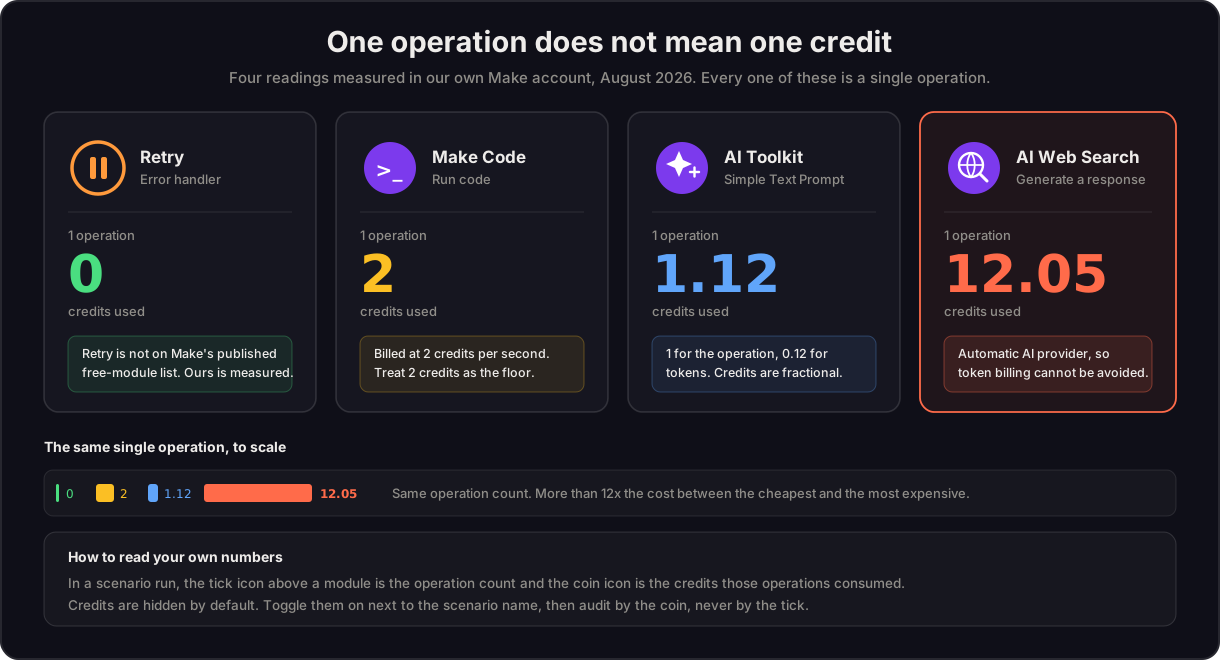
To show what that means in practice, here are four readings taken from real module runs in our own Make account. Every one of them is a single operation:
| Module | Operations | Credits used |
|---|---|---|
| Retry (error handler) | 1 | 0 |
| Make Code (Run code) | 1 | 2 |
| Make AI Toolkit, Simple Text Prompt | 1 | 1.12 |
| Make AI Web Search | 1 | 12.05 |
Same operation count, more than twelve times the cost. That gap is the whole subject of this guide.
I am Prem Patel, founder of Nex Automations, an AI systems studio in Ahmedabad. I hold the Make Level 5 Expert credential and Nex Automations is a Make Silver Solution Partner, listed in the official partner directory. Credit efficiency is something we design for on every build, across 1,200+ automations for 210+ businesses. Everything below is either measured in our own account or read off Make's own documentation on 18 August 2026, and I say which is which.
Two things those readings prove
Credits are fractional. The counter reports two decimal places. The AI Toolkit run above cost 1.12 credits: 1 credit for the operation, 0.12 credits of token usage on top. Almost every guide on the internet talks in whole credits, which quietly hides where AI spend actually accumulates.
Retry is free, and Make's documentation does not say so. Make publishes a list of modules that consume no credits. It names five error handlers, and Retry is not one of them. Our run shows 1 operation, 0 credits. We are publishing that as a measured finding rather than a quoted rule, and it is worth re-checking in your own account before you design around it.
Fixed versus dynamic: the model that explains everything
Make splits credit consumption into two kinds, and once you have this distinction the rest of the system is predictable.
Fixed credit usage means a set rate per run, constant regardless of input or data transfer size. The default is 1 operation = 1 credit. Uploading a file to Google Drive costs 1 credit whether the file is 2 KB or 200 MB. Some modules are tagged at 2 or 10 credits per operation, but the rate is still fixed.
Dynamic credit usage means the cost varies per run with actual consumption. Make tags four factors that drive it:
| Factor | What it means |
|---|---|
| Tokens | Credits scale with the input and output tokens an AI model processes |
| File size | Credits scale with the size of the file processed |
| Pages | Credits scale with page count, which matters for document extraction |
| Run time | Credits scale with processing time, which is how the code module is billed |
The practical rule: fixed-rate modules are forecastable from a module count, dynamic ones are not. Any scenario containing a dynamic module needs to be measured, not estimated.
What is genuinely free
Make publishes a list of modules that consume no credits, and it is longer than most people realise:
- Error handlers: Rollback, Break, Resume, Commit, Ignore
- Routers and filters
- Scenarios modules: Call a subscenario, Start a scenario, Return output, Customize run name
- Make functions modules
Plus Retry, measured at 0 above.
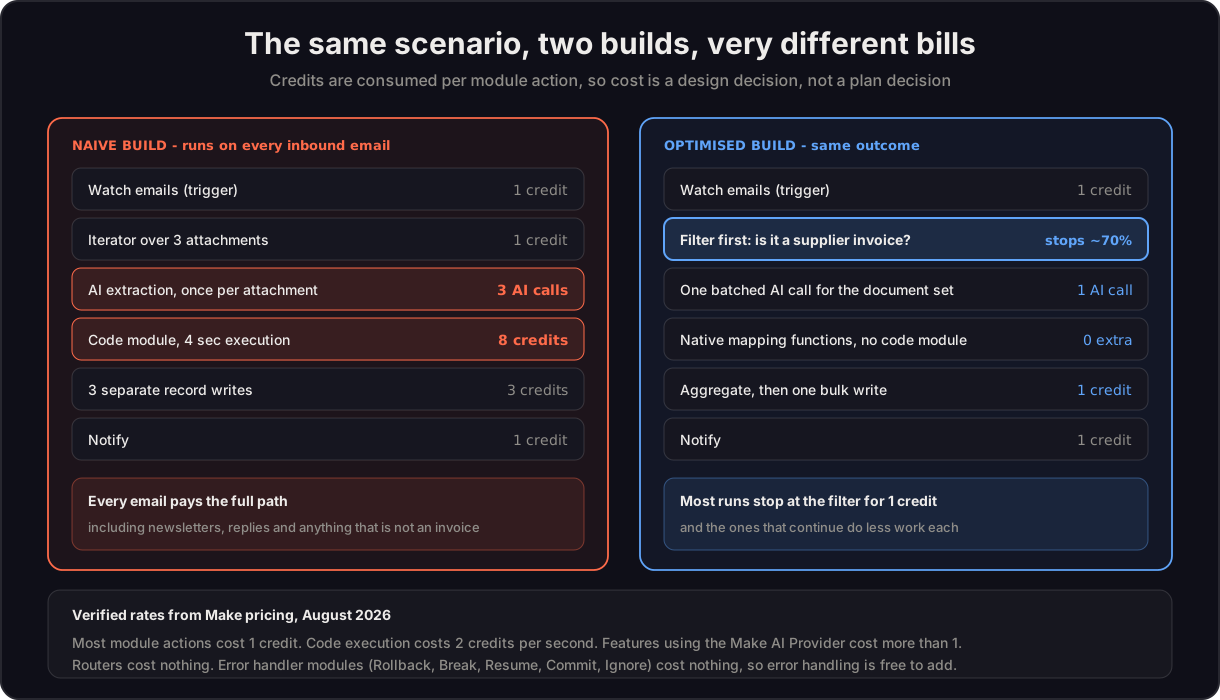
Filters being free is the most under-used fact on that list. A filter costs nothing to add and removes every downstream charge on the runs it stops. If 70 percent of your inbound items are not relevant, a filter in position two deletes 70 percent of your scenario's cost and you pay nothing for the privilege. The same logic makes error handling free to add, which is why well-built scenarios often cost less than fragile ones despite having more modules on the canvas.
How each module type is charged
This is where forecasts usually go wrong, because operations multiply down the scenario.
| Module type | Rule |
|---|---|
| Trigger | 1 credit per run, even when it finds nothing. You are billed for checking |
| Search | 1 credit per run, even when it returns fifty bundles |
| Action (add, update, delete) | 1 credit per input bundle. Ten rows to delete costs 10 credits |
| Aggregator | 1 credit per aggregation |
| Iterator | 1 credit to split, then every downstream module charges per bundle |
| Make Code | 2 credits per second of execution time |
Make's own worked example makes the multiplication concrete: a trigger returns 10 bundles, three downstream modules each run 10 times, and the scenario costs 1 + 30 = 31 operations, not 4.
Two consequences follow. A polling trigger set to every minute runs 43,200 times a month and bills for every check, whether or not anything happened. And a search returning many bundles is cheap, while the action that processes them is not, so the cost lands one module later than people expect.
The code module: 2 credits per second, with a floor
Code execution is billed on time, not complexity. Our measured run above returned 2 credits for a single fast operation, which suggests 2 credits is the practical floor for any code module, however trivial the script. From there it scales:
- A script running 0.5 seconds bills at the 2 credit floor.
- A script running 4 seconds costs 8 credits, every run. On 2,000 runs a month that is 16,000 credits from one module.
- The same script inside an iterator over 20 items pays that cost twenty times, because it executes per item.
Three things follow. Code inside a loop is the most expensive common pattern on the platform, and it is usually avoidable by processing the array in one pass. A slow external API call inside a code module is billed as execution time, so waiting is charged. And most of what people use code modules for, being date formatting, string manipulation, JSON reshaping and conditional values, is available as native mapping functions where the Make functions modules are free. The trigger and action map lists which native building blocks replace the common code-module jobs.
The AI layer: three connection types, and one of them is nearly free
Make now has several AI surfaces, and what they cost depends far less on which feature you use than on how the model is connected. There are three connection types.
| Connection | Plans | How credits are charged |
|---|---|---|
| Make's AI Provider | All plans | 1 credit per operation plus credits based on tokens |
| Custom AI provider (your own API key) | Paid plans | 1 credit per operation only. You pay the model provider for tokens |
| Automatic AI provider (no option offered) | All plans | 1 credit per operation, plus tokens, plus other usage factors |
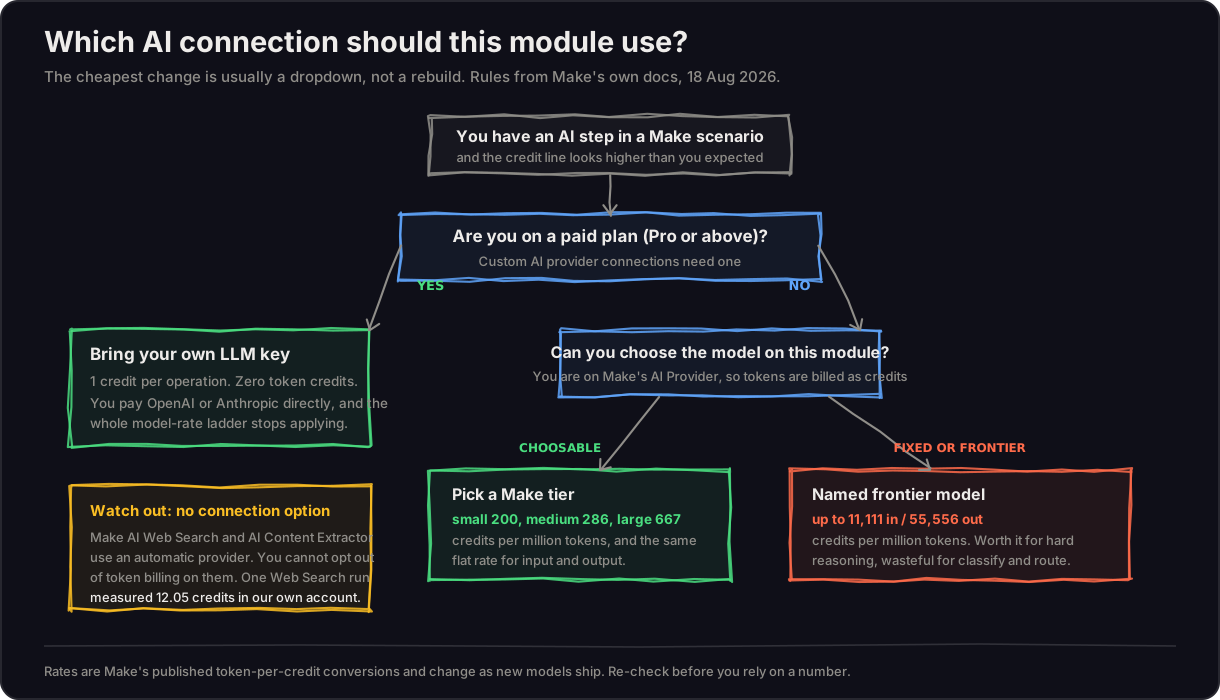
That middle row is the single biggest lever on an AI automation bill. With your own key, the token component of your Make credit consumption disappears entirely: Make charges you for the orchestration, and the model provider charges you for the intelligence, at their rates, with your choice of model. At any serious volume that separates two costs that scale very differently.
The bottom row is the one that catches people out. Make AI Web Search and Make AI Content Extractor connect to a provider automatically with no connection option at all, which means you cannot opt out of token billing on them. That is why the web search above cost 12.05 credits from one operation. The Simple Text Prompt module in the OpenAI, Gemini, Groq and Anthropic Claude apps behaves the same way.
Maia sits outside all of this. It is Make's conversational builder: you describe what you want and it assembles the scenario. It assists at build time, and the scenario it produces consumes credits at the normal rates when it runs. Our Make AI agents guide covers what these agents do well and where a plain automation is the better buy.
The model rate table, and the 201x spread
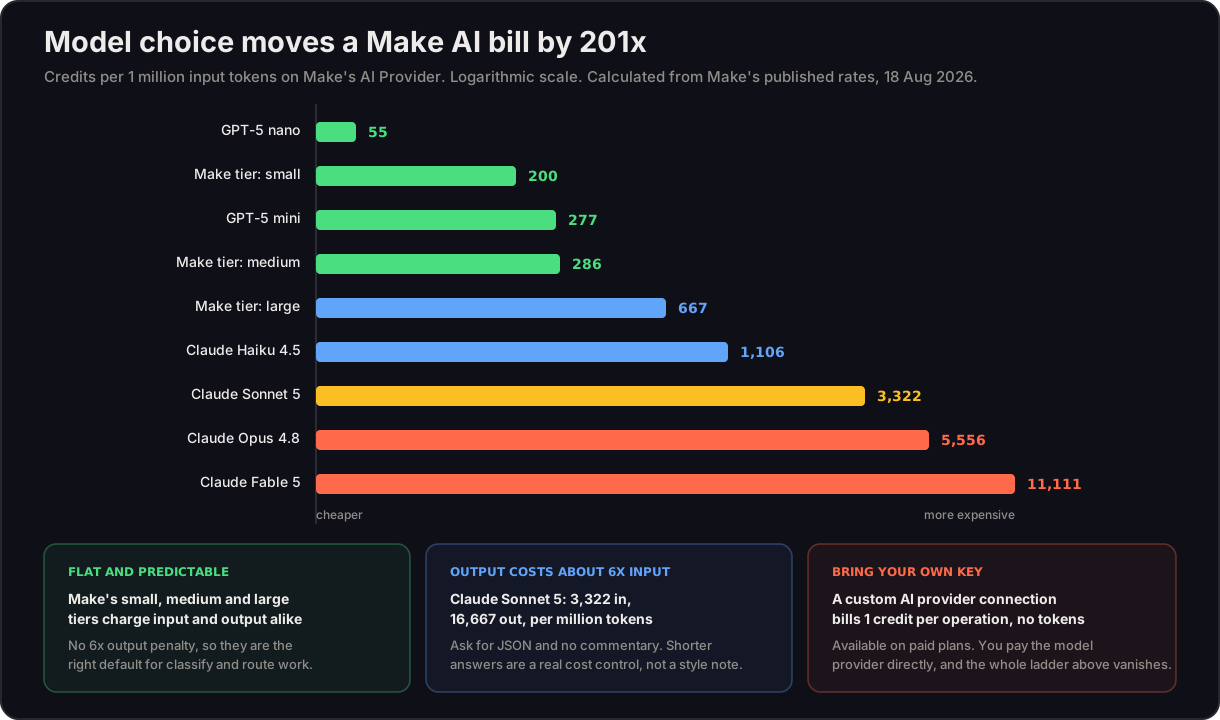
If you are on Make's AI Provider, Make publishes how many tokens each model gets per credit. A bigger number is cheaper. Converting those to credits per million tokens is where the real decision lives:
| Model | Credits per 1M input | Credits per 1M output |
|---|---|---|
| GPT-5 nano | 55 | 442 |
| Make tier: small | 200 | 200 |
| GPT-5 mini | 277 | 2,212 |
| Make tier: medium | 286 | 286 |
| Make tier: large | 667 | 667 |
| Claude Haiku 4.5 | 1,106 | 5,525 |
| Claude Sonnet 5 | 3,322 | 16,667 |
| Claude Opus 4.8 | 5,556 | 27,778 |
| Claude Fable 5 | 11,111 | 55,556 |
That is a 201x spread on input and 126x on output, and the model is a dropdown. No rebuild, no migration, no plan change. It is the cheapest optimisation available on the platform and almost nobody makes it deliberately.
Three readings of that table worth acting on:
- Make's own small, medium and large tiers charge input and output identically. Named models charge output roughly six times harder than input. For anything that classifies, routes or extracts a short field, a Make tier is both cheaper and more predictable.
- Output length is a cost control, not a style preference. Sonnet 5 output costs 16,667 credits per million against 3,322 for input. "Return JSON only, no commentary" is worth real money at volume.
- Long context is charged harder. Going over 272,000 tokens of context roughly halves the tokens-per-credit rate, so context stuffing is billed twice: once for the tokens, again through the worse rate.
Make notes these rates change as new models ship, so re-check them in your account before you rely on a number. The architecture advice above does not age; the multipliers do.
AI Agents: the tool-call charge nobody budgets for
Make's AI Agent app has its own credit table, and one line in it matters more than the rest. On chat, you pay 1 credit per operation plus 1 credit per called tool, plus tokens if you are on Make's AI Provider. An agent that calls four tools to answer one question bills five operations, not one.
Knowledge files add their own layer: uploading a PDF or DOCX costs 1 credit per operation plus 10 tokens per page plus description-generation tokens plus embedding tokens. Querying knowledge later costs 1 credit plus embedding tokens on every query. None of that is expensive per unit, but it is easy to forget when sizing a plan around an agent that answers a hundred questions a day.
Seven design changes that cut credit consumption
- Filter as early as possible. Filters are free and the cheapest run is one that stops at module two.
- Batch AI calls instead of looping them. One call over a document set beats one call per document, in credits and in tokens.
- Change the model before you change the architecture. Moving a classification step from a frontier model to a Make tier can cut that step's cost by more than 90 percent in one dropdown.
- Constrain output. Ask for structured JSON and nothing else. Output tokens are the expensive half.
- Replace code modules with native functions. Make functions modules are free; the code module bills from 2 credits up.
- Aggregate before writing. Actions bill per input bundle, so three writes cost three credits and one bulk write costs one.
- Reconsider polling frequency. Triggers bill for checking. Webhooks fire only on real events.
And the audit rule that finds all of the above: sort scenarios by actual credit consumption, not by how complicated they look. In a scenario run, the tick icon above a module is the operation count and the coin icon is the credits consumed. Credits are hidden by default, so toggle them on next to the scenario name, then read the coin.
Choosing a plan without overbuying
Make publishes tiers from 1,000 credits a month on the Free plan through 5k, 10k, 20k, 40k, 80k, 150k, 300k, 500k, 750k and 1M. Two features matter before you size:
- Credit overage protection keeps scenarios running once you hit the limit rather than stopping mid-process. For anything business-critical this matters more than the tier itself.
- Annual billing changes expiry. Prepaid annual credits last twelve months instead of expiring monthly, which suits seasonal businesses rather than flat usage.
Sizing advice from our own builds: measure a real month before committing to an annual tier, then buy for the median month with overage protection covering the peak, rather than buying for the peak all year. Our Make automation cost guide covers build pricing alongside these platform fees, and the platform comparison has the verified maths against Zapier and n8n if you are still choosing.
When credits are the wrong thing to optimise
Two honest cautions. If your scenario processes genuinely high volume, at some point the answer is self-hosted n8n rather than a cheaper Make design, and we say so when that line is crossed. And if a scenario is expensive because it does something valuable at volume, the credits are not the problem: a build consuming 40,000 credits a month while replacing 15 to 20 hours a week of manual work is not a cost to cut, it is the cheapest employee you have.
There is also a data point worth flagging to anyone in a regulated sector: Make notes that under Anthropic's terms for its Fable model, data may be stored for 30 days with logs accessible during that period. Model choice is occasionally a compliance question, not only a cost one.
FAQ
Q: What are Make.com credits and how do they work? A: Credits are Make's billing unit. Every module action a scenario performs consumes credits. Most standard actions cost 1 credit, the code module costs 2 credits per second of execution time, and AI features add token-based credits on top of the operation. Routers, filters and error handler modules consume none. Credits are fractional and reported to two decimal places, so a single AI operation can cost 1.12 credits rather than a round number.
Q: Which Make modules do not consume credits? A: Make lists the error handlers Rollback, Break, Resume, Commit and Ignore, plus routers and filters, the Scenarios modules Call a subscenario, Start a scenario, Return output and Customize run name, and Make functions modules. We also measured the Retry module at 1 operation and 0 credits in our own account in August 2026, although Retry does not appear on Make's published list.
Q: How many credits does the Make code module use? A: 2 credits per second of execution time, billed on run time rather than lines of code. A measured single run in our account returned 2 credits, so treat 2 as the floor for any code module. A four-second script costs 8 credits per run, and code inside an iterator executes per item, which is the most expensive common pattern on the platform.
Q: How much does Make AI Web Search cost in credits? A: A single Make AI Web Search operation measured 12.05 credits in our own Make account in August 2026, roughly twelve times a standard action. It uses an automatic AI provider connection with no option to supply your own key, so credits are charged on tokens, operations and other usage factors, and the token component cannot be avoided.
Q: Do Make AI Agents and the AI Toolkit use credits? A: Yes. On Make's AI Provider you pay 1 credit per operation plus credits based on tokens. On a paid plan you can use a custom AI provider connection with your own LLM key, which bills 1 credit per operation and no token credits, because you pay the model provider directly. Agent chat additionally bills 1 credit for every tool the agent calls.
Q: Which AI model uses the fewest credits on Make? A: On Make's AI Provider, GPT-5 nano is the cheapest at roughly 55 credits per million input tokens, and Make's own small tier at 200 credits per million is the cheapest option with a flat input and output rate. The most expensive published rate is Claude Fable 5 at roughly 11,111 credits per million input tokens, a 201x spread. Since the model is a dropdown, changing it is usually the fastest saving available.
Q: What is Maia in Make and does it cost credits? A: Maia is Make's conversational builder for creating automations and AI agents by describing them in natural language. It assists at build time, and the scenario it produces consumes credits at normal rates when it runs.
Q: How do I reduce Make credit usage? A: Filter early, since filters are free and stop downstream charges. Switch classification steps to a cheaper model. Constrain output length, because output tokens cost about six times input. Batch AI calls rather than looping them, replace code modules with native functions, aggregate before writing since actions bill per bundle, and use webhooks instead of frequent polling because triggers bill for checking. Then audit by the coin icon rather than by how complex a scenario looks.
Q: Why did my Make bill go up after the switch to credits? A: Under operations most actions cost roughly the same, so module count predicted the bill. Under credits, code execution and AI features consume more than standard actions and vary per run, so a scenario whose design never changed can consume far more than its module count suggests. The usual culprits are code modules inside loops, per-item AI calls, and AI features on an automatic provider connection where token billing cannot be switched off.
Rates and measurements on this page were verified against Make's documentation and our own account on 18 August 2026. Not sure which of your scenarios is quietly consuming the most? Book a free consult and we will look at your actual usage together, including the cases where the honest answer is that your build is fine and the plan is simply the wrong size.