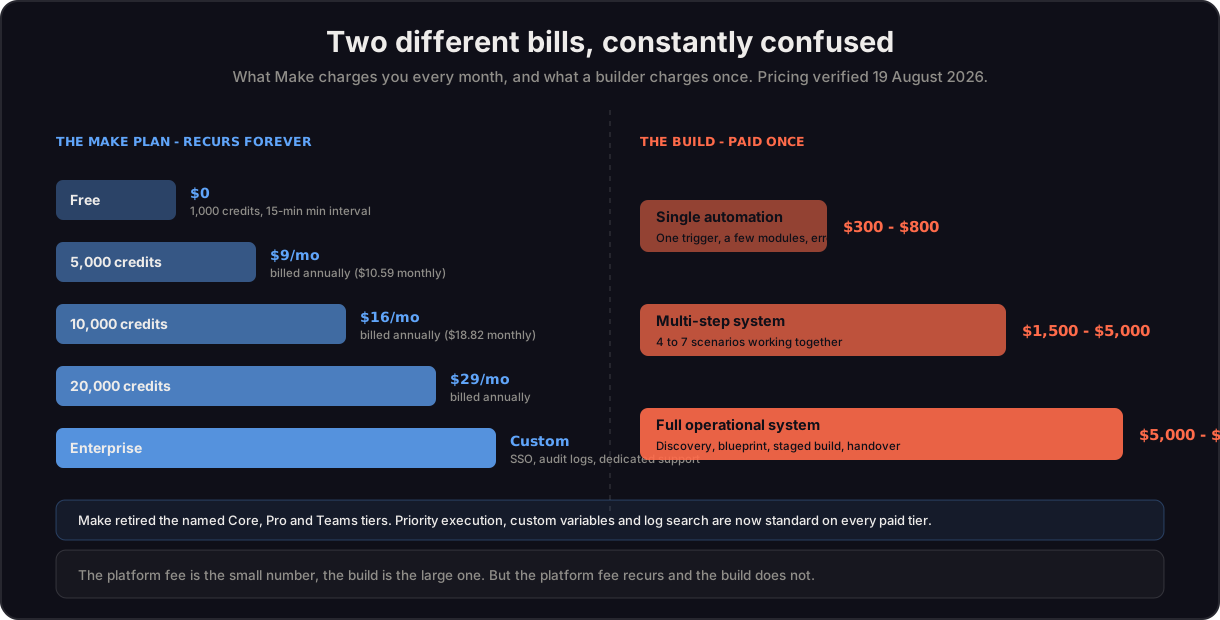
A Make.com automation project in 2026 costs between $300 and $8,000 depending on complexity, plus the Make.com subscription itself, which runs from $0 on the Free plan to about $16 per month for 10,000 credits for most small businesses. Simple single-trigger workflows like a form-to-CRM connection sit at the $300 to $800 range. Multi-step systems with routers, AI steps and several connected apps land between $1,500 and $5,000. Full operational systems spanning order processing, invoicing, reporting and inventory cross $5,000 and run on monthly retainers after launch.
I am Prem Patel, founder of Nex Automations, an AI systems studio in Ahmedabad. I hold the Make.com Level 5 Expert certification, one of fewer than 100 globally, and I am a Zapier Certified Expert. Over 6 years I have built 1,200+ automations for 210+ clients across e-commerce, SaaS, finance and service businesses. The numbers in this guide come from that build dataset, not from a pricing page.
This guide breaks down what you actually pay: the platform subscription, the build cost and the ongoing cost. It also shows where people overspend and how to scope a project so the price matches the value.
What does Make.com itself cost in 2026?
Make.com pricing is separate from what you pay a builder. In August 2025 Make switched from charging by operations to charging by credits. For standard module runs the math is the same, one module run is one credit, but AI features and code execution consume more than one credit each. That single change is why old pricing guides are now wrong.
The plan tiers most businesses use in 2026:
- Free: 1,000 credits per month, 2 active scenarios, 15-minute minimum interval. Fine for testing and one light workflow.
- 5,000 credits ($9 per month): Billed annually, or $10.59 month to month. Suits a solo founder running a few automations.
- 10,000 credits ($16 per month): Billed annually, or $18.82 month to month. The tier most small businesses settle on.
- 20,000 credits ($29 per month): Billed annually. Where agencies and multi-workflow operations tend to land.
Important change, verified 19 August 2026 and re-checked 10 September 2026. Make's pricing page no longer sells Core, Pro and Teams to new customers: new signups see one Make Plan with a credit slider, and the price moves with credits rather than with feature sets. Existing Core, Pro and Teams subscribers keep the plan they are on, and still see it by that name in their Make account, until they change it. Priority execution, custom variables, full-text execution log search, team roles and enterprise apps are now standard on every paid tier, so they are no longer reasons to upgrade. Note this is not a broad price rise: 10,000 credits still costs $16, and $29 now buys 20,000 credits where it previously bought 10,000. What changed for new customers is the cheap Core entry point, which is why $9 now buys 5,000 credits instead of 10,000. A guide that quotes Core, Pro or Teams prices as what a new signup will pay, including older versions of this one, is out of date; a guide that says those plans no longer exist is also wrong, because current subscribers keep them. - Enterprise (custom): SSO, audit logs, advanced security and dedicated support for high-volume operations.
Annual billing saves roughly 15% over monthly. The trap people fall into is under-buying and hitting the credit ceiling mid-month so scenarios stop running, or building inefficiently so AI steps quietly burn credits. Credit consumption depends on how a scenario is built, not just how often it runs. A poorly built scenario can burn several times the credits of a clean one doing the same job.
How much does it cost to build a single automation?
A single, self-contained automation built by an expert typically costs $300 to $800. This covers one trigger, a handful of modules, mapping, error handling and a test cycle.
Examples in this range from my own builds:
- A Typeform or Google Form submission that tags the lead, logs it to Airtable and sends a personalized auto-reply.
- A Razorpay or Stripe payment that triggers an invoice, a WhatsApp confirmation and a logged row.
- A new Shopify order that creates a task and updates a customer record.
The price moves with the number of connected apps, whether AI steps are involved and how much error handling the workflow needs. A two-app flow with no edge cases is cheaper than a two-app flow that has to handle refunds, retries and missing data.
How much does a multi-step automation system cost?
A connected system of several workflows runs $1,500 to $5,000. This is the most common project size for a business that wants real operational relief rather than a single shortcut.
What sits in this tier:
- Lead and client onboarding with CRM logging, task creation and team notifications.
- Product cataloging from Telegram or WhatsApp vendors using AI to extract sizes, prices and descriptions.
- Instagram and Facebook content automation that turns Airtable rows into scheduled posts with AI captions.
- Inventory monitoring with low-stock alerts and draft vendor reorder emails.
These projects involve routers, iterators, aggregators, AI modules and multiple connected accounts. Across my build dataset the average multi-workflow system uses 4 to 7 distinct scenarios working together. The cost reflects design time, not just build time. The planning of how data moves between systems is what separates a system that holds up from one that breaks the first time something unexpected arrives.
How much does a full operational automation system cost?
A complete operational system starts at $5,000 and runs to $8,000 or more, then moves to a monthly retainer. This is for businesses automating an entire function: end-to-end order processing, automated invoicing and reporting, live dashboards, payroll logging and product listing across stores.
At this level you are not buying automations, you are buying a system that runs a part of the business. The price includes discovery, a full blueprint, staged execution, documentation or Loom handover videos and a testing period. Execution on systems this size has ranged from a few weeks to two months in my past projects, depending on how many platforms are involved.
DIY vs hiring an expert: which actually costs less?
DIY looks free because you only pay the Make.com subscription. The real cost is your time and the operations you waste on inefficient builds.
| Path | Upfront cost | Hidden cost | Best for |
|---|---|---|---|
| DIY | Subscription only | Your hours, broken flows, wasted operations | Simple single workflows, learning |
| Freelancer (fixed gig) | $300 to $1,500 | Limited scope, less error handling | Defined one-off automations |
| Expert studio | $1,500 to $8,000+ | Higher upfront | Connected systems that must not break |
The honest answer is that DIY is the right call for one simple workflow you will maintain yourself. The moment a workflow touches money, customers or several apps at once, the cost of it failing silently is higher than the cost of having it built correctly. A broken payment confirmation that nobody notices for a week is far more expensive than the build ever was.
What drives Make.com automation pricing up or down?
Five factors move the price more than anything else:
- Number of connected apps. Each integration adds mapping, authentication and testing.
- AI steps. OpenAI or Claude modules for extraction, writing or classification add design and prompt-tuning time.
- Error handling depth. Handling refunds, retries, missing fields and edge cases is where real engineering time goes.
- Data volume. High credit counts may require restructuring scenarios to stay efficient.
- Documentation and handover. Loom videos and written docs add value and a little cost.
If you want to keep the price down, narrow the scope. Automate the one or two workflows costing you the most time first, prove the value, then expand. That staged approach is exactly how I run projects: pick the highest-pain workflow, ship it, expand from results.
FAQ
Q: How much does Make.com cost per month? A: Make.com runs from free for 1,000 credits a month up through a single Make Plan credit slider: $9 for 5,000 credits, $16 for 10,000 and $29 for 20,000, all on annual billing. New signups no longer see the Core, Pro and Teams names, though existing subscribers keep those plans, and most growing businesses sit around the 10,000 to 20,000 credit steps. Since August 2025 Make charges by credits not operations, and AI steps cost more than one credit each, so an efficient build costs less to run.
Q: Is it cheaper to use Make.com than Zapier? A: For multi-step workflows Make.com is usually 3 to 5 times cheaper because it charges by credit rather than by task, and a single Make scenario can do work that would cost several Zapier tasks. For very simple two-step automations the difference is small.
Q: How much should I pay a Make.com expert? A: A single automation runs $300 to $800, a connected multi-workflow system runs $1,500 to $5,000 and a full operational system starts at $5,000. Rates vary by region and certification level. A Make Level 5 Expert costs more but wastes fewer operations and builds systems that hold up.
Q: Can I build Make.com automations myself for free? A: Yes, on the Free plan with 1,000 credits and two active scenarios. This works for one simple workflow you will maintain. Once a workflow touches payments, customers or several apps, the cost of it failing quietly usually outweighs the build cost.
Q: Why do two similar automations cost different amounts? A: Price tracks complexity under the surface, not what the workflow looks like. Error handling, refund logic, missing-data handling and the number of connected accounts drive cost more than the visible number of steps.
Related guides
- Make.com vs Zapier vs n8n: Which Should You Use?
- Automation platform cost calculator: price one workflow in Make credits, Zapier tasks and n8n executions side by side
- What is Make.com? Complete Guide for 2026
- What to Look for When Hiring an Automation Expert
- 11 E-commerce Automations for Agencies and Brands
Need your workflows scoped and built? Book a free consult: 30 minutes, no pitch, just a scope conversation. For a fixed-scope build, see the Make.com automation gig on Fiverr. To try Make yourself, the free plan gives you 1,000 credits to start, or take 1 month free with 10,000 credits on my partner link. Full breakdown: is Make.com free?