 Make.com
 Retool
 GoHighLevel
 Claude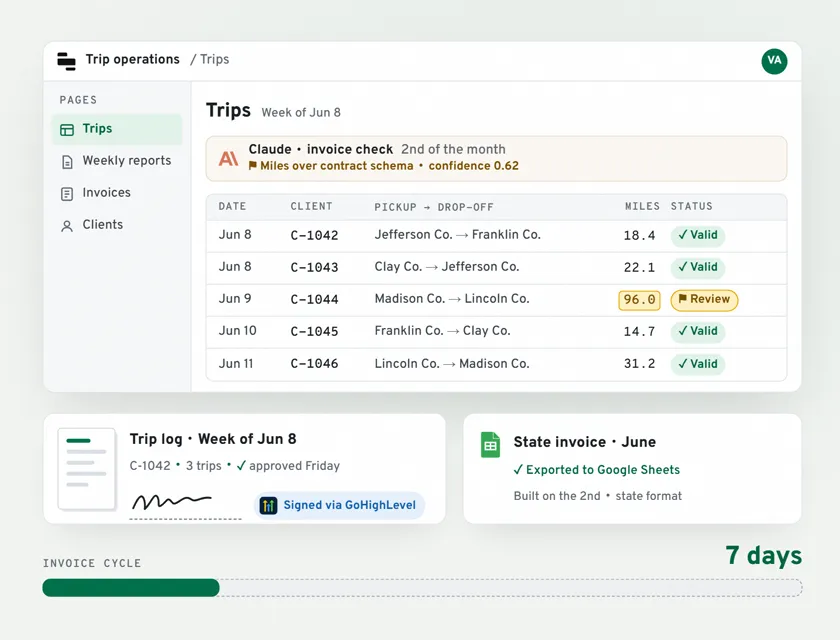
 GoHighLevel
 State invoice
The Situation
A state-contracted transportation provider in the US manages hundreds of monthly trips across multiple counties for government-funded programs. Their team of 10+ included virtual assistants logging daily trips, regional managers reviewing weekly reports and coordinators tracking state compliance.
Every part of their operation ran on paper and disconnected spreadsheets. Trip logs were manually compiled. Signatures were chased by email. Invoices took 30+ days to prepare, directly strangling cash flow on government contracts that reimbursed based on those invoices.
"I've spent several years looking for the solution you are offering. I've tried so many different options that did not help." Founder, US Transportation Provider
The 5 Problems
- VAs recorded trips in scattered spreadsheets: no standardisation, no validation
- Getting client signatures required chasing emails and physical folders
- Invoice compilation took 30+ days, delaying state reimbursements every cycle
- Trip data, client records and billing lived in completely disconnected systems
- State contracts required documented compliance: they had none
What Was Built
A complete digital operations platform built on 6 Make scenarios, Retool dashboards, GoHighLevel CRM, NocodeBackend as the central database and Claude AI for document intelligence.
How it flows:
- New referral intake → GHL creates contact → Make generates client ID → NocodeBackend stores record
- Daily → VAs log trips in Retool smart dropdowns (approved referrals only)
- Every Friday → Make compiles weekly report → Retool notifies manager for approval
- After approval → Make generates trip log documents → GHL sends for client e-signature
- 2nd of every month → Make + Claude AI aggregate trips → validate fields → format state-compliant invoice → export to Google Sheets
Tools used:
- Make.com: 6 production scenarios (2,181+ operations in highest-volume scenario)
- Retool: role-specific dashboards for VAs, managers, coordinators
- GoHighLevel: CRM, client communications, e-signature workflows
- NocodeBackend: central database as single source of truth
- Claude AI (Anthropic): invoice field normalisation and anomaly detection
- Google Sheets: state-format invoice export
The 6 Make Scenarios
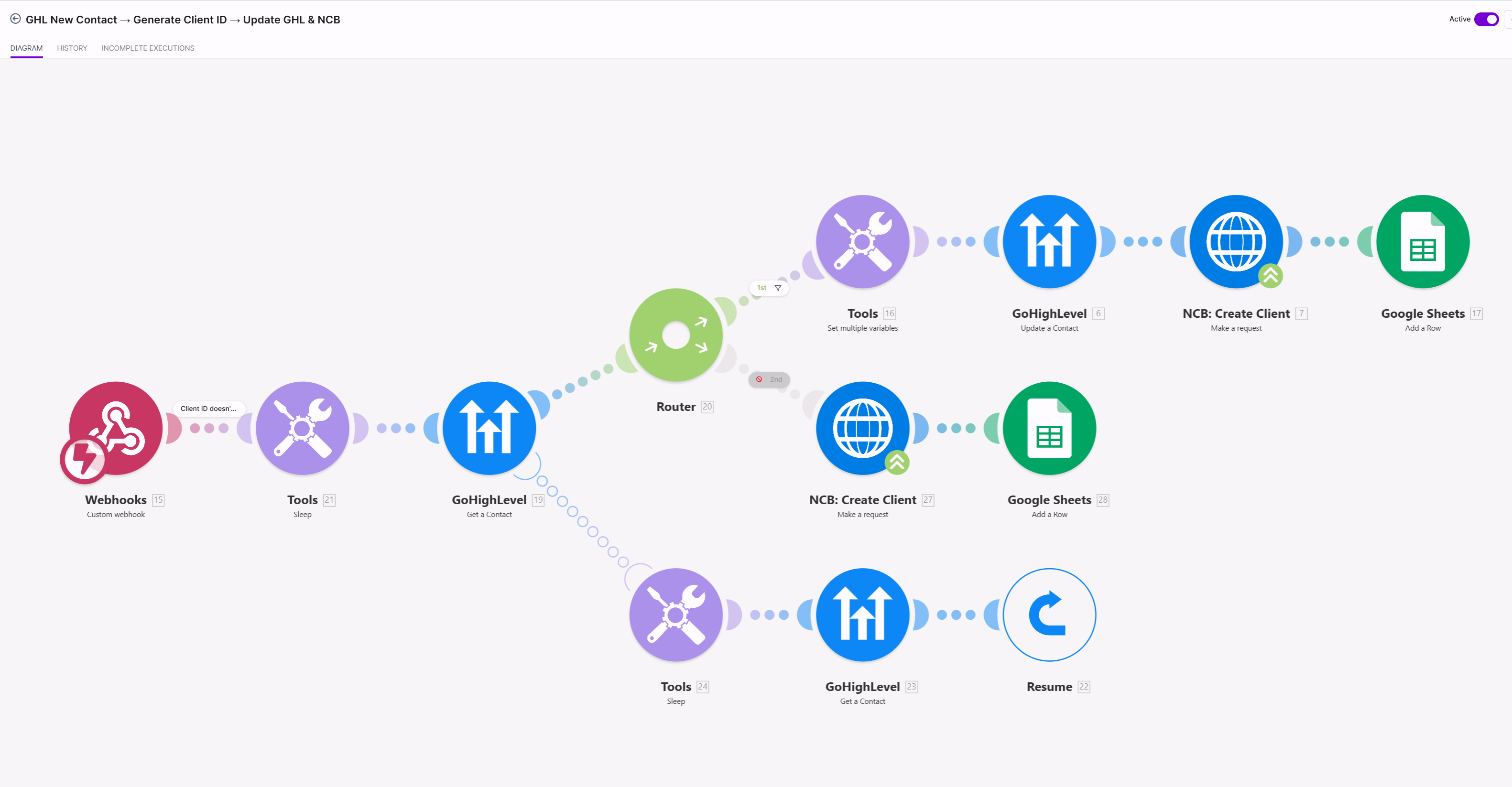
Scenario 1: Client Intake: GHL New Contact → Client ID → Update NocodeBackend
When a referral is submitted, GHL creates the contact, Make generates a unique client ID and NocodeBackend is updated. A 3-path router handles new clients, existing clients and error recovery with resume logic. No referral is ever dropped or duplicated.
Scenario 2: Weekly Report Trigger: Trip Compilation → Manager Approval
Every Friday, the trigger fires from Retool. Make pulls trip data from NocodeBackend, iterates by client, aggregates trip rows, creates a Google Doc, uploads to Cloudinary and sends to GHL for manager notification and approval.
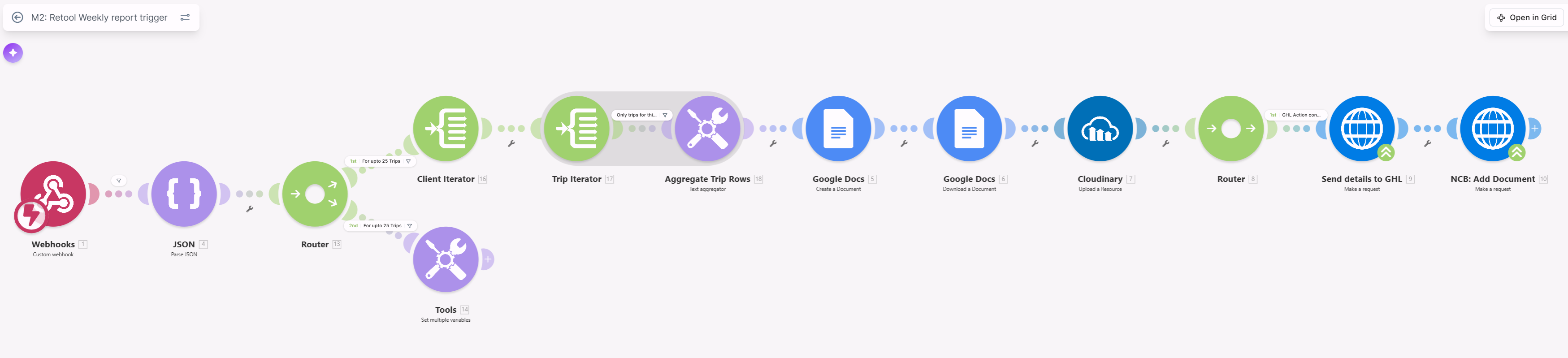
Scenario 3: Monthly Report Trigger: Full Client Billing Aggregation
Same architecture as the weekly trigger but runs on the monthly billing cycle. Iterates all active clients, aggregates the full month's trip data, creates the monthly report document, routes to GHL for dispatch.

Scenario 4: Monthly Scheduled Report + Client E-Signature
Scheduled monthly. NCB reads all active clients, iterates through each, reads their associated trips, creates and downloads a Google Doc, uploads to Cloudinary, then routes to GHL, triggering e-signature dispatch to the client and logging the document back to NocodeBackend.
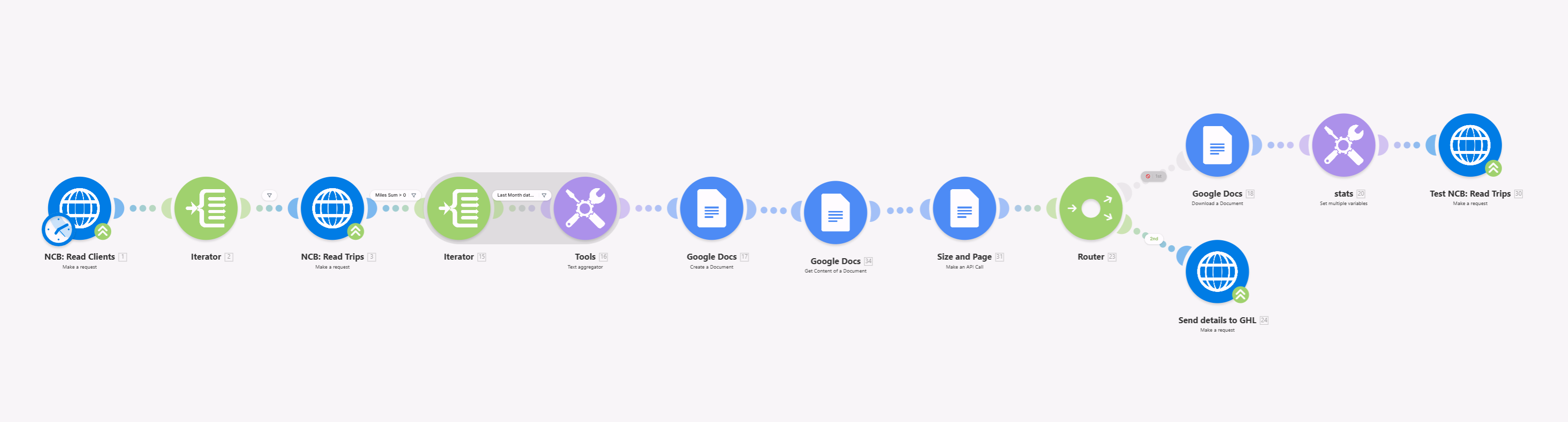
Scenario 5: Invoice Export with Claude AI (2,181+ operations)
The most complex scenario. Triggered from Retool, it runs 4 parallel branches: standard Google Sheets export, existing-sheet update logic, Claude AI invoice validation and a scenarios runner for cascading downstream triggers. Claude receives raw trip JSON, validates each field against the state contract schema, flags anomalies with a confidence score, and returns a structured invoice-ready object, replacing a 2 to 3 day human QA step with a 60-second automated check.
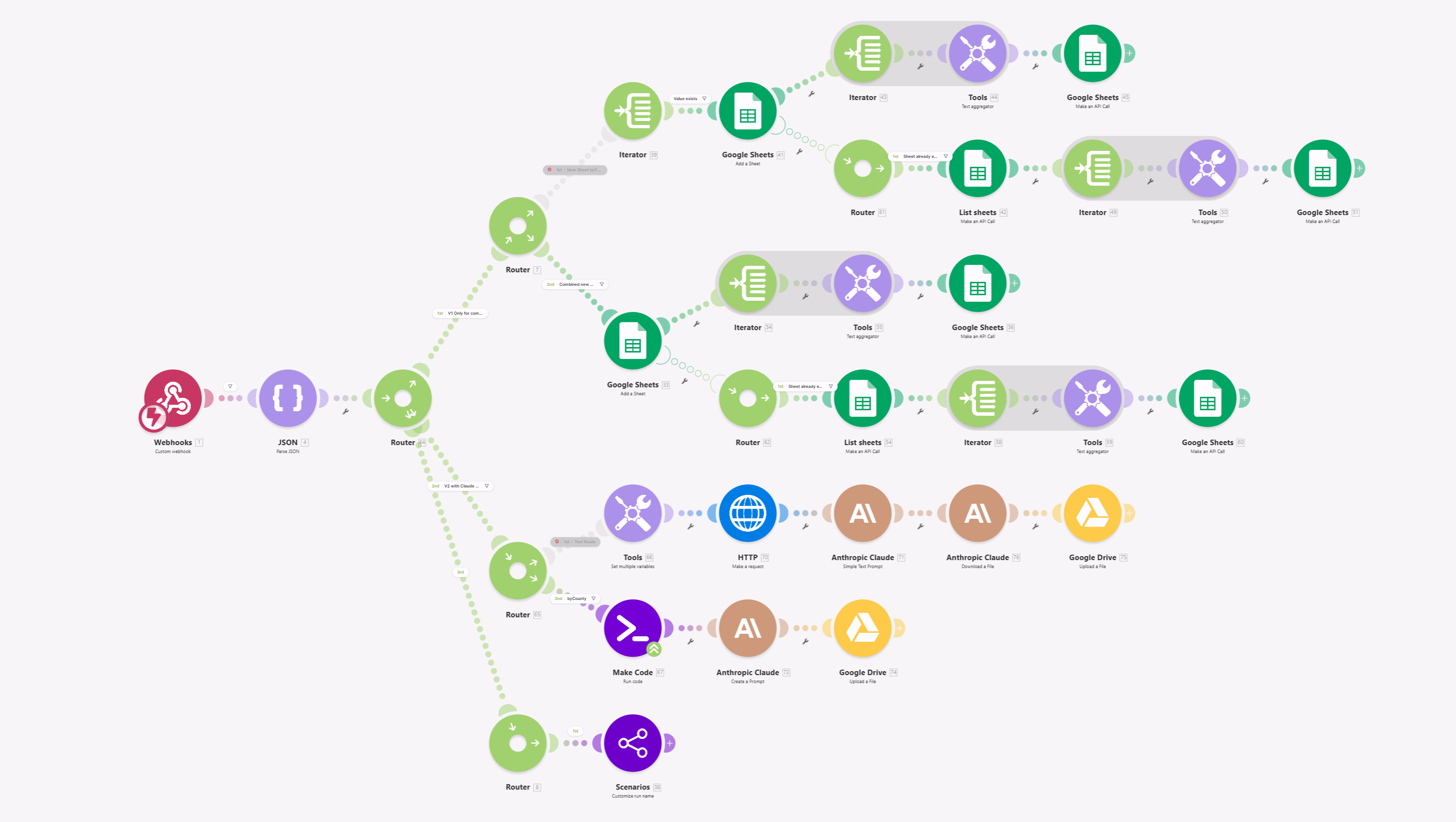
Scenario 6: Weekly Scheduled Report → GHL Dispatch
Scheduled weekly. Reads active clients and trips from NocodeBackend, creates Google Docs for each, uploads to Cloudinary and dispatches reports via GHL to the relevant managers and coordinators.

The Results
| Metric | Before | After | Change |
|---|---|---|---|
| Invoice processing time | 30+ days | 7 days | ↓ 77% |
| Team on unified platform | 0 | 10+ | Unified |
| Audit trail for compliance | None | Full digital record | Built |
| Trip log compilation | Manual | Fully automated | 100% |
| Coverage areas | 0 | Multiple | Scalable |
| Manual report compilation | Weekly & monthly | Zero | Eliminated |
- Time saved per week: 31 hours
- Annual labor saving: ~$29,000 at blended rate, conservative
- Cash flow impact: Invoices paid 23 days faster on state government contracts
- Conservative total value: $40,000+/year
- Build time: 30 days, 6 scenarios in production
The Insight
The biggest mistake in projects like this is automating what already exists. We didn't digitise the paper process. We rebuilt the foundation.
The architecture principle: every piece of data enters the system once and flows automatically. VAs log trips. Make processes and routes. Retool gives managers visibility. GHL handles client communication. Claude handles document intelligence.
The Claude AI integration was the difference-maker for invoices. Instead of a human QA step before state submission, Claude receives raw trip JSON, validates each field against the state contract schema, flags anomalies with a confidence score, and returns a structured invoice-ready object. What took a human 2 to 3 days of checking now happens in under 60 seconds.
Phase 2 roadmap: Same-day invoicing is now possible. The foundation is built for it.
FAQ
Q: How do you automate invoice processing for a transportation company? A: The key is building a single source of truth for trip data, then automating the weekly compilation, manager approval, client signature and invoice generation as connected steps. I built this for a US transportation provider using Make + Retool + NocodeBackend. Trip data enters once and the invoice generates automatically on the 2nd of each month without any manual compilation.
Q: Can Make integrate with GoHighLevel for transportation operations? A: Yes. I've built production systems connecting Make with GoHighLevel for contact management, automated document dispatch, e-signature workflows and pipeline stage tracking. The integration handles bidirectional data sync between GHL custom fields and an external database in real time.
Q: How long does it take to build an invoice automation system for transportation? A: A complete system covering trip logging, weekly reporting, client signatures and automated invoice generation takes 30 days for a mid-size operation. The build I delivered across multiple counties and 10+ team members took exactly 30 days from kickoff to all 6 scenarios in production.
Q: How much does it cost to automate operations for a transportation company? A: Every build is scoped based on the number of scenarios, team size and integration complexity. Most mid-size transportation automation projects fall in the medium build tier. The labor savings typically exceed the build cost within 8 to 12 weeks of go-live.
Q: Can automation handle state compliance requirements for transportation contracts? A: Yes, and it does this better than manual tracking. The system creates a full digital audit trail: every trip, approval and signature is timestamped and stored in NocodeBackend. The state invoice exports in the exact format required. Before automation, this client had no audit trail at all, a serious regulatory risk.
Q: What is the ROI of automation for a transportation company? A: On this build: 31 hours/week saved, ~$40,000/year in labor costs eliminated at conservative rates, plus working capital unlocked by getting paid 23 days faster on state government contracts. Most clients see full ROI within 4 to 8 weeks of go-live.
Running a similar operation?
If your team repeats any process, we build the system that runs it.