 Make.com
 Razorpay
 Google Sheets
 Google Slides
 Flutter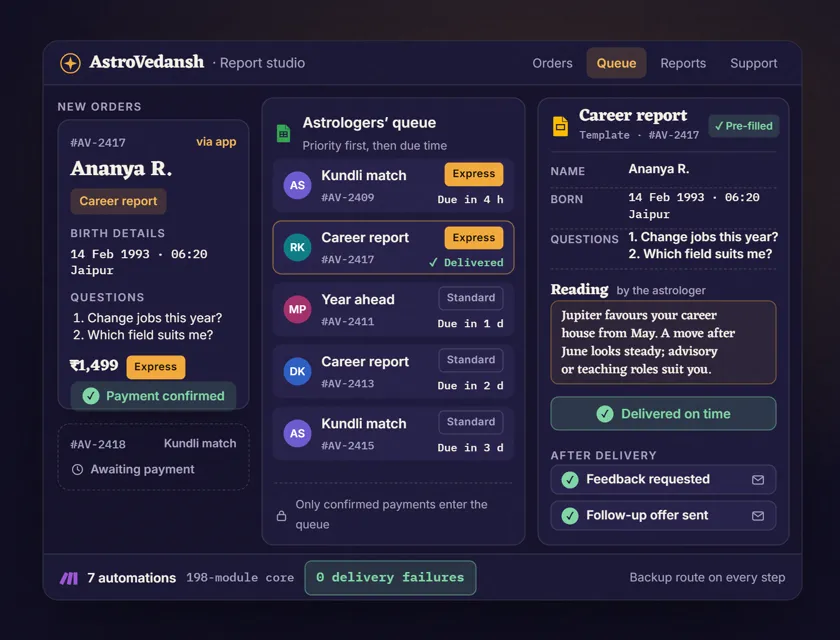

The Situation
AstroVedansh is an Indian Vedic astrology studio, co-founded by Rajat Vallabh with astrologer Vedansh Vallabh, that sells personalised astrology reports through its own Flutter app. Every report is a small project: the customer pays, shares their birth details and the questions they want answered, an astrologer writes the reading, and the finished report has to reach the customer by the time they were promised.
The studio had built its own automation in Zapier. It had missing links and no error handling, so when a step failed the order simply stopped, and a customer who had paid could wait for a report that was never sent.
"Good work, and he takes responsibility for it. Available whenever we need him." Rajat Vallabh, Co-founder, AstroVedansh (LinkedIn recommendation, lightly edited)
The 3 Problems
- Orders fell through gaps. A 20-step Zap with no error handling meant one failed step stopped the order, and nobody found out until the customer asked.
- The astrologers worked from scattered inboxes. There was no single queue showing which paid orders were due next, which were priority and who was writing what.
- Astrologers retyped what the customer had already sent. Names, birth details and questions were copied into each report by hand before any astrology could start.
What Was Built
The Zapier build was migrated to Make.com, first as a 49-step scenario with error routes and backup paths on every critical step. It grew with the studio into 7 connected automations that collect data at each stage of an order, with one 198-module scenario at the core.
The 7 automations
| # | Automation | What it does | Tools |
|---|---|---|---|
| 1 | Order intake | Takes the order from the Flutter app with the report type, birth details and questions, and logs every data point | Flutter app, Make.com, Google Sheets |
| 2 | Payment confirmation | Releases the order only when Razorpay confirms the payment; unpaid orders never reach an astrologer | Razorpay, Make.com |
| 3 | Astrologer queue | Puts each paid order in one team queue, sorted by priority and by the delivery time promised to the customer | Google Sheets, Make.com |
| 4 | Report templates | Opens a Google Slides template already filled with the customer's details and questions, so the astrologer writes only the reading | Google Slides, Make.com |
| 5 | Report delivery | Formats the finished report, delivers it on time and tracks the order to done, with a backup route if a step fails | Make.com |
| 6 | Support routing | Sends every customer question to one team support queue with an owner | Make.com, Google Sheets |
| 7 | Feedback and upsell | Asks for feedback after delivery and sends a follow-up offer matched to the report the customer bought | Make.com |
How an order flows:
- Order. The customer orders in the app and shares their birth details and questions.
- Payment. Razorpay confirms the payment and the order moves on.
- Queue. The order joins the astrologers' queue by priority and promised delivery time.
- Reading. The astrologer opens the pre-filled template, writes the reading and marks it done.
- Delivery. The report is formatted and delivered, and the order is tracked to done.
- After delivery. Feedback, the follow-up offer and any support request are handled without anyone chasing.
Tools used:
- Make.com - the 7 automations, the core one 198 modules: routers, iterators, aggregators and an error route on every critical step
- Flutter app - the studio's own app, where customers order and share their details
- Razorpay - payment confirmation that gates every order
- Google Sheets - the astrologers' queue, order records and the data collected at each stage
- Google Slides - the report templates the astrologers fill in
- Zapier - the original build, retired in the migration
Why 198 Modules
198 modules is not 198 steps in a row. It is a branching tree: each report type, priority level and follow-up path has its own branch, with its own validation and its own way to fail safely. A priority order takes a different path through the queue than a standard one. A delivery that fails is retried or rerouted instead of dropped.
Error routes everywhere. The original Zap had none. In the rebuild every critical module has a recovery path: retry for rate limits, skip and flag for bad data, halt and alert for anything that would send a customer the wrong report.
JSON contracts between modules. Every module expects a known structure and produces a known structure, so when something fails the error says which field in which module, and debugging takes minutes instead of reading 198 modules.
The Results
| Measure | Before | After |
|---|---|---|
| Platform | 20-step Zap, no error handling | 7 Make.com automations, a 198-module core, error routes throughout |
| Delivery failures | Orders could stop silently | Zero at scale |
| Payments | Checked by hand | Razorpay confirmation releases each order |
| Astrologer queue | Scattered inboxes | One queue by priority and delivery time |
| Report set-up | Customer details retyped by hand | Google Slides template pre-filled with details and questions |
| After delivery | Manual, when remembered | Feedback, upsell and support routing on every order |
The Insight
Complexity in automation is not the number of modules. It is how well the system handles branching and failure. A 20-step automation with no error handling is less reliable than a 198-module one with a recovery path on every critical step, because the bigger one knows what to do when something goes wrong.
The other lesson is about where to spend a specialist's time. An astrologer's hour is worth most when it goes into the reading. Everything around it, the payment check, the queue, the template, the delivery and the follow-up, is work a system can do the same way every time.
FAQ
Q: How do you automate an astrology report business? A: Split the order into stages and give each one an automation. At AstroVedansh, 7 Make.com automations cover order intake from the app, Razorpay payment confirmation, the astrologers' queue, pre-filled report templates, delivery, support routing, and feedback with a follow-up offer. The astrologer only writes the reading.
Q: Can Make.com run a whole order-to-delivery system for a services studio? A: Yes. In this build 7 Make.com automations, around one 198-module core scenario, handle order collection from a Flutter app, Razorpay payment confirmation, the team queue by priority and delivery time, pre-filled report templates, delivery, feedback, upsells and support routing.
Q: Why migrate from Zapier to Make.com? A: Here the Zapier build had missing links and no error handling, so failed steps stopped orders silently. Make.com's error routes, routers and aggregators made a recovery path on every critical step practical, and delivery failures went to zero.
Q: Can Make.com handle scenarios with 100+ modules? A: Yes. The key to reliability at this size is error handling on every critical module, JSON contracts between modules and aggregators for batch work. The core scenario here runs 198 modules.
Q: How do report templates save an astrologer's time? A: The Google Slides template arrives filled with the customer's name, birth details and questions, so the astrologer writes only the reading. The system formats and delivers the finished report.
Running a report, reading or consulting business where specialists lose hours to admin? Book a free consult and I will map the system your workflow needs.