If you've searched "automate my business" even once, Make.com has probably come up. And if you're wondering what it actually is, whether it's worth your time, whether the free plan is real and how it compares to everything else out there. This is the guide that answers all of it.
I'm Prem Patel. I'm a Make Level 5 Expert, their highest certification, globally top 1%. I've built 1,200+ automations for 210+ businesses using Make. I know this platform inside out. Everything in this guide is based on direct experience, not a YouTube summary.
Let's get into it.
What is Make?
Make is a visual automation and integration platform that lets you connect apps, move data between them and automate repetitive tasks, without writing code.
You build what Make calls "scenarios": flowchart-style workflows where you can see every step, every connection and every data transformation happening in real time on a canvas. You drag and drop modules, connect your apps and define when and how data flows between them. The result: tasks that used to require a human to manually move data, trigger actions or check conditions now happen automatically, whether you're awake, asleep or on a call.
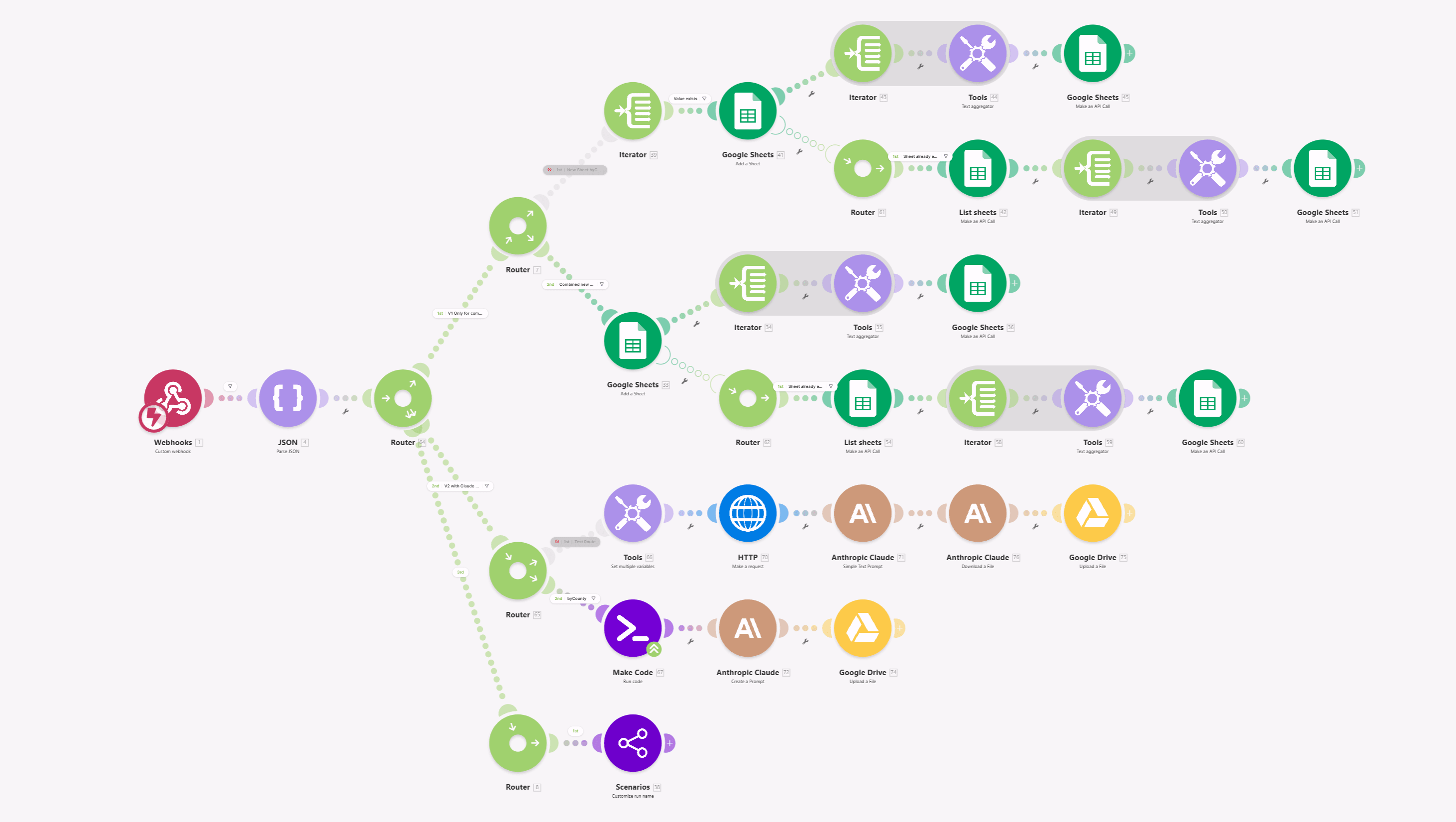
Here's a simple example of what a Make scenario does:
- A customer fills out a form on your website
- Make detects the submission
- It creates a contact in your CRM
- Sends a personalised welcome email
- Creates a task in your project management tool
- Posts a Slack notification to your team
All of that happens in seconds. Automatically. Without anyone touching it.
Make connects over 3,000 apps including Google Workspace, Shopify, HubSpot, Salesforce, Airtable, Slack, OpenAI, Anthropic Claude, GoHighLevel, WhatsApp, Notion, Stripe and virtually every other SaaS tool you use.
The History of Make: From Integromat to Make
Make did not start as Make.com. Understanding its history explains a lot about why the platform is built the way it is.
2012: The platform is founded in Prague, Czech Republic by Vladimír Fanta and Ondřej Gazda under the name Integromat. The core idea: give non-developers the kind of app integration power that previously required engineers.
2013 to 2019: Integromat grows steadily as what many called automation's best-kept secret. It builds a fiercely loyal user base among agencies, developers and power users who found Zapier too limited for complex workflows. The platform becomes known for its visual-first approach, multi-branch routing and deep data transformation capabilities.
2020: Integromat is acquired by Celonis, the process mining and execution management company. This gives the platform enterprise-grade infrastructure, security and go-to-market resources while keeping its own engineering team.
February 22, 2022: The rebrand. Integromat becomes Make. The company acquires the domain, rolls out a redesigned interface, new branding and a refreshed vision: not just a no-code integration tool but a visual platform for building anything from simple workflows to complex systems.
As CEO Ondřej Gazda said at launch: "Make captures the evolution of our platform, the spirit of our customers, and reflects one of the most transformational trends of our era: from rigid, top-down, repetitive jobs to flexible, empowering, and meaningful work."
2023 to 2024: The rebrand pays off. Make gains serious traction with technical users and agencies. The community grows to 50,000+ members. The platform positions itself as the middle ground between no-code simplicity and developer-grade power.
2025 to 2026: Make launches a full native AI suite: AI Agents, AI Toolkit, AI Web Search and AI Content Extractor, plus Maia (the AI scenario builder) and 350+ AI app integrations. The platform moves from automation tool to AI orchestration platform. Celonis has raised over $1.4 billion in funding to date, giving Make the infrastructure of a serious enterprise platform.
Today Make serves 500,000+ organisations globally.
How Make Works: Core Concepts
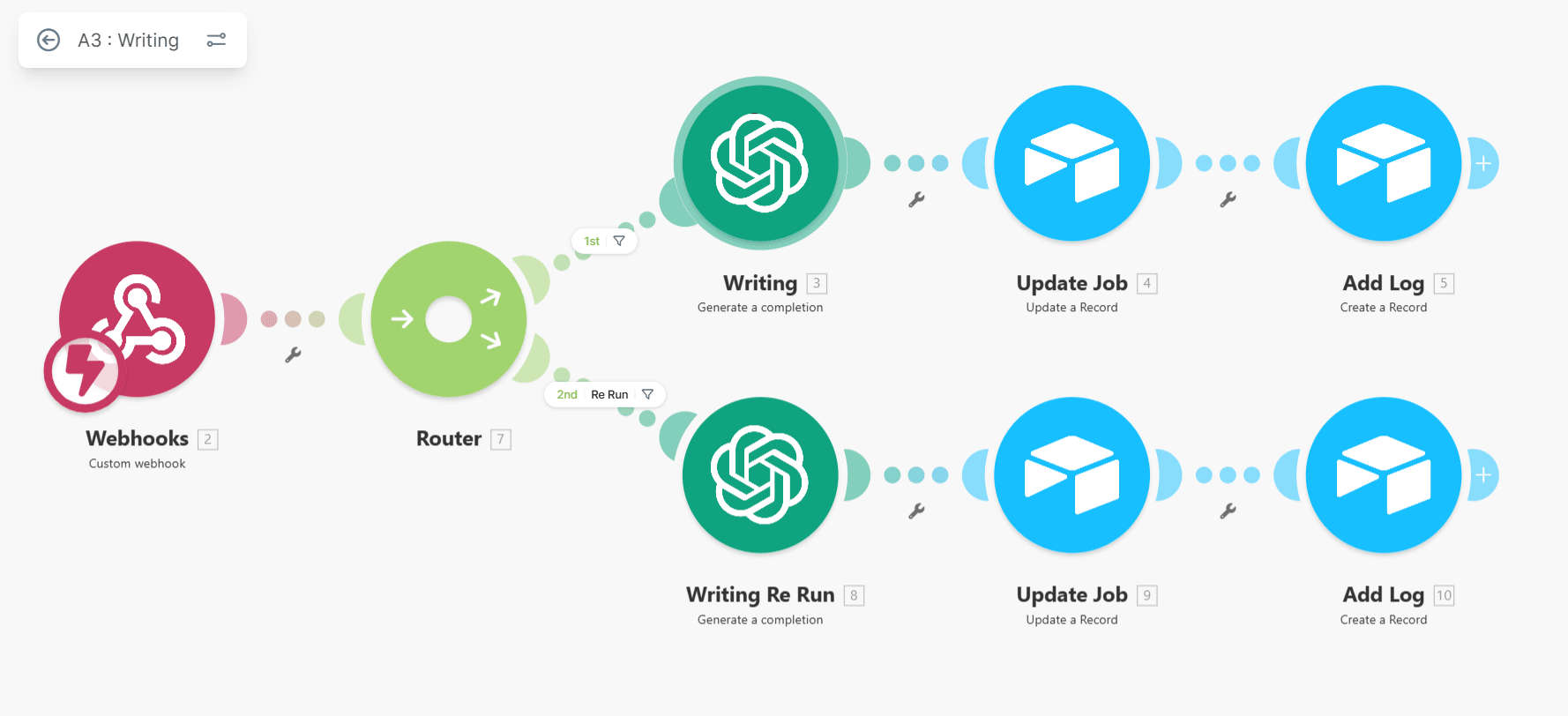
Before getting into specific features, here are the key concepts you need to understand:
Scenarios
A scenario is a Make automation. It's the visual workflow you build on the canvas. One scenario can contain dozens of modules, branches and conditions. You can have as many scenarios as you want on paid plans.
Modules
Modules are the building blocks of a scenario. Each module performs one action: search for a record, create a row, send an email, filter a result, transform data. Every module that executes consumes one credit.
Triggers
A trigger is the event that starts a scenario. Make supports two types:
- Scheduled triggers: run your scenario at an interval (every minute, every hour, daily)
- Instant triggers (webhooks): fire the scenario immediately when something happens in real time
Routers
Routers split your scenario into multiple branches based on conditions. This is one of the most powerful features in Make and something Zapier cannot match cleanly. A single trigger can branch into 10 different paths based on the data.
Iterators and Aggregators
Iterators process arrays one item at a time. Aggregators combine multiple bundles into one. Together they let you handle bulk data, processing a list of 500 orders, sending 200 personalised emails or parsing a full CSV, without writing loops in code.
Filters
Filters are conditions between modules. They stop execution if conditions aren't met, routing data only where it belongs.
Data Transformation
Make has a powerful built-in formula system. You can manipulate strings, parse dates, format numbers, work with JSON and perform calculations directly inside your scenario without external tools.
What Apps Does Make Support?
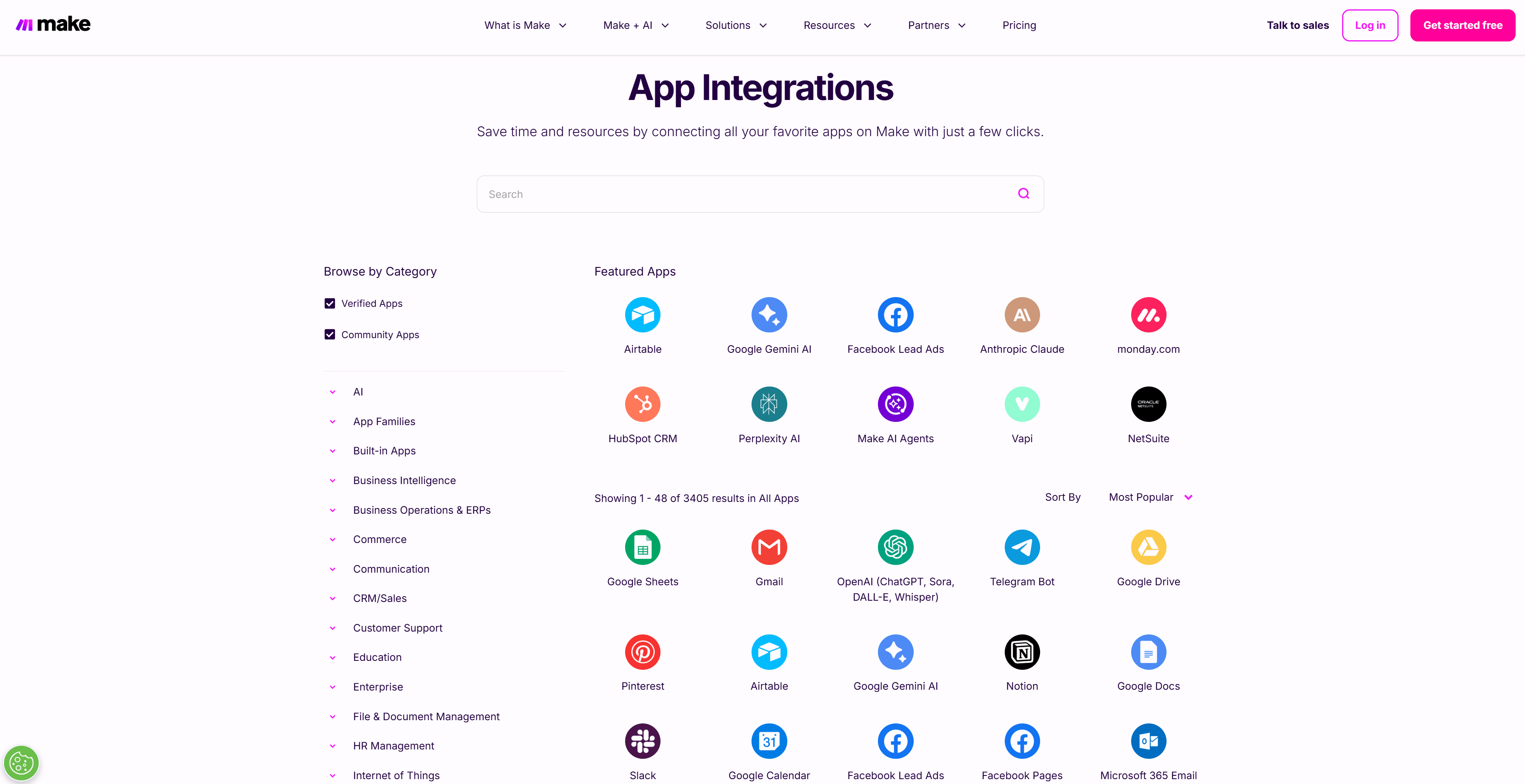
Make connects over 3,000 apps natively. That number covers:
Business and productivity: Google Workspace, Microsoft 365, Notion, Airtable, Monday.com, ClickUp, Asana, Trello, Slack, Zoom
CRM and sales: HubSpot, Salesforce, Pipedrive, GoHighLevel, Zoho CRM, ActiveCampaign
E-commerce: Shopify, WooCommerce, BigCommerce, Stripe, Razorpay, PayPal, Square
Marketing: Mailchimp, ConvertKit, Klaviyo, Facebook Ads, Google Ads, Instagram, LinkedIn
AI platforms: OpenAI, Anthropic Claude, Google Gemini, Stability AI, ElevenLabs, Perplexity, Mistral, Cohere and 340+ more
Databases: Airtable, Google Sheets, MySQL, PostgreSQL, MongoDB, Supabase, NocodeBackend
Communication: WhatsApp Business, Telegram, Twilio, Slack, Teams, Gmail, Outlook
Finance and accounting: QuickBooks, Xero, Zoho Invoice, FreshBooks, Stripe
File and documents: Google Drive, Dropbox, OneDrive, Box, Cloudinary, PDF.co
Developer tools: GitHub, GitLab, Jira, Linear, Postman, Webhook.site
And virtually everything else via the HTTP/API module, which lets you connect any service with a REST API, even custom internal systems, without a pre-built integration. This is what sets Make apart from simpler tools. If an app has an API, Make can connect to it.
Make's Built-In AI Tools (2025 to 2026)
This is where Make has made the biggest leap in the last 12 months. It now has a full native AI suite that doesn't require an OpenAI key, a separate API subscription or any glue code.
Make AI Agents: Autonomous agents that reason, plan and take action across your apps. Unlike a regular scenario (fixed sequence you design), an AI Agent decides how to complete a goal. Give it tools and a system prompt; it figures out the rest.

Make AI Toolkit: Eight plug-and-play text modules for the most common AI tasks:
- Summarize Text
- Translate Text (any language)
- Identify Language
- Analyze Sentiment (positive/neutral/negative)
- Categorize Text (to categories you define)
- Extract Information from Text
- Standardize Text
- Chunk Text
Make AI Web Search: Real-time web search inside your scenarios. Your automations can now query the live web and use the results as data.
Make AI Content Extractor: Pulls structured data from PDFs, images, audio, receipts, invoices and Word documents directly inside your scenario. No external parser needed.
Maia: Make's conversational AI scenario builder. Describe what you want to automate in plain English and Maia generates the starting structure.
350+ AI App Integrations: Native modules for OpenAI, Anthropic Claude, Google Gemini, Stability AI, ElevenLabs and 345+ more AI services.
All of these are available on every plan, including the free tier. On paid plans, you can also connect your own API keys and pay your AI provider directly for token usage.
Who is Make For?
Make sits in a specific position in the automation market. It is not the simplest tool and it is not the most powerful. It is the best balance of the two for this category of user:
Agencies and freelancers building automation systems for clients. Make handles the complexity those clients need without requiring you to write and maintain code.
Solopreneurs and operators who have outgrown Zapier. If you're hitting Zapier's limits on branching, data transformation or pricing, Make is the natural next step.
Technical non-coders: people comfortable with logical thinking and data who don't want to write Python. The visual builder rewards that kind of thinking.
Small to mid-size businesses with repeating operational processes: onboarding, invoicing, reporting, inventory management, lead routing.
Developers who want to build workflows fast without maintaining infrastructure. Make handles the scheduling, error handling and retry logic so you focus on the logic.
Who Make is not for: someone who wants to connect two apps in five minutes and never think about automation again. For that, Zapier's simplicity is worth the price premium. For anyone who needs real power at a real price: Make.
Make Use Cases by Industry
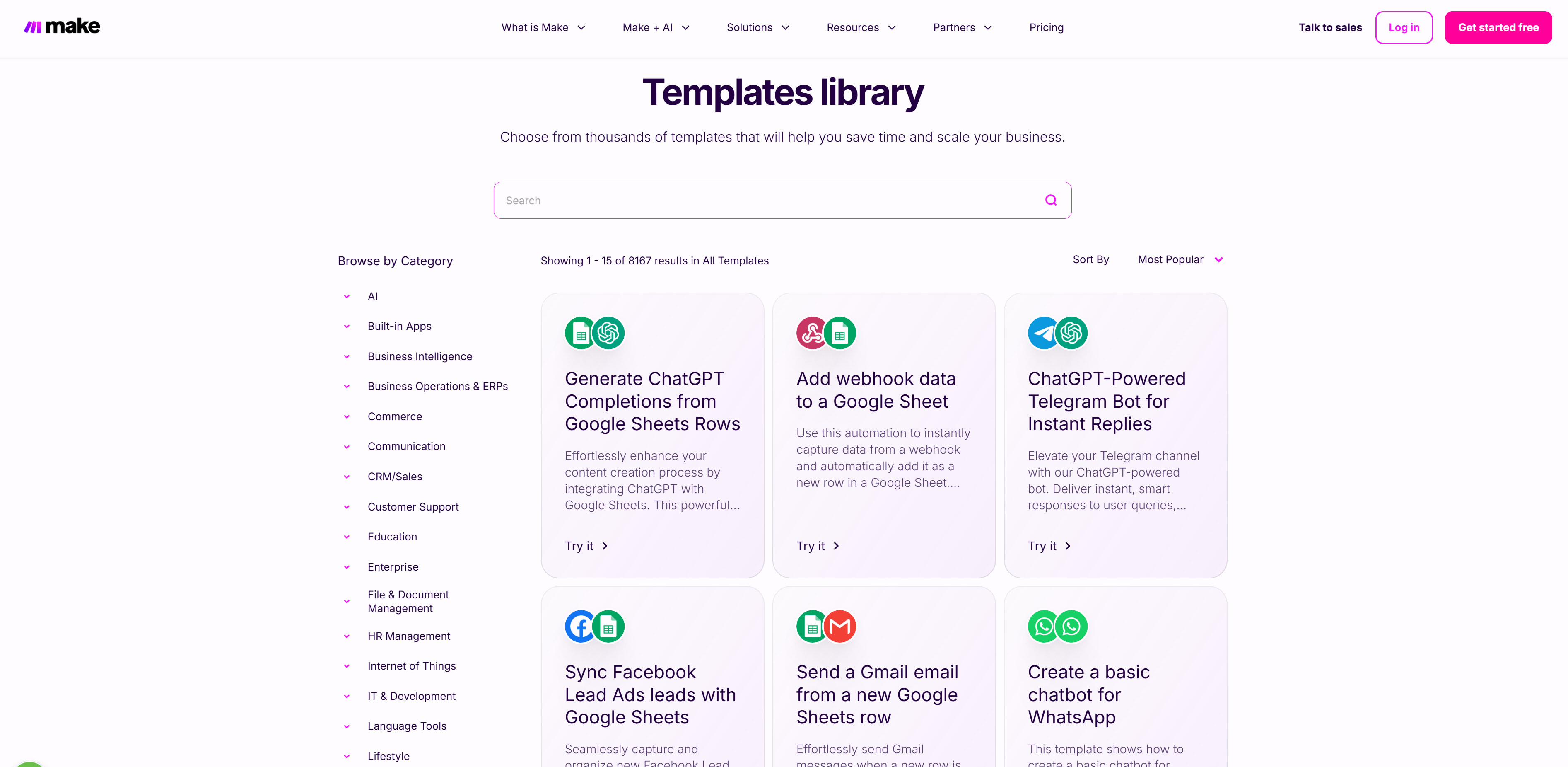
Here's what Make is actually being used to build across industries:
E-commerce:
New orders → automatic fulfilment notifications → inventory update → accounting entry. Vendor product data from Telegram → AI-generated descriptions → Shopify listings. Returns logged → customer notified → refund initiated.
Agencies:
New lead form → CRM contact created → personalised email sent → ClickUp task assigned → Slack notification. Client payment received → invoice generated → project kickoff email sent → onboarding folder created.
Finance and operations:
Payment received → invoice generated → WhatsApp confirmation sent → accounting entry logged. Expense receipts photographed → Make AI Content Extractor pulls line items → expense report created automatically.
Real estate:
Inbound property enquiry → lead scored → assigned to agent → viewing scheduled → follow-up sequence triggered.
Healthcare and compliance:
Patient form submitted → appointment confirmed → reminder sequence triggered → clinical notes filed. (HIPAA-compliant configurations available on Enterprise.)
Transportation and logistics:
Trip logs entered → weekly report compiled → manager approval triggered → client signature collected → invoice exported with Claude AI validation. (I built this exact system. It cut invoice processing from 30 days to 7 days. Read the full case study.)
Marketing and content:
New product added to Airtable → AI caption generated → Instagram post scheduled → Facebook post scheduled → team notified.
HR and operations:
New hire form submitted → accounts provisioned → welcome email sent → orientation scheduled → equipment request created.
How to Use Make for Free
This is one of the most searched questions about Make and the answer is better than most people expect.
Make has a permanently free plan. Not a 14-day trial. Not a freemium that expires. A real, indefinite free plan. Full comparison of the free plan against the free month: is Make.com free?
Here's exactly what you get:
| Feature | Free Plan |
|---|---|
| Monthly credits | 1,000 |
| Active scenarios | 2 |
| Minimum run interval | 15 minutes |
| App integrations | All 3,000+ |
| AI tools | Yes (uses credits) |
| Visual workflow builder | Full access |
| Routers and filters | Yes |
| Credit card required | No |
What 1,000 free credits gets you in practice:
If your scenario has 5 modules and runs every hour, that's 5 credits × 24 hours × 30 days = 3,600 credits per month, so you would need a paid plan for that. But if that same scenario runs once a day, it's 5 × 30 = 150 credits per month, very comfortable on the free plan.
The free plan is genuinely useful for:
- Learning the platform before committing
- Running 1 to 2 lightweight automations (daily digest, simple notifications)
- Testing scenarios before moving them to a paid plan
- Personal projects with low volume
The real limitations to know:
- Only 2 active scenarios at once (not ideal for business use)
- 15-minute minimum interval (no near-real-time automation)
- No Make API access (can't trigger scenarios programmatically)
- No webhooks for instant triggering
For anything serious, you need Core. At $9/month billed annually, it is the cheapest serious automation platform available.
Building and testing scenarios is always free. Make does not charge credits for testing, debugging or running scenarios in development mode. Credits only count when a scenario is active and executing successfully.
Make Pricing: Every Plan Compared (2026)
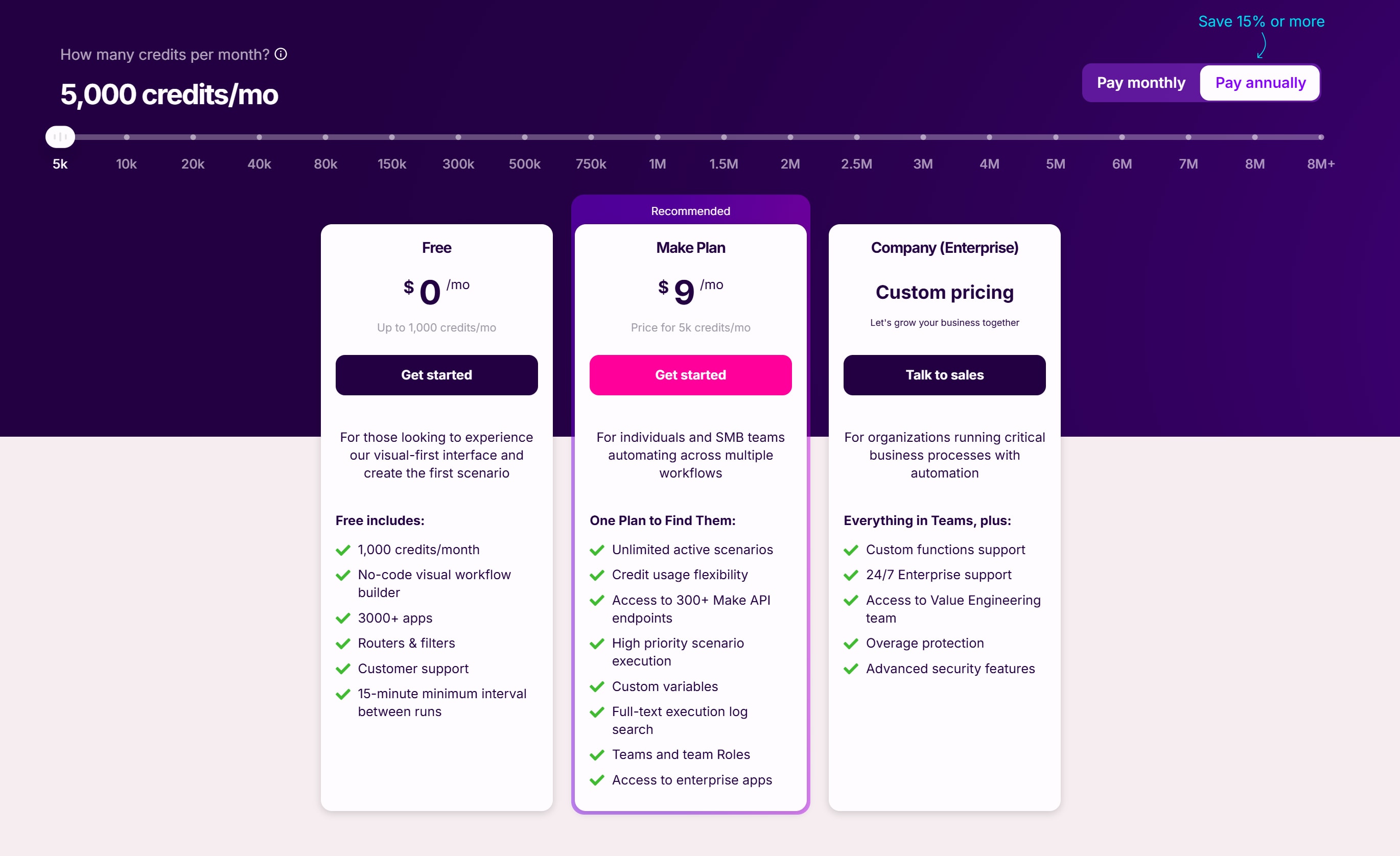
Make moved from an "operations" model to a credit-based model in August 2025. For standard automations, 1 module action = 1 credit. AI integrations consume credits based on token usage.
Make Just Simplified Their Pricing
As of early 2026, Make has moved from four separate paid tiers (Core, Pro, Teams, Enterprise) to a much simpler structure: one paid plan called "Make Plan" that scales with your credit volume, plus Enterprise for large organisations.
New pricing structure:
| Plan | Price | Credits/month | What you get |
|---|---|---|---|
| Free | $0 | 1,000 | 2 active scenarios, 15-min interval, all 3,000+ apps |
| Make Plan | From $9/mo | 5,000+ (slider up to 8M+) | Everything: unlimited scenarios, priority execution, team roles, custom variables, API access, enterprise apps |
| Company (Enterprise) | Custom | Custom | Custom functions, 24/7 support, Value Engineering team, overage protection, advanced security |
The credit slider on the Make Plan goes from 5,000 up to 8M+ per month. Your price scales with credit volume only. Even at the $9/month entry point you get everything the Pro and Teams plans, which existing subscribers still hold, lock behind an upgrade: priority execution, full-text log search, custom variables, team roles and access to enterprise apps.
What changed and why it matters: Previously Make charged more for features. Now they charge only for volume. One paid plan. One set of features. Choose how many credits you need.
Old Pricing vs New Pricing (If You've Read Other Guides)
Many Make articles still reference Core, Pro and Teams. Those are the old plan names. Here's how they map:
| Old plan | Old price | New equivalent |
|---|---|---|
| Core | ~$9 to $10.59/mo | Make Plan (5k credits tier) |
| Pro | ~$16 to $18.82/mo | Make Plan (higher credit tier) |
| Teams | ~$29 to $34.12/mo | Make Plan (higher credit tier) |
| Enterprise | Custom | Company / Enterprise |
All features that were spread across Core, Pro and Teams are now included in every Make Plan. You just choose your credit volume.
A Note on My Affiliate Link and the Old Plans
My referral link (make.com/en/register?pc=prime) currently gives 1 month free on the older Pro plan structure, which includes 10,000 credits, priority execution, custom variables and all AI tools.
Make is transitioning accounts to the new simplified structure. My link is still working as of writing but may change as Make completes the migration. If you click the link and land on the new Make Plan structure instead of the old Pro trial, that is still a solid deal: 1 month free with all features included from day one.
- 10,000 credits included
- Priority execution
Start your free Make trial here (Affiliate link: you get a free month, I get a small credit. Recommendation is genuine.)
Credit scaling: The pricing page has a slider from 5,000 to 8M+ credits per month. You can also add one-time credit top-ups if you occasionally exceed your monthly allocation.
Rollover credits: Unused credits roll over one month on paid plans. Seasonal businesses no longer waste slow months.
Annual billing: Saves approximately 15% compared to monthly across all plans.
Cost vs Zapier: Even at Make Plan's $9/month entry point, you get more credits and no feature gating. Zapier charges ~$20/month for 750 tasks. Make gives 5,000 credits for $9 with priority execution included. At scale the cost difference can reach 10x or more.
The Better Way to Start: 1 Month Free on the Full Platform
The free plan is a good starting point. But the smartest way to evaluate Make is to experience the full platform with real credits before committing. My affiliate link gives you 1 month free with all paid features included: unlimited active scenarios, priority execution, AI tools, custom variables, team roles, API access and enterprise app connections. No credit card for the trial period. No hobbled version. You get everything. Start your free Make trial here (Affiliate link: you get a free month, I get a small credit. Recommendation is genuine. I've built 1,200+ automations on this platform.)
Make vs Zapier vs n8n: Which Should You Use?
Short answer: they serve different users. Here's the honest breakdown:
| Make | Zapier | n8n | |
|---|---|---|---|
| Best for | Technical non-coders needing power | Simplicity and speed | Developers needing full control |
| App integrations | 3,000+ | 8,000+ | 400+ native + HTTP |
| Visual builder | Best-in-class | Linear, simple | Good but complex |
| Pricing | 10k ops for ~$9/mo | 750 tasks for ~$20/mo | Free self-hosted |
| Learning curve | Moderate | Low | High |
| AI features | Native suite built in | Built in (Zaps AI) | LangChain nodes, full control |
| Multi-branch logic | Excellent (routers) | Limited (Paths) | Good |
| Code execution | JavaScript / Python (limited) | JavaScript (limited) | Full Node.js |
| Community | 50,000+ members | Massive | Growing fast |
Choose Make if: You need complex branching, data transformation and multi-step logic at a price that doesn't scale exponentially with volume. Best for agencies, operators and technical non-coders.
Choose Zapier if: You want the largest app library, the simplest interface and have a budget for premium pricing. Best for non-technical users who need things working fast.
Choose n8n if: You're a developer, want self-hosted control or are running high-volume AI-heavy workflows where Make's credit costs become prohibitive.
I use Make for the vast majority of client builds. I recommend Zapier to clients who just need a simple 2-step flow and don't want to learn a new tool. I recommend n8n when the client needs deep code integration or very high volume at minimum cost.
Full comparison: Make vs Zapier vs n8n →
Make as a Make Level 5 Expert: My Perspective

I'm one of fewer than a few hundred people globally who hold Make's Level 5 Expert certification, their highest tier. I earned it by demonstrating advanced scenario architecture across a wide range of use cases and by contributing to the Make ecosystem as a Solutions Partner.
Here's what 1,200+ automations on Make has taught me:
The visual builder is genuinely the best in class. Nothing else gives you the same real-time visibility into data flowing through a complex multi-branch workflow. When you're debugging a 40-module scenario at 11pm for a client, seeing exactly which bundle failed and why is invaluable.
The learning curve is real but front-loaded. Routers, iterators, aggregators and the credit model take a few hours to understand properly. After that, building speed increases dramatically. Make Academy covers it well.
The credit model is fair if you understand it. Build lean scenarios. Test before activating. Use the free development mode to iterate before spending credits on production runs.
The AI tools changed what's possible. AI Content Extractor alone has opened up entire categories of automation that previously required a full OCR service plus a parsing layer plus custom code. That's now one module.
The community is underrated. The Make Community forum (50,000+ members) has solved more edge cases for me than the official documentation.
How to Get Make Automation Built for You
If you want to use Make but don't want to build the automation yourself, or if you need something more complex than a template can handle, I offer two options:
Option 1: Custom build (discovery call)
For complex, multi-scenario systems tailored to your specific business. I scope, design and build everything. You get working automation with documentation.
Option 2: Ready-made automation gigs on Fiverr
For fixed-scope automations at clear pricing. Common workflows, standard integrations, fast delivery.
Browse Make automation gigs on Fiverr →
I've built automation systems for e-commerce brands in India, agencies in Germany, transportation providers in the US, SaaS companies in the UK and solo operators everywhere in between. If your process repeats, I build the system that runs it.
Frequently Asked Questions
What is Make used for?
Make is used to automate repetitive business tasks by connecting apps and moving data between them without code. Common uses include lead capture and CRM entry, order processing and fulfilment notifications, inventory update, accounting entries, vendor product data from Telegram, returns logged, lead scoring, patient form submission, clinical notes filing, expense receipts extraction, property enqury scoring, transportation trip logs, social media scheduling, onboarding forms and Equipment request creation.
Is Make free?
Yes. Make has a permanent free plan with 1,000 credits per month, access to all 3,000+ integrations and 2 active scenarios. No credit card required. It does not expire. For business use, you'll want the Make Plan starting at $9/month for 5,000+ credits with unlimited active scenarios and all features included.
What happened to Integromat? Is it the same as Make?
Yes. Make is the rebranded version of Integromat. Integromat was founded in 2012 in Prague, Czech Republic, acquired by Celonis in 2020 and rebranded as Make in February 2022. All Integromat accounts, scenarios and features carried over. The core technology is the same. Make is Integromat with a better interface, a shorter name and significantly expanded AI capabilities.
How many apps does Make integrate with?
Make has 3,000+ native app integrations covering every major category of business software. Beyond native integrations, the HTTP/API module lets you connect any service with a REST API, which means the practical integration count is effectively unlimited. Make also has 350+ dedicated AI app integrations including OpenAI, Anthropic and Google Gemini.
How much does Make cost?
Make pricing in 2026 has simplified significantly. Free plan: $0 for 1,000 credits/month. Make Plan: from $9/month for 5,000 credits with all features included, scaling via slider up to 8M+ credits/month. Enterprise: custom pricing. Annual billing saves ~15%. Unused credits roll over one month on paid plans. The old Core, Pro and Teams tiers have been merged into one Make Plan.
Is Make better than Zapier?
For complex workflows with multi-branch logic, data transformation and price-sensitive scaling: yes. Make delivers 5,000 credits for ~$9/month vs Zapier's 750 tasks for ~$20/month. Make's visual builder handles routers, iterators and aggregators in ways Zapier's linear model cannot. For simple 2-step automations where simplicity matters more than power: Zapier is easier. For high-volume, code-heavy workflows: n8n wins. Make is the middle ground that most operators and agencies end up at.
What is a Make scenario?
A scenario is a Make automation. It is the visual workflow you build on the canvas. A scenario has a trigger (the event that starts it) and one or more modules (the actions it executes). Scenarios can branch, loop, filter and transform data. They run on a schedule or in real time via webhooks.
Can Make work with AI tools like ChatGPT or Claude?
Yes. Make has native modules for OpenAI, Anthropic Claude, Google Gemini and 350+ other AI services. It also has its own built-in AI tools (AI Toolkit, AI Agents, AI Web Search, AI Content Extractor) that work without any external API key on any plan. On paid plans, you can connect your own AI API keys and pay your provider directly for token usage.
What is the Make Level 5 Expert certification?
Make Level 5 Expert is the highest certification tier Make offers globally. It is held by fewer than a few hundred specialists worldwide (top 1%) and is awarded based on demonstrated expertise in advanced scenario architecture, data transformation and platform capability. I hold this certification alongside Make Solutions Partner status.
How long does it take to learn Make?
Most people can build a working automation within a few hours of starting. Make Academy recommends approximately 19 hours of training before building production workflows. The learning curve is front-loaded. Understanding routers, iterators and the credit model takes time upfront, then building speed accelerates significantly.
What is Make's credit system?
Make switched from operations to credits in August 2025. For standard automations, 1 module action = 1 credit. AI integrations consume credits based on token usage. Failed operations generally do not consume credits. Testing and debugging in development mode is free. Credits roll over one month on paid plans as of 2026.
The Bottom Line on Make in 2026
Make in 2026 is not a Zapier alternative. It is a mature AI and automation orchestration platform that happens to be more powerful than Zapier and significantly cheaper for the same output.
The free plan is real and genuinely usable for learning and light automation. The Make Plan starting at $9/month is the best value entry point into serious automation available anywhere in 2026. The trial offer (1 month free via my affiliate link) gives you the full platform before committing.
If your team repeats any process, there is a Make.com scenario that can run it.
Start free (no card required): make.com
Start with 1 month free on Pro (10,000 credits + all AI tools): make.com/en/register?pc=prime
Need it built for you: book a free consult, or order through Fiverr if you prefer an escrow platform