If you're trying to hire an automation expert for Make, Zapier or AI workflow systems, this guide breaks down exactly how to evaluate them based on real production experience, not theory.
[!TIP] Special Offer: If you're starting with Make, sign up using this link to get the Pro plan (worth $18) for free for one month, including 10,000 operations (instead of the usual 1,000 on the free plan). This is the best way to test production-grade workflows without hitting limits early.
This is written for founders, operators and teams who want reliable automation systems that do not break under real-world conditions.
You’ll learn what actually matters when hiring, what to avoid, and how to tell if someone has built real systems or just demo workflows.
I've built 1,200+ automations for 210+ businesses across e-commerce, finance, SaaS, real estate and trading. I'm a Make Level 5 Expert, top 1% globally, and one of around 180 Zapier Certified Experts worldwide.
If you're searching for terms like: - hire Make expert - hire Zapier expert - automation consultant for business - AI workflow automation expert - Fiverr Make expert - Fiverr Zapier expert - automation freelancer for business systems
This framework will help you evaluate candidates correctly whether you're hiring on Fiverr, Upwork, through referrals or directly.
I'm writing this from the practitioner's side. But I want to give you the framework I'd use if I were the client.
Because I've seen what happens when businesses hire the wrong person for automation work. Half-built systems. Scenarios that break the moment real data hits them. No error handling. No documentation. No way to maintain or modify anything without going back to the same person.
Hiring right matters more in automation than in most technical work. Bad automation is sometimes worse than no automation. A broken invoice system that runs silently for three weeks costs more than a manual process you can see failing in real time.
Here's what to actually look for.
1. They Can Talk About Failure, Not Just Success
Every automation expert will tell you about the workflows they built that worked. The question that separates good from great is: tell me about a scenario that broke in production and what you did about it.
Real automation work involves data that doesn't match what you expected. APIs that go down at 2am. Webhook payloads with missing fields. Edge cases that your test data never surfaced.
A skilled expert has stories about this. They've built error handlers that send Slack alerts when something fails. They've added retry logic to API calls because they know networks are unreliable. They've designed scenarios to fail gracefully instead of silently.
If someone only talks about the happy path, trigger fires, data moves, action completes, they haven't worked in production at real scale. Test environments are clean. Real client data isn't.
What to ask: "Walk me through how you handle errors in a production Make scenario." If the answer involves more than just the happy path, you're in good hands.
2. Certification Is a Filter, Not a Guarantee, but It Matters
Make Level 5 certification means passing a comprehensive assessment covering advanced scenario architecture, error handling, data transformation, API integrations and performance optimisation. The final level is earned by solving a technical challenge set by Make's own engineering team, under limits on the operations the solution may consume, so an inefficient scenario fails even when it technically works. I earned mine that way in 2024 and recertified in 2026. There are fewer than a few hundred Level 5 Experts globally.
Zapier's certification program is similarly selective, with around 180 certified experts worldwide at the time of writing.
These aren't badges you get for completing a course. They require demonstrated proficiency on actual scenarios. They're a baseline filter that tells you the person has been verified by the platform itself.
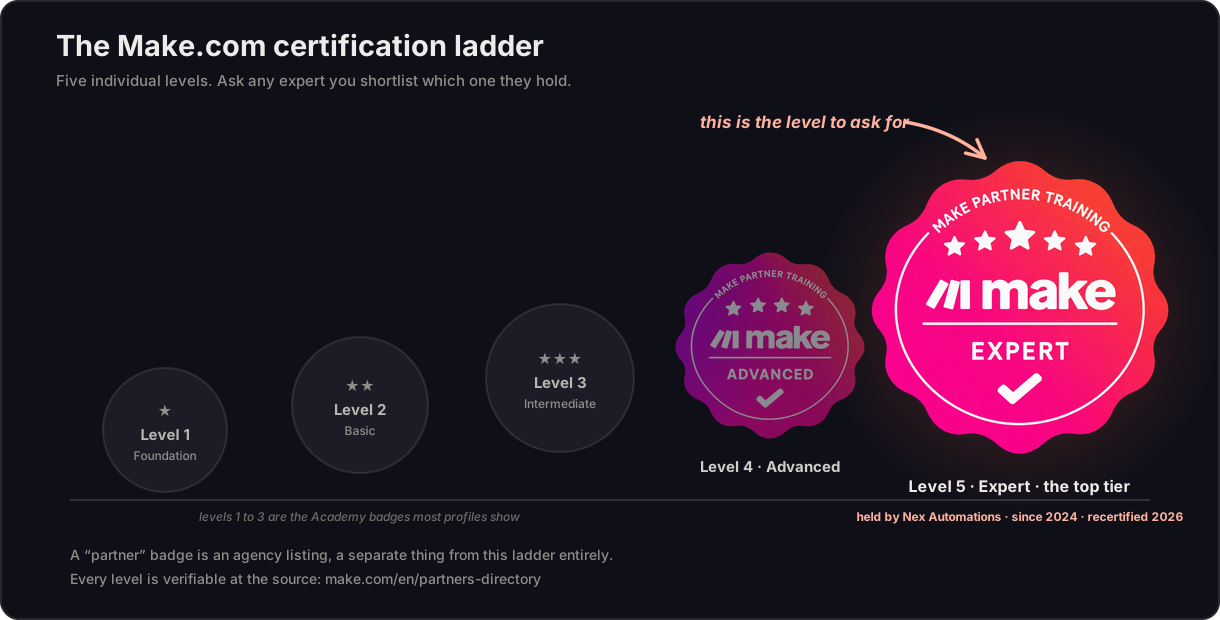
That said, certification without experience means nothing. A Level 5 badge earned three months ago with 10 client builds is worth less than someone who's been building on Make for three years with 500+ scenarios in production, even without the badge.
The combination you want: certification plus a track record of real builds in industries similar to yours.
What to check: Ask to see their platform profile or partner directory listing. Make's Solutions Partner directory and Zapier's Expert Directory both verify credentials independently.
3. They Ask More Questions Than They Answer in the First Call
A red flag I see constantly: automation experts who jump straight to proposing solutions before they understand the problem.
"I'll build you a lead automation in Make" is a useless statement without knowing your current tool stack, your team's technical comfort level, your data volume, your error tolerance, and what happens when something breaks.
A good automation expert spends the first call listening. They ask about your existing systems before they mention any tools. They want to know who will maintain this after it's built. They ask what happened last time a process failed manually, because that tells them what the failure mode of the automation needs to handle.
The best discovery calls I've run go 20 minutes before I mention a single platform. Because the platform is almost never the hard part. Understanding the process, the edge cases, and the people involved. That's the hard part.
What to watch for: If someone pitches a specific tool or solution before your first call is 10 minutes in, they're selling a product, not solving your problem.
If you're already evaluating experts and want a second opinion on whether your use case is worth automating, that itself tells you a lot about the kind of expert you should hire. A good consultant will tell you clearly whether a process should be automated now, later, or not at all.
4. They Have Work You Can Actually See
Portfolio evidence in automation is tricky because most client work is confidential. But a legitimate expert will have something: anonymised workflow screenshots, case studies with outcomes, Loom videos of systems in action, or references you can call.
I share Make workflow screenshots in proposals and on my portfolio. They show the actual architecture: module count, routing logic, error handling paths. A client can look at a 6-scenario system with 2,000+ weekly operations and understand they're looking at real production work, not a demo.
What to be skeptical of: stock screenshots from Make's own documentation, vague case studies with no numbers, or portfolios that only show two-step linear flows.
The complexity of someone's portfolio work is directly correlated with the complexity of work they can do for you. A person who has only built 3-step Zapier integrations cannot reliably architect an 8-scenario Make system with Claude AI, custom error handling, and a Retool dashboard.
What to ask for: "Can you show me a scenario you built for a client similar to me?" If they can show you something, even anonymised, that's the right answer.
If you're browsing Fiverr specifically, this becomes even more important. Many automation gigs look similar on the surface, so the fastest way to filter is not price or badges alone. It's whether the seller can show real system thinking, real workflow structure, and real production examples.
5. They Tell You When Automation Isn't the Answer
This one surprises people. But the most trustworthy automation experts are the ones who will sometimes tell you not to automate something.
I've had discovery calls where the client wants to automate a process that runs three times a month, takes 15 minutes manually, and has highly variable inputs that would require enormous complexity to handle programmatically. The honest advice in that situation is: this doesn't need automation right now. Fix the process first, or automate something else that actually moves the needle.
An expert who will tell you this is an expert who's thinking about your business outcome, not their invoice. They're the right person to hire for everything else.
Also watch for platform agnosticism. I'm a Make Level 5 Expert. I still recommend Zapier to certain clients, the ones who need quick, simple connections that their non-technical teams can manage. I still recommend n8n for clients with technical teams who have high-volume flows where the economics make self-hosting worthwhile.
An expert who only recommends one platform regardless of your situation is either limited in their knowledge or optimising for their own convenience.
What to ask: "Is there a situation where you'd recommend against automation for a specific process?" A confident expert will say yes and give you an example.
6. They Can Explain What Happens After the Build
The build is the easy part. What happens in month three when the API changes? What happens when your team onboards a new VA who doesn't know how the system works? What happens when a scenario starts failing and you don't know why?
A professional automation build includes documentation. At minimum: what each scenario does, what triggers it, what it connects to, and what to check if it breaks. Better: a Loom walkthrough of the full system that anyone on your team can follow.
Also ask about their approach to handoff. Do they build in a way that you or your team can modify, or does everything require going back to them? Both models can be legitimate. A retainer relationship where they maintain the system ongoing is fine, but it should be a choice you make, not a situation they create by building something unmaintainable.
I deliver documentation and a Loom walkthrough on every build. Not because clients always need it immediately, but because the moment they do need it and it doesn't exist, the trust I built during the project evaporates.
What to ask: "What does your handoff process look like? What documentation do you deliver?"
Where to Find Automation Experts (And How to Filter Fast)
There are a few common places businesses look first: Fiverr, Upwork, referrals, LinkedIn, agency referrals, and partner directories.
If you're using Fiverr, the volume of choices can be useful, but it can also make it hard to tell who actually understands production-grade automation and who mainly sells simple app-to-app connections.
If you want a benchmark for what a production-focused automation expert profile looks like, you can review my Fiverr profile and current gig here:
Fiverr Profile: prempatel237 on Fiverr Fiverr Gig: Make.com automation gig
You do not need to hire based on marketplace polish alone. Use platforms like Fiverr to compare: - technical depth - clarity of communication - evidence of real builds - understanding of your stack - confidence around failure handling - post-build documentation and support
A solid Fiverr search starting point would be queries like: - Make expert - Zapier expert - automation expert - automation consultant - AI automation expert - Make automation - Zapier automation - Airtable automation expert - Shopify automation expert - CRM automation expert
The goal is not just to find someone who can connect apps. The goal is to find someone who can design systems that keep working.
The Red Flags: What to Avoid
They can't tell you how many scenarios they've built. Real practitioners know roughly. "I've built around 50 client automations" is a real answer. "A lot" is not.
They quote a fixed price for a project they haven't scoped. Good automation work is scoped before it's priced. Anyone quoting $500 for "a Make automation" before they've asked about your data volume, integration count, and error requirements is guessing, and guessing wrong either costs them or costs you.
They've never touched your platform. If you need Make work and they've only ever used Zapier, that's months of learning curve happening on your project budget.
They promise zero downtime or zero errors. No production automation system has zero errors. The honest answer is: errors happen, and here's how we handle them. Anyone promising perfection doesn't understand production systems.
Their communication disappears mid-project. You'll know this early if you ask them how they communicate during a build. Legitimate experts have a process: check-ins, delivery milestones, testing phases. Vague answers about "staying in touch" are a warning sign.
What Good Automation Work Actually Costs
For context, without endorsing any specific pricing:
Simple automations (1-3 scenarios, basic integrations, linear flows): typically $200-800 depending on complexity and who's building it.
Medium builds (4-8 scenarios, multiple integrations, routing logic, error handling): typically $800-3,000.
Enterprise builds (9+ scenarios, custom dashboards, AI integration, multi-team systems): $3,000-15,000+.
Any quote significantly below these ranges for complex work is a red flag. Not because the person isn't talented, but because real complexity takes real time, and underpriced work means either the complexity isn't being addressed or the expert is learning on your project.
One important nuance here: cheap automation is rarely cheap in the long run. If a broken workflow causes missed leads, wrong invoices, bad CRM data, or delayed reporting, the hidden cost can be much higher than the original build quote.
What Most People Miss About Automation (And Why Systems Fail)
Most failed automation projects do not fail because the trigger did not fire. They fail because the builder did not think through the messy parts.
That includes: - missing or malformed data - unexpected API responses - duplicate records - retries and timeouts - ownership after handoff - what happens when a team member changes a field, app, or process later
This is why "can they build it?" is not the only question. The better question is: "Can they design it to survive real-world use?"
That difference is huge.
FAQ
Q: How do I verify that someone is actually a Make Level 5 Expert?
A: Make maintains a public Solutions Partner directory. You can search by name or location and see verified partner listings. Level 5 certification is separately verifiable via a certificate link that the expert should be able to share. I'm listed at Make's Solutions Partner directory and my Level 5 certificate ID is kxtsttyjyp, issued 2024, recertified 2026.
Q: Should I hire a freelancer or an automation agency?
A: For most SME and agency work, a specialist freelancer with 3+ years of production experience will outperform a generalist agency's junior team member. Agencies add value for large-scale enterprise work where you need multiple specialists across concurrent projects. For a single complex build, a specialist freelancer is almost always better value.
Q: How long should an automation project take?
A: Simple builds: 1-2 weeks. Medium builds: 2-4 weeks. Enterprise builds: 4-12 weeks. Any estimate under a week for a complex multi-scenario system is either overconfident or the scope is being underestimated. Any estimate over 3 months for a medium build suggests poor project management or a scoping problem.
Q: What platforms should my automation expert know?
A: At minimum, they should be proficient on the platform you're using (Make, Zapier, or n8n) plus the specific tools in your stack. For most B2B use cases: Make or Zapier plus Airtable or Google Sheets, plus whatever your CRM and payment tools are. AI integration knowledge (OpenAI API, Claude API) is increasingly important for 2025-2026 builds.
Q: Can I build the automation myself instead of hiring someone?
A: For simple 2-3 step integrations with no conditional logic, yes. Zapier and Make both have good documentation. For anything with routing logic, error handling, multiple data sources, or AI steps, the time cost of learning while building usually exceeds the cost of hiring. A good expert also designs for maintainability in ways that first-time builders typically miss.
Q: What's a fair test to evaluate an automation expert before hiring?
A: Ask them to scope your project in writing. Not a quote, a scope document. What they'll build, what it will do, what the edge cases are, what error handling they'll include. A capable expert can scope your project in 1-2 hours. The quality of that document tells you more than any portfolio screenshot.
Q: Is Fiverr a good place to hire an automation expert?
A: It can be, if you know how to filter properly. Fiverr gives you access to a wide range of specialists quickly, but the platform works best when you evaluate beyond price and delivery promises. Look for depth, real examples, platform-specific expertise, and how clearly the seller thinks about edge cases. A well-scoped Fiverr project with the right expert can work extremely well. A rushed, poorly scoped one usually does not.
If you want to see how I approach this work before we talk, the case studies on the Work page show real systems built for real clients, with actual numbers, actual tools, and actual results.
If you're ready to scope a build: book a free consult.
If you prefer to review my Fiverr presence first, you can do that here as well:
Fiverr Profile: prempatel237 on Fiverr Fiverr Gig: Make.com automation gig