Every automation ever built on Make, Zapier or n8n is the same three parts: a trigger that starts it, logic that decides what happens, and actions that do the work. That is the whole model. Once you can name the triggers and actions your business needs, you have written your own requirements document, and any competent builder can quote it. This guide is the map: every trigger type, every logic building block, every action class, what each of the three platforms calls them, and where each one hits a wall.
I am Prem Patel, founder of Nex Automations, an AI systems studio in Ahmedabad. I hold the Make Level 5 Expert and Zapier Certified Professional credentials, and Nex Automations is listed in both official partner directories, the only India-based company on both as of August 2026. This is the same map we walk clients through in a scoping call before quoting any of the 1,200+ systems we have built.
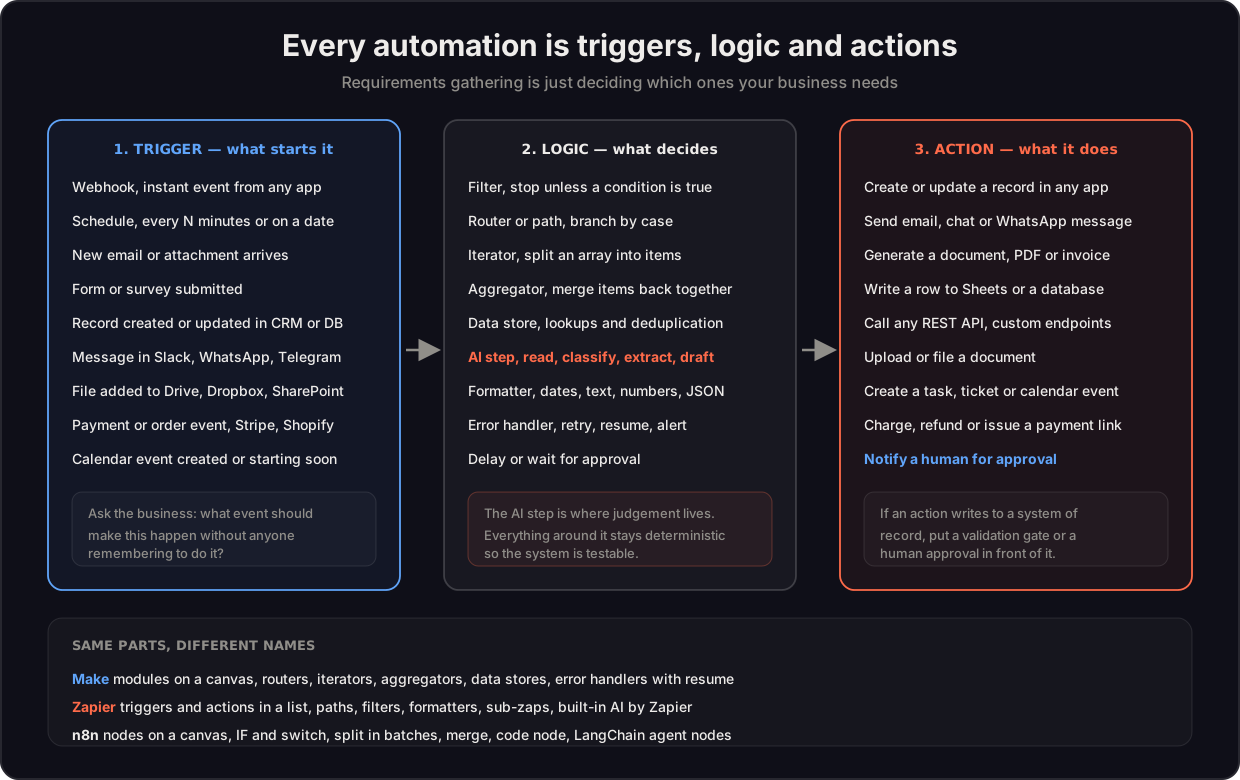
Part 1: triggers, what starts the run
| Trigger type | What it means | Typical use |
|---|---|---|
| Webhook or instant | Another system pushes an event the moment it happens | Form submitted, payment received, order placed |
| Schedule | Runs every N minutes, daily, or on set dates | Nightly sync, weekly report, monthly billing run |
| New email or attachment | A message arriving in a monitored mailbox | Invoice intake, support triage, document collection |
| New or updated record | A row or object changes in a CRM, database or sheet | Deal stage moves, contact created, inventory changes |
| New file | A file lands in Drive, Dropbox, SharePoint or S3 | Document processing, media pipelines |
| Chat message | A message in Slack, Teams, WhatsApp or Telegram | Internal requests, customer conversations |
| Commerce event | Order, refund, subscription or payment events | Shopify, Stripe, Razorpay, WooCommerce flows |
| Calendar event | Event created, updated or about to start | Meeting prep, reminders, follow-ups |
| Manual or on-demand | A human presses a button or calls the scenario | Bulk operations, one-off runs, AI-invoked tools |
Platform reality: all three support all of these. The differences are polling intervals on cheaper plans (a "instant" trigger on a low tier may actually check every 1 to 15 minutes), and how many apps have native instant triggers versus needing a webhook set up by hand.
Part 2: logic, what decides
This is where the real difference between a working system and a demo lives.
| Building block | What it does | Make | Zapier | n8n |
|---|---|---|---|---|
| Filter | Stops the run unless a condition is true | Filter on a route | Filter step | IF node |
| Branch | Sends different cases down different paths | Router | Paths | Switch node |
| Loop over items | Splits an array and handles each item | Iterator | Looping (limited) | Split in Batches |
| Merge results | Combines items back into one bundle | Aggregator | Line-item support | Merge node |
| Lookup and dedupe | Stores values between runs | Data store | Storage (basic) | Static data or DB node |
| Transform data | Dates, text, numbers, JSON reshaping | Functions | Formatter | Set, Code, Function nodes |
| AI step | Reads, classifies, extracts or drafts | AI modules, MCP | AI by Zapier, Agents | LangChain nodes |
| Custom code | Anything the built-ins cannot do | Limited, functions | Code steps | Full Code node |
| Error handling | Retries, fallbacks, alerts, resume | Error handlers with resume | Autoreplay on paid tiers | Error workflow, retries |
| Wait or approval | Pauses until a time or a human responds | Sleep, webhook wait | Delay | Wait node |
Where each platform hits a wall. Zapier is the fastest to build in and the most expensive at volume, and its looping and data-manipulation options are the most limited of the three. Make gives you the deepest visual logic per rupee (routers, iterators, aggregators and error handling that can resume), which is why complex client systems usually land there. n8n gives you full code, self-hosting and the deepest AI agent tooling, at the price of needing someone technical to own it. We compared all three with pricing math in the platform comparison, and the wider market including enterprise options in the 2026 platform landscape.
Part 3: actions, what it does
| Action class | Examples |
|---|---|
| Create or update records | CRM contacts and deals, Airtable and Notion rows, database inserts, tickets |
| Communicate | Email, Slack, Teams, WhatsApp Business, Telegram, SMS |
| Documents | Generate PDFs, contracts, invoices and proposals, e-signature requests, file and rename |
| Spreadsheets and databases | Append or update rows in Sheets or Excel, write to Postgres, MySQL, Supabase |
| Any API | HTTP request to any REST endpoint, which is the escape hatch that makes "no connector" a non-problem |
| Commerce and finance | Create invoices, charge or refund, issue payment links, sync accounting entries |
| Scheduling | Create calendar events, send booking links, assign tasks |
| Human in the loop | Send for approval and wait, escalate, route to the right person with context |
The last row is the one that separates production systems from demos. Any action writing to a system of record should sit behind a validation rule or a human approval, and any AI-generated output that reaches a customer should have a person or a rule in front of it.
How this becomes a requirements document
The scoping conversation we run is literally this map, in four questions:
- What event should start this? That is your trigger. If the answer is "when someone remembers to do it", that is exactly the problem worth removing.
- What has to be decided along the way? Conditions, branches, exceptions. Anything answered with "it depends" becomes a filter, a router or an AI step.
- What should happen at the end? Your actions, in order, with the systems named.
- What happens when it fails? The question almost nobody asks before buying, and the one that determines whether you rebuild in a year.
Worked example. A distributor says: "Supplier invoices come by email, someone types them into Tally, and mistakes get caught at month end." Mapped: trigger is new email with attachment in a shared mailbox; logic is an AI step extracting supplier, line items, totals and tax, then validation rules checking arithmetic and matching against the purchase order, then a router splitting clean invoices from exceptions; actions are writing the entry, filing the document, and notifying a human for anything that failed validation. That is a $300 to $2,500 build depending on volume and how many suppliers use non-standard formats. We wrote up the full pattern in the AI PDF extraction guide and the honest buy-versus-build comparison in the document AI landscape.
What these platforms cannot do
Being straight about the limits saves everyone a wasted call:
- They do not fix undecided processes. If two people do the job differently and nobody has decided which is right, automation encodes the confusion.
- They are not real-time control systems. Sub-second industrial control, high-frequency trading execution and similar belong in purpose-built software.
- They do not replace a system of record. An automation platform moves and transforms data between your CRM, ERP or accounting system. It should not become the place your data lives.
- They do not remove the need for access. If a legacy system has no API, no export and no database access, no platform can reach it. Screen-scraping and RPA are a different tool class, covered in the platform landscape.
- AI steps are not deterministic. They are excellent at reading and drafting, and they need validation around them before anything irreversible happens.
FAQ
Q: What is the difference between a trigger and an action in automation? A: A trigger is the event that starts the automation, such as a form submission, an incoming email or a scheduled time. An action is what the automation does afterwards, such as creating a record, sending a message or generating a document. Everything between them, the filters, branches, loops and AI steps, is logic.
Q: What can Make.com, Zapier and n8n actually do? A: All three connect apps by listening for triggers, applying logic and performing actions across thousands of services, plus any REST API through an HTTP request. They handle filtering, branching, loops, data transformation, AI steps, error handling and human approval steps. They are not real-time control systems, they do not replace systems of record, and they cannot reach software that exposes no API or export.
Q: How do I write requirements for an automation project? A: Answer four questions per process: what event should start it, what has to be decided along the way, what should happen at the end and in which systems, and what should happen when it fails. That maps directly to trigger, logic, actions and error handling, which is everything a builder needs to quote accurately.
Q: Which platform has the best logic and error handling? A: Make offers the deepest visual logic for the price, with routers, iterators, aggregators and error handlers that can resume a failed run. n8n goes furthest for developers with full code nodes, self-hosting and the deepest AI agent tooling. Zapier is fastest to build simple flows and the most limited on loops and data manipulation, and the most expensive at high task volume.
Q: Can automation platforms connect to software that has no integration? A: Usually yes, through an HTTP request module calling the software's REST API, which is available on all three platforms. If the software has no API, no webhook and no export, the answer is no, and the realistic options become RPA tooling, database-level access or a change of software.
Q: Do I need AI in my automation? A: Only where the process needs judgement on messy input, such as reading a document, classifying a message or drafting a reply. If you can draw the flowchart with fixed rules, a deterministic automation is cheaper, faster and easier to test. The AI agent versus automation guide covers the test in detail.
Have a process in mind but not sure how it maps? Book a free consult and we will walk it through these four questions live, and you will leave with a written trigger, logic and action spec you can take to any builder, including us.