 Make.com
 TradingView
 Telegram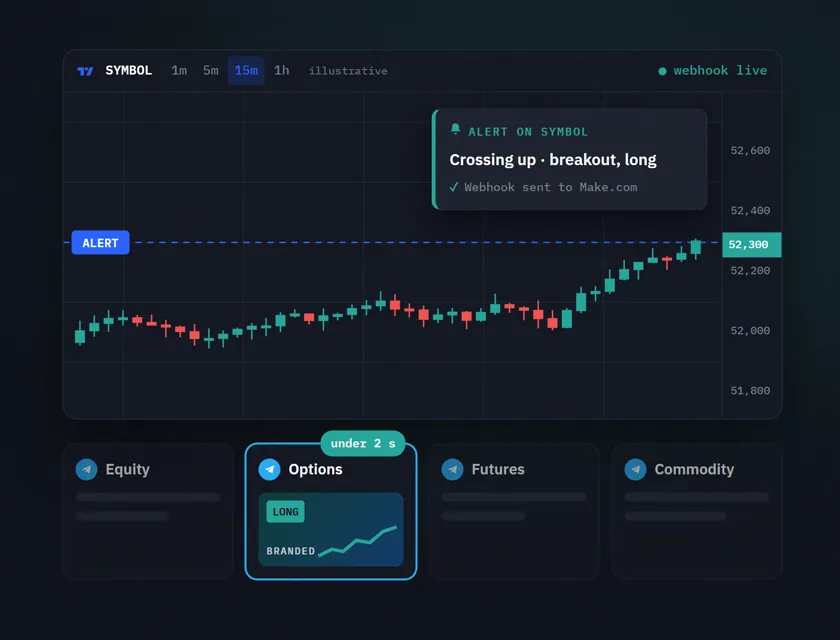
The Situation
Alok Daiya is a SEBI-registered analyst running a trading signal service. His team provides real-time stock and options alerts to subscribers across multiple Telegram channels, each dedicated to a specific asset class.
The old process: a TradingView alert fires, someone on the team sees it, manually creates a branded chart image with the alert details, selects the correct Telegram channel based on the asset type and sends it. In calm markets, this took 2 to 5 minutes per alert. In volatile markets where multiple signals fire simultaneously, alerts were delayed, sent to wrong channels or skipped entirely.
For a trading signal service, delivery speed is the product. An alert that arrives 3 minutes late has already lost its value.
"Lightning-fast scalable system that saved us time and captured market momentum perfectly." Alok Daiya, SEBI Registered Analyst
The 3 Problems
- Manual routing was too slow. 2 to 5 minutes per alert in a market that moves in seconds. During high-volatility periods, the team could not keep up with the volume.
- Channel selection errors. With multiple Telegram channels for different asset types, alerts were occasionally sent to the wrong audience. An options alert in the equity channel erodes subscriber trust.
- Branded image creation was a bottleneck. Each alert needed a formatted chart image with the signal details overlaid. Creating this manually for every alert was the slowest step in the chain.
What Was Built
A fully automated signal delivery pipeline that runs from TradingView to Telegram in under 2 seconds, with zero human involvement.
How it flows:
- TradingView alert fires via webhook
- Make.com receives the webhook payload with signal data (ticker, direction, price, timeframe)
- Make.com generates a branded chart image dynamically using the signal data
- Router module selects the correct Telegram channel based on asset type
- Alert is delivered with the branded image to the right channel
- Execution is logged for audit and performance tracking
Tools used:
- Make.com - webhook receiver, image generation, routing logic, Telegram dispatch
- TradingView - alert source via webhooks
- Telegram - multi-channel delivery to subscribers
- Image generation service - branded chart overlays
The Technical Architecture
The key design decision was the router. TradingView sends a JSON payload with the alert details. Make.com parses the ticker symbol and maps it to the correct asset category (equity, options, futures, commodity). Each category routes to a different Telegram channel.
Why this matters: A simple "send to Telegram" automation would blast every alert to one channel. The router ensures subscribers only see alerts relevant to their asset class. This is a retention feature disguised as routing logic.
Image generation: Rather than using static templates, the system generates a fresh branded image per alert with the ticker, price, direction (bullish/bearish) and timeframe embedded. This means every alert looks professional and carries the brand identity without anyone touching a design tool.
Error handling: If TradingView sends a malformed payload or an unrecognized ticker, the system logs the error and sends a Slack notification to the team rather than delivering a broken alert. In production, this has caught edge cases that would have been embarrassing if sent to subscribers.
The Results
| Metric | Before | After | Change |
|---|---|---|---|
| Alert delivery time | 2-5 minutes | Under 2 seconds | down 98% |
| Manual process per alert | Full manual | Zero | Eliminated |
| Channel routing errors | Occasional | Zero | Eliminated |
| Alerts during high-volatility | Missed or delayed | All delivered | 100% coverage |
| Branded image creation | Manual per alert | Auto-generated | Eliminated |
The Insight
This build taught me something about automation in time-sensitive domains: the system is not competing against "no automation." It is competing against market speed. A 2-minute delay does not just waste time. It makes the alert worthless. The subscriber acts on stale data or misses the move entirely.
The architecture principle here is minimal latency by design. Every module in the Make.com scenario is optimized for speed: no unnecessary data transformations, no external API calls that add latency, no queuing. The webhook fires, the router decides, the image generates, Telegram sends. Four steps. Under 2 seconds.
FAQ
Q: Can Make.com receive TradingView webhooks? A: Yes. Make.com's Custom Webhook module generates a unique URL that you paste into TradingView's alert webhook field. When the alert fires, Make.com receives the full JSON payload instantly.
Q: How fast is the alert delivery? A: Under 2 seconds from TradingView alert to Telegram delivery. This includes webhook processing, image generation, channel routing and message send.
Q: Can this work with Discord instead of Telegram? A: Yes. The routing and image generation logic is platform-agnostic. Replace the Telegram module with Discord's webhook module and the rest of the system works identically.
Q: How does the system handle multiple simultaneous alerts? A: Make.com processes webhook events in parallel. If 5 alerts fire within the same second, all 5 are processed independently and delivered to their respective channels without queuing delays.
Running a signal service or real-time alert system? Book a free consult and I will scope the exact build for your platform.