To extract data from a PDF with AI using Make.com, you build a scenario that does four things: receives the PDF, converts it to a format the AI can read, sends it to an AI model like Gemini with a clear instruction on what to pull out, then validates the returned data before using it. The validation step is what separates a reliable extraction from one that silently returns wrong values. AI can read messy, varied documents that rigid parsers cannot, but because its output is probabilistic, the data must be checked before it flows downstream.
I am Prem Patel, founder of Nex Automations, an AI systems studio. I hold the Make Level 5 Expert certification. AI document extraction is one of the highest-return automations we build, because it replaces the slowest, most error-prone manual task in many businesses: reading documents and typing what they say into a system.
This guide covers the full extraction workflow, why validation matters more than the extraction itself, how to keep it credit-efficient and the QA approach that makes the output trustworthy.
Why AI changed PDF extraction
For years, automating PDF reading meant the document had to be perfectly predictable. A parser looked for a value in a fixed position. The instant a supplier changed their invoice layout or a form arrived scanned slightly crooked, the automation broke or returned nonsense.
AI models read documents the way a person does, by understanding content rather than position. An AI extraction can pull the total from an invoice whether it sits top-right or bottom-left, read line items in any order and handle a document it has never seen before. This is what made document extraction practical for real-world inputs that vary every time.
The tradeoff is that AI output is probabilistic. A parser either finds the value or fails visibly. An AI can return a plausible, well-formatted, completely wrong value with total confidence. That single difference is why the design of an AI extraction workflow is mostly about controlling and checking the AI, not just calling it.
The extraction workflow, step by step
A reliable AI PDF extraction in Make.com follows this shape.
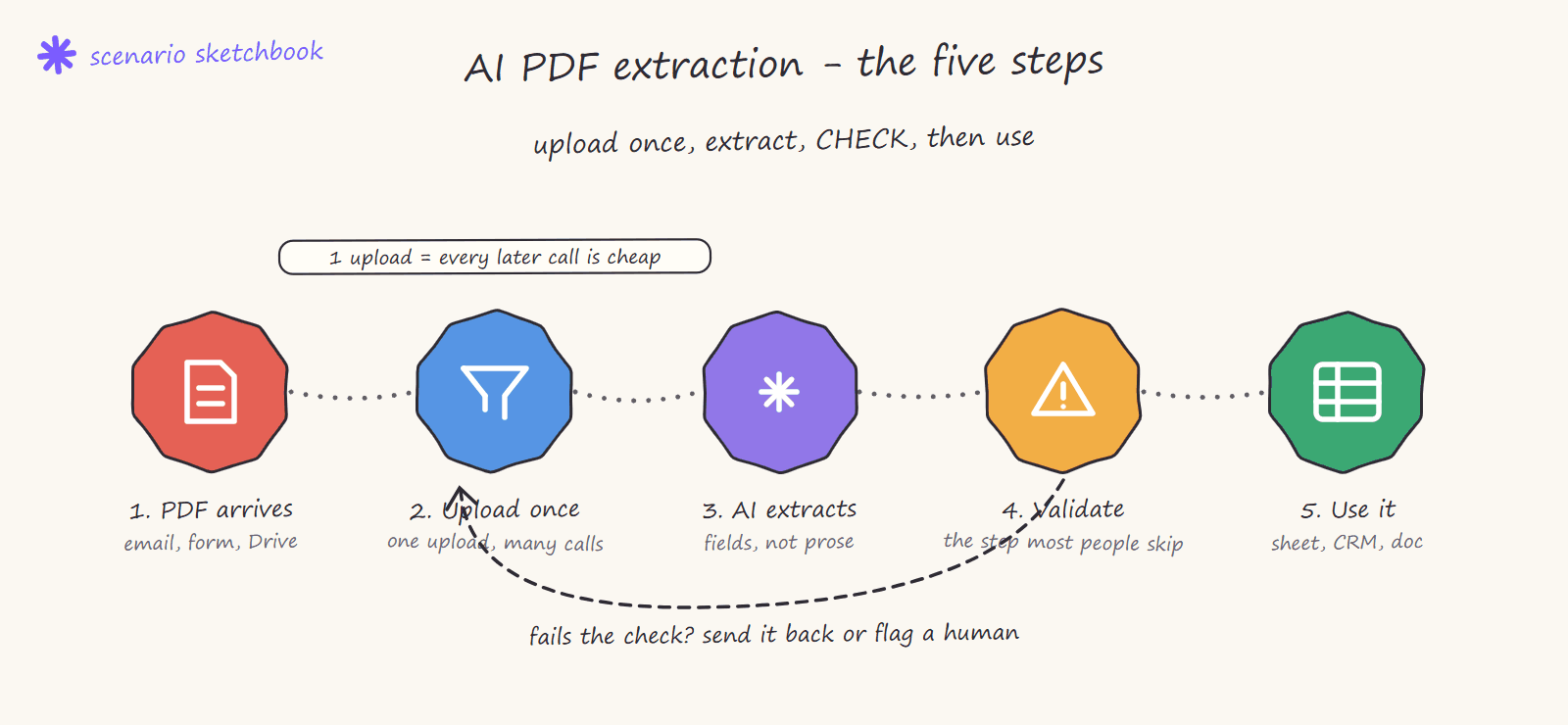
1. Receive the document. The trigger: an email with a PDF attachment, a file uploaded to a Drive folder, a webhook from another system, a new row pointing to a file. Make picks it up.
2. Prepare the document for the AI. Depending on the model and the file, this means passing the PDF directly, converting pages to images, or extracting raw text first. The goal is to give the AI the cleanest possible input. Scanned or image-based PDFs may need an OCR or vision-capable model step here.
3. Send to the AI with a precise instruction. This is the heart of it. The AI step (Gemini, Claude or another model) gets the document plus a prompt that specifies exactly what to extract and in what structure. The instruction should ask for a fixed format, typically structured JSON with named fields, so the output is predictable and machine-readable rather than free text.
4. Parse the AI response. The structured output is turned into Make variables your workflow can use: invoice number, total, date, line items, party names, whatever was requested.
5. Validate before using. The step most builds skip and the one that makes the difference. Covered next.
6. Use and store. The validated data flows to its destination: a row in Airtable, a record in the CRM, a generated document, an accounting tool. A copy of the source document and the extracted data is logged so there is always a record.
Why validation matters more than extraction
The extraction is the easy part. Modern models are good at reading documents. The hard part, and the part that determines whether you can trust the automation, is catching the times the AI gets it wrong.
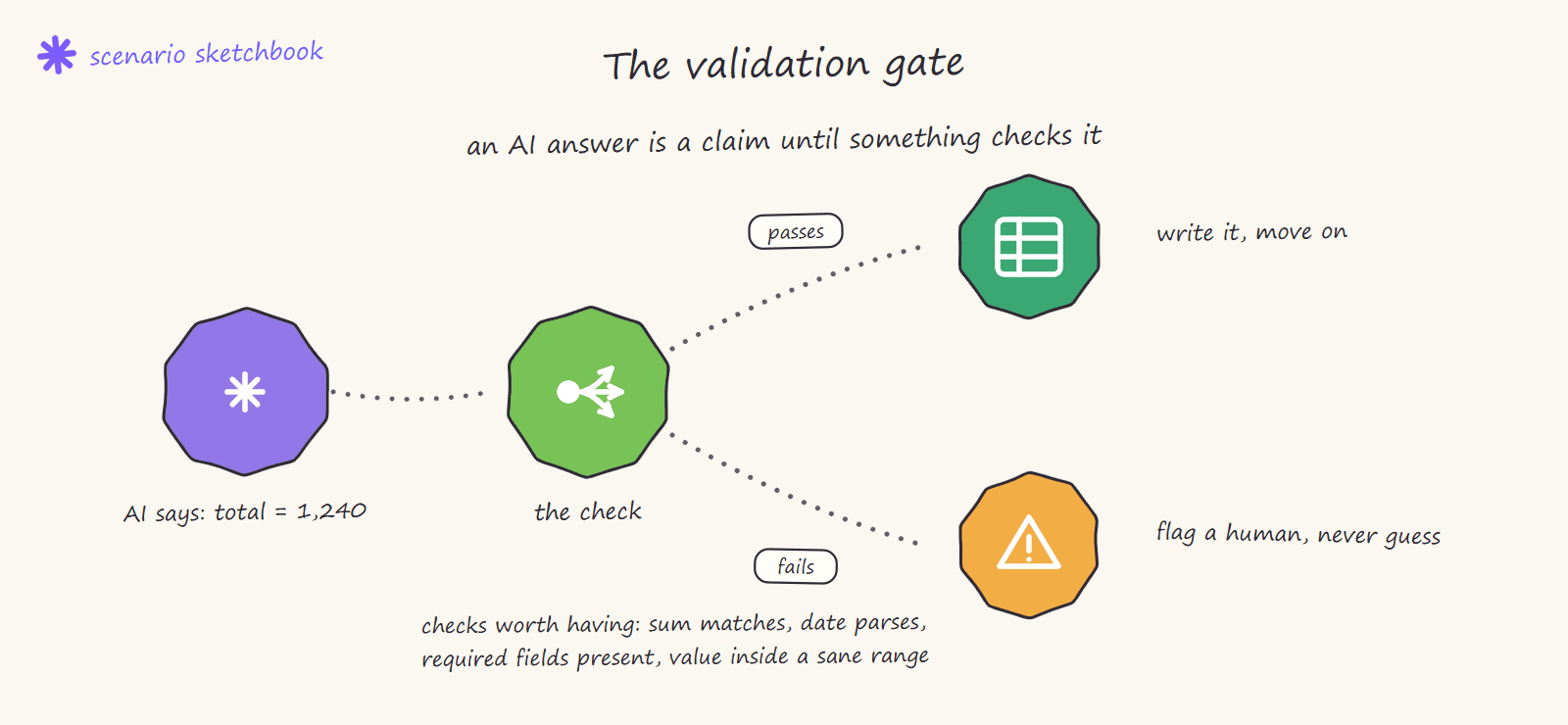
A serious extraction workflow validates the output before it is used. The validation checks depend on the document but the principle is the same: confirm the data makes sense before letting it flow downstream. Practical checks:
- Type and format checks. Is the total actually a number? Is the date a valid date? Did every required field come back, or are some empty?
- Range and sanity checks. Is the invoice total within a plausible range? Do the line items sum to the stated total? A mismatch flags a likely extraction error.
- Cross-checks against known data. Does the supplier name match a known vendor? Does the invoice number follow the expected pattern?
- Confidence routing. When a check fails, the workflow does not silently proceed. It routes the document to a human review queue, flags it in a channel, or holds it rather than acting on bad data.
This is the QA layer. Without it, an AI extraction is a fast way to put wrong data into your systems. With it, it is a reliable replacement for manual reading. The validation is not optional polish, it is the difference between an automation you can trust and one you cannot.
Keeping extraction credit-efficient
Since Make moved to the credit model in August 2025, AI steps cost more credits than standard modules. Extraction workflows can get expensive if built carelessly. The efficient approach:
- One AI call per document, not per field. Ask the model for all fields in a single structured response rather than calling it repeatedly. This is the biggest cost lever.
- Pre-filter before the AI step. If only certain documents need extraction, filter them with cheap standard modules before the expensive AI call.
- Right-size the model. Use a capable but cost-appropriate model for the task. Not every extraction needs the largest model.
A well-designed extraction can process a document for a small, predictable credit cost. A careless one can cost many times that for the same result.
The smallest version worth building: receipts in Slack
Before a contracts pipeline, build the cheap one. Someone posts a receipt photo in a Slack channel, one AI call reads the vendor, amount, date and tax, the result goes to Airtable as a pending row, and an approve button writes it to the books.
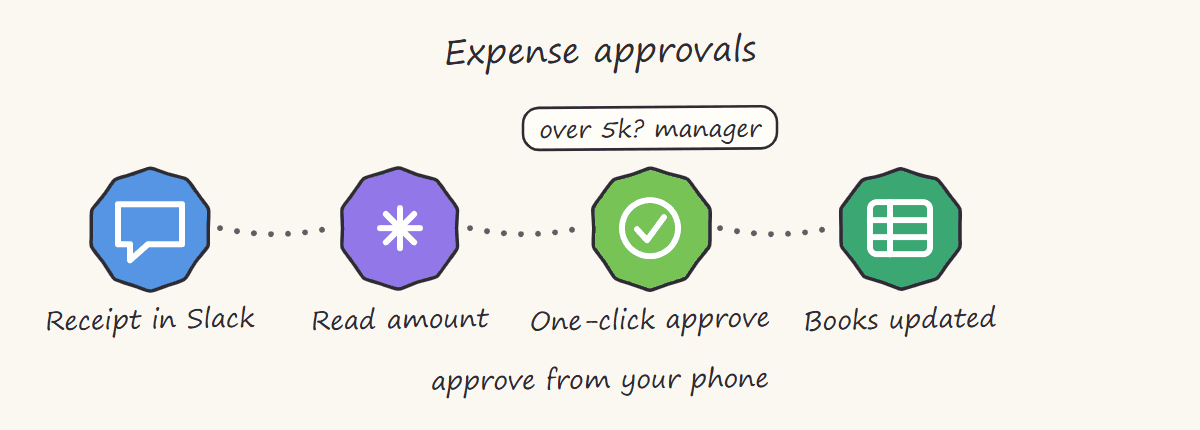
It is a single AI call per document, so it is credit-cheap, and the human approval step is the validation gate: nothing reaches the accounts until a person clicks. Around six hours to build, and it is the fastest way to see whether AI extraction is accurate enough on your actual paperwork before you invest in a bigger pipeline.
Inside a production pipeline: extracting details from contracts and policies
The clearest way to show how the pieces fit is a real system. This is the architecture of an extraction pipeline we run in production for a legal-tech client, where the job is pulling details out of contracts and policy documents (parties, dates, obligations, coverage terms, exclusions) and turning them into a structured review document. Module by module:
Two ways in, one pipeline. The scenario starts with a router fed by two triggers: a custom webhook (the app sends each new contract automatically) and a manual-send branch (a Google Docs fetch, a Gmail step and a Drive file download) so a human can push a one-off document through the exact same pipeline. One set of logic, no special cases.
Download and pre-process. The file is downloaded and passed through a processing step that normalises it before any AI sees it. Policies and contracts arrive as scans, exports and files of wildly different sizes; this step is what keeps the rest of the scenario predictable.
Upload once, reuse everywhere. The document is uploaded to the AI provider (Gemini in this build) a single time, and every later AI call references that upload instead of re-sending hundreds of pages. On long contracts this is the difference between a workable credit bill and an absurd one. A web-search step sits alongside it for context lookups the document itself cannot answer.
Deliberate pauses. Sleep modules sit between AI calls. Not decoration: they respect provider rate limits so a batch of fifty policies does not collapse the run.
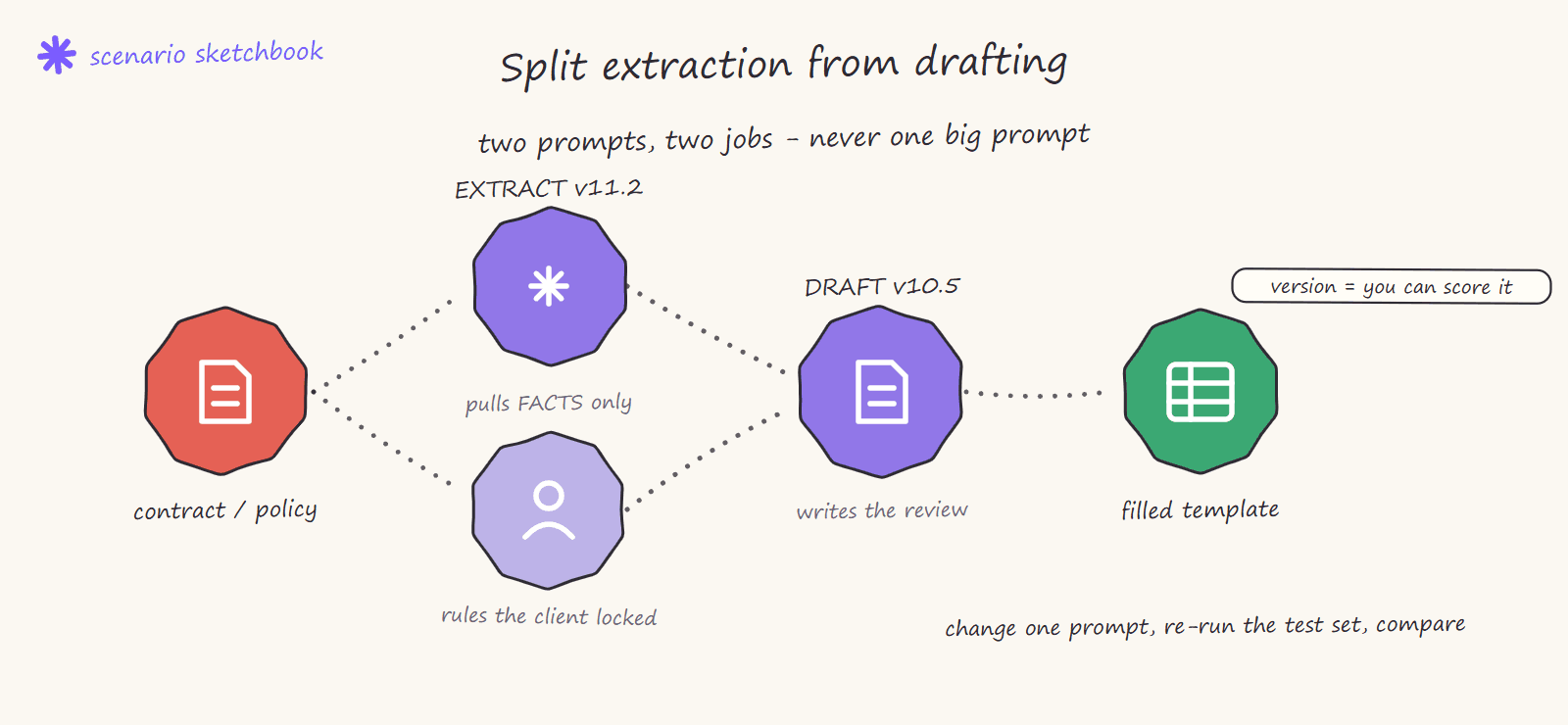
Parallel extraction branches, versioned prompts. A router fans the document out to parallel branches, each responsible for its own slice of the extraction. Look closely at the module names in a build like this and you will see versions in them, like EXT v11.2 and Draft v10.5.4. Extraction and drafting are separate, separately versioned prompt steps: extraction pulls the facts, drafting writes the review prose from those facts. When accuracy needs improving, you change one prompt version, re-run the test set and compare numbers. This split-and-version discipline is what took out-of-sample accuracy on this system from 70% to about 80%.
Template, fill, verify. Each branch creates a Google Doc from a template, fetches the document, runs a code step to prepare the batch of changes and applies them through a BatchUpdate API call. The template is the contract between the AI and the output: the model never freewheels a document, it fills a structure a human designed.
Callback, download, deliver. A final router closes the loop: a signed status callback tells the client application the review is ready, the finished Google Doc is downloaded, and Gmail sends it to the reviewer. Every AI and delivery module in the scenario carries a Retry error handler, so a transient failure re-runs instead of silently dropping a contract.
The pattern to steal, whatever your document type: separate intake from processing, upload once, split extraction from drafting, version your prompts, fill templates instead of generating freeform and always close the loop with a status callback plus retries.
How we build AI extraction at Nex Automations
When we build an extraction workflow, the extraction itself is maybe a third of the work. The rest is the validation and exception handling: deciding what "wrong" looks like for that specific document, building the checks that catch it and designing what happens when a check fails. We assume the AI will occasionally be wrong and build so that when it is, the workflow flags it rather than passing bad data on.
We also design the AI calls to stay credit-efficient and document the whole pipeline so the team can maintain it. The result is an extraction system a business can actually rely on for invoices, contracts and forms, not a demo that works until the first unusual document arrives.
If you want reliable AI document extraction built with proper validation, you can book a call and we will start with your highest-volume document type.
FAQ
Q: Can Make.com extract data from a PDF automatically? A: Yes. Make can receive a PDF, send it to an AI model like Gemini to extract the fields you specify, then validate and store the result. For scanned or image PDFs it uses OCR or a vision-capable model. The key to reliability is validating the extracted data before using it.
Q: Which AI model is best for PDF extraction in Make.com? A: Gemini, Claude and GPT models all handle document extraction well. The best choice depends on the document type, accuracy needs and credit budget. The model matters less than the validation layer around it, since any model can occasionally return a wrong value.
Q: How accurate is AI PDF extraction? A: Modern models are highly accurate on clear documents but never perfect, and they can return confident wrong values. This is why a validation layer that sanity-checks the output is essential. With validation, the overall workflow becomes reliable even though the AI alone is not flawless.
Q: How much does AI PDF extraction cost on Make.com? A: It depends on document volume and how the workflow is built. The biggest cost lever is calling the AI once per document for all fields rather than once per field. Since Make uses credits and AI steps cost more, an efficient design keeps the per-document cost small and predictable.
Q: What happens when the AI extracts the wrong data? A: In a properly built workflow, a validation step catches it. Checks like type validation, range and sanity checks and cross-references flag suspect data, and the workflow routes it to human review instead of using it. Without validation, wrong data flows downstream silently, which is the main risk of AI extraction.
Related guides
- Automate Document and PDF Workflows with Make.com
- Automated Invoice and Contract Generation with Make.com
- How Much Does Make.com Automation Cost?
- Hire a Make.com Expert: Full Vetting Guide
Want reliable AI document extraction built with proper validation? Book a free consult: 30 minutes to scope exactly what your documents need. For a fixed-scope build, see the Fiverr's Choice Make.com automation gig. To try Make yourself, the free plan is a solid starting point. Or take 1 month free with 10,000 credits on my partner link.