Updated 17 October 2026. New sections: the seven-step document processing workflow and five patterns agencies and operations teams run in production, each tied to a shipped build and its result.
You can automate almost any document or PDF workflow with Make.com by combining four building blocks: a trigger that starts the flow, an AI or parsing step that reads or generates content, a document tool that produces the file and a delivery step that sends or stores it. The most common automations are reading data out of incoming PDFs, generating branded PDFs like invoices and contracts and turning raw data into formatted reports. A well-built document automation removes hours of manual work per week and, more importantly, removes the silent errors that manual document handling creates.
I am Prem Patel, founder of Nex Automations, an AI systems studio. I hold the Make Level 5 Expert certification and we are a listed Make Partner. Across 1,200+ builds for 210+ clients, document and PDF automation is one of the most requested and highest-return categories of work, because every business runs on documents and almost all of it is still done by hand.
This guide covers what document automation actually is, the building blocks, the main workflow types, where AI fits and the mistakes that quietly break document pipelines.
What is document automation?
Document automation is the use of software to create, read, process or route documents without a person doing it manually. Instead of someone copying data into an invoice template or reading a contract to pull out key terms, a workflow does it automatically and consistently.
In Make.com terms, a document automation is a scenario that connects a data source to a document action. The data might come from a form, a CRM, a spreadsheet or another incoming document. The action might be generating a PDF, extracting fields from one or reformatting content into a clean output. Make sits in the middle and moves the data between the tools that each do one part of the job.
The value is not only speed. Manual document work produces errors that nobody notices until they matter: a wrong figure on an invoice, a missing clause in a contract, a number transposed in a report. Automation makes the output consistent every time.
The four building blocks of any document workflow
Almost every document automation, however complex, is built from the same four parts.
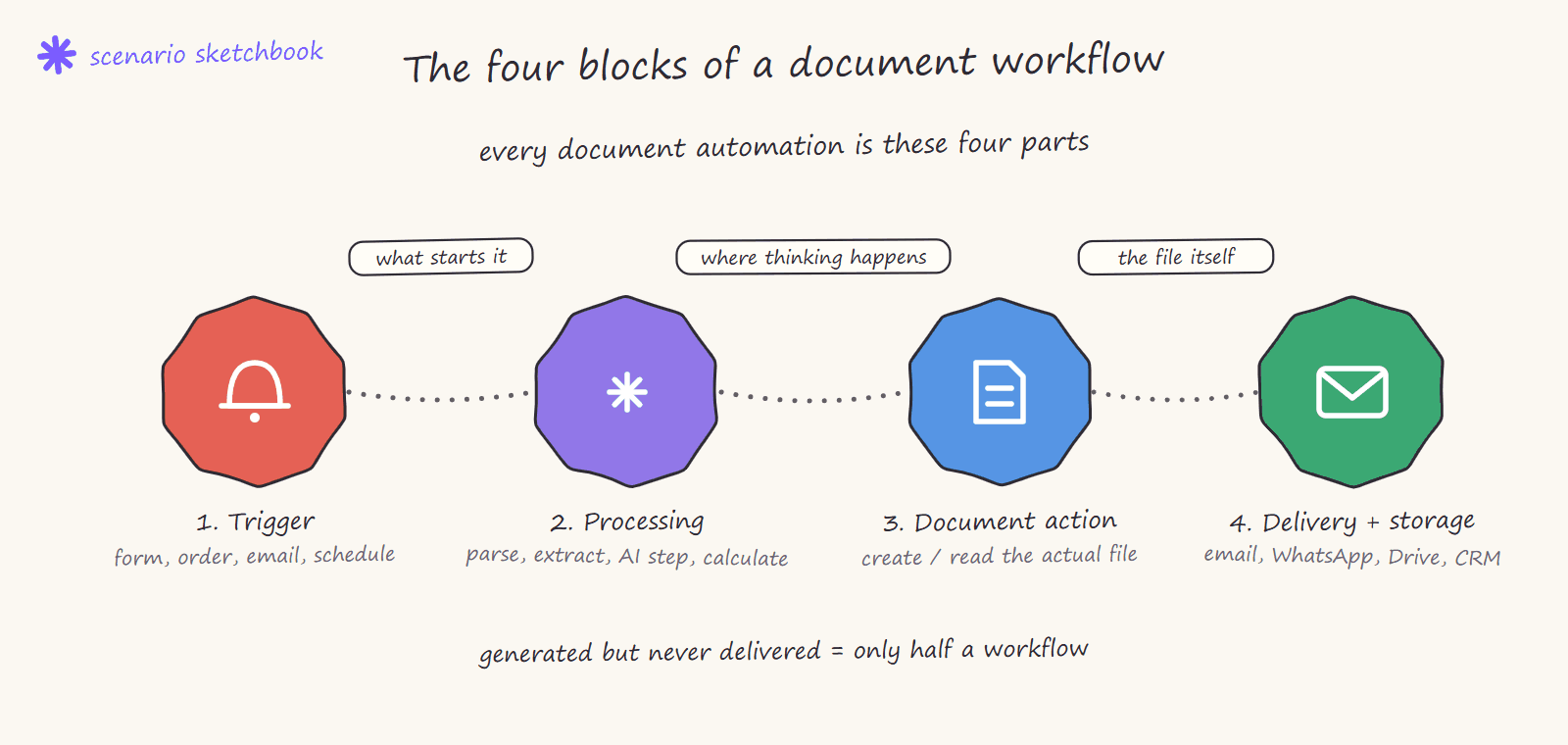
The trigger. What starts the workflow. A new form submission, a paid invoice, a new row in Airtable, an email with an attachment, a scheduled time. This is the event that says a document needs to be made or read.
The processing step. Where the thinking happens. This is parsing an incoming PDF, calling an AI model to extract or generate text, mapping data into the right shape or running calculations. In modern builds this is increasingly an AI step.
The document action. The tool that actually produces or reads the file. Tools like Google Docs, PDF generation services, document parsers and others each handle one type of document job. Make connects to these.
The delivery and storage step. What happens to the finished document. Emailed to a client, sent on WhatsApp, saved to Google Drive, logged in a sheet, attached to a CRM record. A document that is generated but not delivered or stored is only half a workflow.
Understanding these four parts is what lets you look at any manual document task and see how it becomes an automation. Here are all four in one production scenario from our client work: a webhook trigger, iterators and a text aggregator doing the processing, Google Docs creating and reading the document, and a router handing the finished report off for delivery:

The document processing workflow, step by step
Automating document processing workflows comes down to seven steps. The first three are what most tutorials show. The last four are what make it safe to leave running:
| Step | What happens | What breaks if you skip it |
|---|---|---|
| 1. Intake | A trigger picks up the file or record: an email attachment, an upload, a new row, a paid order | Files arrive in places nobody watches |
| 2. Classify | The document is sorted by type (invoice, contract, form, report) so each type gets its own rules | One template forced onto every document |
| 3. Extract or generate | Fields are read out of the document, or a document is built from a template | Nothing, this is the visible part |
| 4. Validate | Totals add up, required fields exist, dates and amounts sit in range | A confident wrong value goes out looking right |
| 5. Exception queue | Anything that fails is parked with the reason for a person to fix | One bad file stops the whole batch |
| 6. Deliver and file | The document is sent, stored and attached to the right record | Generated but never received |
| 7. Log | Every run records what was read, made and sent | No answer when a client asks what they got |
How agencies and ops teams automate document workflows: five patterns from production
These are the patterns we run for clients, each with the build it came from:
| Pattern | Typical documents | How it runs | Shipped result |
|---|---|---|---|
| Per-record batch generation | Letters, certificates, client packs | Each record runs on its own path; failures are parked with a reason; a daily summary lists what shipped | Error-tolerant document generation: 50+ documents a day, 75% of a bad batch still ships on time |
| Long-document AI review | Contracts of 100 to 1,000 pages | Upload is chunked, extraction is queued with retries, every fact carries a page citation, fabricated facts are checked for | AI contract review SaaS: 94.9% best-run accuracy on a golden test set |
| Invoice generation under compliance rules | Invoices for a state-contracted service | Trips are aggregated weekly or monthly and an AI step validates each invoice, in a state-compliant format, before it is sent | Transportation invoice automation: processing time down 77%, 30 days to 7 |
| Extraction from photos and chat | Vendor price lists, product photos | A vision model reads images and text; exceptions such as handwritten prices are flagged | AI vendor catalog: 10+ hours a week saved, error rate under 1% |
| Scheduled reports | Weekly and monthly client or store reports | Data is pulled, reconciled, rendered and sent on a schedule with no AI step | Multi-store sales intelligence: 1 to 2 days of manual work per report to 0 |
The common thread: the document type decides the rules and validation decides what ships. The exception queue is a feature, not a failure.
The main types of document automation
There are three broad directions document automation runs, and most businesses need all three eventually.
Reading documents (data in). Pulling structured information out of incoming documents: extracting line items from a supplier invoice, key terms from a contract, fields from a scanned form. This is where AI extraction has changed what is possible, because models can now read messy real-world documents that rigid parsers could not. This is covered in depth in the AI PDF extraction guide.
Generating documents (data out). Turning structured data into finished files: invoices from paid orders, contracts from a signed proposal, certificates, branded reports. The data already exists somewhere, the automation assembles it into a professional document. This is covered in the automated invoice and contract guide.
Reformatting and routing. Taking documents that already exist and reshaping or moving them: merging, splitting, converting formats, applying consistent formatting, filing them in the right place. Less glamorous, but it removes a surprising amount of daily friction.
Where AI fits in document automation
AI changed document automation in one specific way: it made unstructured documents machine-readable. Before, automating document reading meant the input had to be perfectly structured, a fixed PDF layout, a clean form. The moment a supplier sent an invoice in a slightly different format, the automation broke.
AI models handle variation. They can read an invoice whether the total is top-right or bottom-left, extract contract terms phrased differently each time and summarise a document into the fields you actually need. Inside Make, an AI step (using models like Gemini, Claude or GPT) sits in the processing slot and does the reading or generating that rigid tools could not.
But AI introduces its own risk, and this is the part most guides skip. AI output is probabilistic, which means it can be confidently wrong. An AI that extracts the wrong invoice total and a human who transposes a digit produce the same problem: a document that looks right and is not. This is why a serious document automation does not just call the AI and trust it. It validates the output, which the extraction guide covers in detail.
The mistakes that quietly break document workflows
Document automations rarely fail loudly. They fail silently, which is worse, because the wrong document goes out before anyone notices. The common failure points across real builds:
- No validation on AI output. The model returns a value, the workflow uses it, nobody checks it was right. The single most common cause of bad automated documents.
- No handling for the document that does not fit. The one invoice in an unexpected format, the contract missing a field. If the workflow has no path for the exception, it either breaks or produces garbage.
- Generated but not verified. The PDF is created but never checked that it actually rendered correctly before being sent.
- Credit-heavy AI steps left unoptimised. Since Make moved to the credit model in August 2025, AI steps cost more than standard modules. A document workflow that calls AI on every field instead of once per document quietly burns budget.
- No record of what was sent. A document goes out with no logged copy, so when a client queries it, there is no record of what they actually received.
How we build document automation at Nex Automations
When we build a document workflow, we start by mapping the four blocks for the specific task, then we design for the exception before the happy path. The question is never just "can we generate this invoice," it is "what happens to the invoice that has a refund, the contract missing a clause, the PDF that fails to render." That is where a document automation either holds up or quietly fails.
We build the validation and error handling in from the start, document the workflow so the team can maintain it and design AI steps to stay credit-efficient. The result is a document pipeline a business can actually trust to run without someone checking every output.

If you want a document or PDF workflow built properly, you can book a call and we will map the highest-value document task in your business first.
FAQ
Q: How do agencies automate document workflows? A: They split the workflow into intake, classification, extraction or generation, validation, an exception queue, delivery and a log, and they run each document on its own path so one bad file cannot stop the batch. In our build for a US professional services firm producing 50+ documents a day from Airtable, failures are parked with a reason and 75% of a bad batch still ships on time, where before one bad record stopped everything.
Q: What does a document processing workflow look like, step by step? A: Seven steps: (1) a trigger picks up the file or record, (2) the document is classified by type, (3) fields are extracted or the document is generated from a template, (4) the output is validated against rules (totals add up, required fields present, dates in range), (5) anything that fails goes to an exception queue with the reason, (6) the finished document is delivered and filed, (7) every run is logged so you can show what was sent. Most broken document automations skip steps 4, 5 or 7.
Q: How accurate is AI document extraction in production? A: It depends on the document and the checks around the model. On our contract review SaaS for an Australian property-law specialist, the best run scored 94.9% on a golden test set of real contracts of 100 to 1,000 pages, and the mean across prompt versions ranged from 70.2% to 79.5%. That gap is why every extracted fact carries a page citation and why validation, not the model, decides what ships.
Q: What document tasks can Make.com automate? A: Generating documents (invoices, contracts, reports, certificates), reading and extracting data from incoming documents and PDFs or reformatting and routing existing files. A scenario connects a trigger, a processing or AI step, a document tool and a delivery step.
Q: Can Make.com read data from a PDF? A: Yes. Make can parse structured PDFs directly, and for messy or varied documents it can pass them to an AI model such as Gemini or Claude to extract the fields you need. Validate the extracted data before using it, because AI output can be confidently wrong.
Q: Is document automation with Make.com reliable enough for invoices and contracts? A: Yes, when it is built with validation and error handling. Our invoice system for a state-contracted US transportation provider cut processing time by 77%, from 30 days to 7, on Make with GoHighLevel and Retool. The reliability comes from the build, not the platform.
Q: Do AI document steps cost a lot on Make.com? A: AI steps use more credits than standard modules since Make moved to credits in August 2025. Calling the model once per document rather than once per field keeps the cost low; per-field calls are a common hidden cost.
Q: What is the difference between document generation and document extraction? A: Generation turns structured data you already have into a finished file, such as an invoice from a paid order. Extraction reads an incoming document and pulls structured data out of it, such as the line items on a supplier invoice. Most businesses need both.
Related guides
- AI PDF Extraction with Make and Gemini
- Automated Invoice and Contract Generation with Make.com
- How Much Does Make.com Automation Cost?
- Hire a Make.com Expert: Full Vetting Guide
- Document AI and IDP landscape 2026: nine vendors compared
- How companies govern AI automations
Want your document workflows built to production standard? Book a free consult: 30 minutes to map the exact flow for your file types and downstream systems. For a fixed-scope build, see the Fiverr's Choice Make.com automation gig. To start building yourself, Make.com's free plan covers basic document routing. Or take 1 month free with 10,000 credits on my partner link.