Make.com scenarios fail in production in 12 recurring ways: no error handler, happy-path-only design, unhandled pagination, ignored rate limits, webhook backlog and duplicates, missing idempotency, iterator and aggregator misuse, timezone mismatch, credit burn from polling, silent schema drift, unattended incomplete executions and expired connections. Most of them are silent. The run shows green, the data is wrong or missing, and nobody finds out until a report, an invoice or a customer does.
I am Prem Patel, founder of Nex Automations, an AI systems studio in Ahmedabad. I hold the Make Level 5 Expert certification, we are a listed Make Silver Partner and a Zapier Solution Partner, and over 6 years we have shipped 1,200+ automations for 210+ clients. A large share of our inbound work is not new builds. It is scenarios someone else built that have started breaking, skipping records or burning credits. This list is ranked by how often each failure turns up in that repair work, most common first.
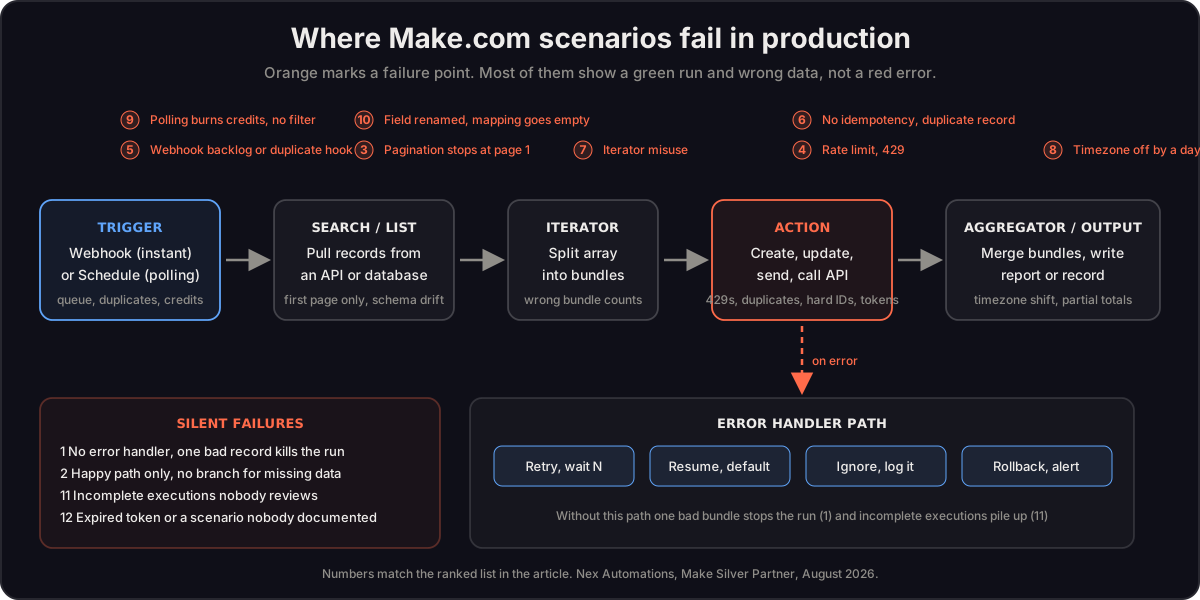
The 12 failures, ranked by how often we see them
1. No error handler, so one bad record kills the run
Symptom: The scenario stops partway through a batch. Some records made it, the rest did not. The execution log shows one red module and a stack of bundles that never ran.
Root cause: Make stops a scenario the moment a module throws an error unless an error handler route is attached to that module. The default behaviour is stop, not skip. A single record with a missing email, a bad date or a deleted contact halts everything queued behind it.
Cost when ignored: Every record after the bad one is lost for that run. On a scheduled scenario that runs every 15 minutes, a stuck run also means the next 15 minutes of records are delayed or dropped depending on how the trigger is set. We regularly find scenarios that have been half-processing batches for weeks.
The fix: Attach an error handler to every module that talks to an external app. Use Resume with a sensible default for optional data, Ignore for records that should be skipped and logged, Break to retry transient errors with a wait, and Rollback for chains that write to more than one system. Route every ignored record to a data store or a sheet so someone can see what was skipped.
Prevention: No module that calls an API ships without an error route.
2. Happy-path-only design
Symptom: The scenario works perfectly in testing and fails on real data within the first week. Empty fields, unexpected characters, a customer with two orders in the same minute.
Root cause: The scenario was built and tested against one clean sample bundle. Nobody asked what happens when a field is empty, when a filter matches nothing or when a search module returns zero results and the following modules never execute.
Cost when ignored: Unpredictable. Usually a slow trickle of missed records that ops staff patch by hand, which means the automation is now costing time instead of saving it.
The fix: Test with the ugliest records you have, not the cleanest. Add filters with explicit fallback routes. Use the ifempty and default functions in mappings. Put a router with a catch-all route after every search so a zero-result case does something visible.
Prevention: Before go-live, run the scenario against ten deliberately broken records.
3. Unhandled pagination
Symptom: Totals are low. The report looks plausible, the run is green, and the numbers are quietly a fraction of reality.
Root cause: Most APIs return results in pages. A list or search module returns the first page and a cursor or offset for the next one. If the scenario never loops on that cursor, it only ever sees the first page. Some Make modules handle this with a limit field, many HTTP calls do not.
Cost when ignored: This is the most expensive silent failure we see. An e-commerce brand came to us after their monthly sales report had run green for three months. The build never handled BigQuery pagination, so it pulled roughly 10,000 of 40,000+ rows and discarded the rest. Regional revenue, top-SKU rankings and tax totals were each 60 to 70 percent wrong, and the client had been making stock and margin decisions on them.
The fix: Build a repeater or a loop that keeps fetching until the API returns no next-page token, then aggregate all pages into one array before any calculation. Log the row count on every run and alert when it drops sharply from the previous run.
Prevention: Every list call gets a row count check against the source system.
4. Ignoring rate limits and 429 responses
Symptom: Runs fail in bursts, usually at month end or after a bulk import. The error says 429 or Too Many Requests.
Root cause: The scenario fires requests as fast as the iterator feeds them. The target API throttles, returns 429, and without a retry handler the bundle fails.
Cost when ignored: Failed bundles at exactly the moment volume matters most. A bulk update of 2,000 contacts that succeeds for 300 and fails for the rest is worse than no update, because now the data is inconsistent.
The fix: Add a Break error handler with a wait between retries, add a Sleep module inside the loop when the API is known to be strict, and batch writes where the app supports it. Read the rate limit headers and design around them instead of hoping.
Prevention: Look up the target API's rate limit before the first iterator goes in.
5. Webhook queue backlog or duplicate webhooks
Symptom: Records arrive late, sometimes hours late, or the same order is processed twice. The webhook shows a queue count in the Make interface.
Root cause: Instant triggers queue incoming webhooks. If the scenario is off, errored, or slower than the incoming rate, the queue grows. Separately, many source apps resend a webhook when they do not get a fast acknowledgement, which produces duplicates the scenario dutifully processes.
Cost when ignored: Duplicate orders, duplicate invoices, duplicate customer emails. A queue that grows unnoticed can also hit its size limit, at which point events are lost.
The fix: Keep the webhook scenario thin. Accept, store and acknowledge, then let a second scenario do the heavy work. Add a deduplication check against a data store keyed on the source event ID. Monitor the queue count.
Prevention: One scenario receives, another processes.
6. Missing idempotency, so records duplicate
Symptom: The CRM has three copies of the same lead. The accounting app has two invoices for one order.
Root cause: The scenario uses a Create module where it should use a search-then-create or an upsert pattern. Any retry, rerun or duplicate trigger creates the record again.
Cost when ignored: Data cleanup, wrong reporting and, in the invoice case, a customer billed twice.
The fix: Search by a stable external ID before creating. If found, update. If not, create and store the ID. Where the target app supports an upsert module, use it. For anything that moves money, add the source ID to the record and a data store check before the write.
Prevention: Never a bare Create on a record that can arrive more than once.
7. Iterator and aggregator misuse
Symptom: The email goes out with one line item instead of ten. Or ten emails go out instead of one. Bundle counts in the log do not match what the business expects.
Root cause: An iterator turns one bundle containing an array into many bundles. Every module after it runs once per item. If the scenario needs one output for the whole set, an aggregator has to bring the items back together, and its source module has to be set to the right iterator. Get either wrong and the counts are off.
Cost when ignored: Wrong documents sent to real customers, or a flood of near-duplicate messages that damages trust.
The fix: Draw the bundle count at every step before building. Set the aggregator's source explicitly. Use the array aggregator for building structures and the text aggregator for building message bodies. Test with an input of three items and confirm the output count.
Prevention: Write the expected bundle count next to each module in the scenario notes.
8. Date and timezone mismatch
Symptom: Orders appear on the wrong day. Reports run for the wrong window. A reminder fires at 3 am.
Root cause: Make stores and processes dates in a scenario-level timezone, the source app sends dates in its own, and the destination interprets them in a third. A date without an explicit timezone is a guess.
Cost when ignored: Daily reports that miss the last few hours of every day. Month-end cutoffs that shift revenue between periods, which your accountant will notice eventually.
The fix: Set the organisation and scenario timezone deliberately. Use formatDate and parseDate with explicit timezone arguments in every mapping that touches a date. Store timestamps in UTC and convert at the display layer only.
Prevention: No date mapping without a timezone argument.
9. Credit burn from polling and unfiltered runs
Symptom: The credit balance runs out mid-month. Scenarios pause. Nobody can point to which one is the expensive one.
Root cause: Since Make moved to a credit model in August 2025, every module execution costs credits whether or not it did useful work. A scheduled trigger that polls every five minutes consumes credits on every check, even when there is nothing new. A scenario without an early filter runs all its downstream modules on records it will then discard.
Cost when ignored: A higher plan tier than the work justifies. We have seen accounts where the majority of monthly credits were spent on polls that returned nothing.
The fix: Move to instant webhook triggers wherever the source app supports them. Put the filter as early as possible so unwanted records stop at module one. Raise the polling interval on anything that is not time-sensitive. The full breakdown is in our Make.com credits explained guide.
Prevention: Review the operations-per-scenario chart every month and fix the top line first.
10. Silent schema drift when an app changes field names
Symptom: A field that used to populate is now blank in every new record. The run is green. Nothing errored.
Root cause: The source app renamed, removed or restructured a field. The mapping in Make still points at the old path, which now resolves to empty. Make does not raise an error for an empty mapping.
Cost when ignored: Weeks of records with a missing field. If the field was a price, a tax rate or a status, downstream decisions were made on blanks.
The fix: Add a validation step after the trigger that checks required fields are present and routes to an alert if not. Refresh module data structures after any app update. Where possible use stable IDs rather than display names in mappings.
Prevention: A required-fields check module in every scenario that feeds a report or a money system.
11. Incomplete executions piling up unattended
Symptom: The Incomplete Executions tab has hundreds of entries. Nobody has opened it in months.
Root cause: When a scenario is set to store incomplete executions and an error occurs, Make saves the run for manual resolution. That is useful only if someone resolves them. Left alone, they accumulate, consume storage and hide the fact that records were never processed.
Cost when ignored: Every entry is a record that did not complete. Hundreds of entries is hundreds of missed leads, orders or updates. Storage limits can also cause the scenario to stop storing new ones.
The fix: Triage the backlog, fix the root cause behind the most common error, then set up a weekly review or an alert scenario that reads the count and posts it to Slack or email.
Prevention: Incomplete executions get an owner and a weekly slot.
12. Expired connections on a scenario nobody documented
Symptom: A scenario that has run for a year stops with an authorisation error. Nobody knows who set up the connection, what the scenario depends on or why it exists.
Root cause: OAuth tokens expire, passwords change, the person who authorised the connection leaves the company. Make notifies the connection owner, and if that owner is gone the notification goes nowhere. With no documentation there is no map for whoever inherits it.
Cost when ignored: A full outage of every scenario sharing that connection, plus the hours it takes to reverse-engineer what the scenario was supposed to do before anyone can fix it.
The fix: Reauthorise under a shared service account rather than a personal login. Then document each scenario in one place: trigger, apps, connections, data stores, what it feeds and who owns it. We do this for every build we hand over.
Prevention: Shared service accounts for connections and a one-page document per scenario.
All 12 at a glance
| Failure | How it shows up | Who usually catches it | Fix effort |
|---|---|---|---|
| 1. No error handler | Run stops on one bad record | Ops staff, when records go missing | Low, hours |
| 2. Happy path only | Works in test, fails in week one | Ops staff | Medium, a day |
| 3. Unhandled pagination | Totals quietly low, run green | Finance, months later | Medium, a day |
| 4. Rate limits and 429s | Bursts of failures at high volume | Whoever runs the bulk job | Low, hours |
| 5. Webhook backlog or duplicates | Late records, double processing | Customers, sometimes | Medium, a day |
| 6. Missing idempotency | Duplicate records and invoices | Sales or finance | Medium, a day |
| 7. Iterator and aggregator misuse | Wrong item counts in output | Customers, via a wrong email | Medium, hours to a day |
| 8. Timezone mismatch | Wrong day, wrong window | Accountant at month end | Low, hours |
| 9. Credit burn | Credits run out mid-month | Account owner | Low to medium |
| 10. Schema drift | Field goes blank, run green | Nobody, for weeks | Low once found, hard to find |
| 11. Incomplete executions | Backlog nobody reviews | Nobody | Medium, depends on backlog |
| 12. Expired connections, no docs | Auth error, full outage | Everyone, at once | Low fix, high recovery time |
When to fix it yourself and when to hire
Some of these are genuinely a one-hour fix for anyone comfortable in the Make editor. Others look like a one-hour fix and are not, because the visible error is a symptom of a design that needs to be redrawn. The honest split from our repair work:
| Failure | Fix it yourself if | Hire someone if |
|---|---|---|
| 1. No error handler | One or two modules, one app | Chain writes to several systems and needs rollback |
| 2. Happy path only | You can list every bad-data case | You cannot, or the scenario touches money |
| 3. Pagination | The module has a native limit field | It is an HTTP call with cursors, or a report depends on it |
| 4. Rate limits | Adding a Sleep module solves it | Volume needs batching or a queue redesign |
| 5. Webhook backlog | Turning the scenario back on clears it | Duplicates are already in downstream systems |
| 6. Idempotency | The app has an upsert module | You need a data store keyed on external IDs |
| 7. Iterator and aggregator | Single iterator, single aggregator | Nested arrays or multiple aggregation points |
| 8. Timezone | One date field in one mapping | Dates cross three or more apps |
| 9. Credit burn | One obvious polling scenario | You cannot tell which scenario is expensive |
| 10. Schema drift | You know which field changed | You do not, and reports have been wrong for weeks |
| 11. Incomplete executions | Under 50 entries, one error type | Hundreds of entries, mixed causes |
| 12. Expired connection | You know who owns it and what it does | Nobody does |
The rule of thumb: if the fix is inside one module, do it yourself. If the fix means changing how data flows through the scenario, or if the failure has already leaked wrong data into a report, an invoice or a customer inbox, hire. The cost of a scenario audit is small next to a quarter of decisions made on wrong numbers. Our Make.com automation cost guide puts real figures on both sides, and how to hire a Make.com expert covers what to check before you engage anyone.
One more honest note. Adding an AI step to a fragile scenario makes every one of these failures worse, because the AI module will happily produce confident output from missing data. Stabilise the deterministic parts first. Our Make AI agents guide explains where AI belongs in a scenario and where it does not.
FAQ
Q: What is the most common way a Make scenario fails? A: A missing error handler. Make stops the whole run when any module errors, so one record with a missing field halts everything queued behind it. In our repair work across 1,200+ automations it is the first thing we check and the most frequent thing we find.
Q: What is the most expensive Make.com mistake? A: Unhandled pagination in anything that feeds a report or a financial number. The run is green, the totals are simply a fraction of reality. We rebuilt one sales report that had silently dropped roughly 30,000 of 40,000+ rows for three months, leaving revenue and tax totals 60 to 70 percent wrong.
Q: Can a Make scenario fail without showing an error? A: Yes, and most of the failures on this list do exactly that. Pagination that stops at page one, a renamed field that maps to empty, a timezone that shifts orders to the wrong day and a polling trigger that burns credits on nothing all show a successful run. Silent failures need row counts, required-field checks and alerts, not just the execution log.
Q: Why do my Make.com credits run out so fast? A: Usually because a scheduled trigger is polling every few minutes and consuming credits whether or not anything is new, or because filters sit late in the scenario so every discarded record still runs the modules before it. Switch to instant webhooks where possible and move filters to the front.
Q: How do I stop duplicate records from Make? A: Search by a stable external ID before creating, or use an upsert module where the app has one. For webhooks, store each event ID in a data store and skip any ID you have already seen. Never rely on a bare Create module for anything that can arrive twice.
Q: How much does it cost to fix a broken Make.com scenario? A: A single-module fix is an hour or two of work. A redesign that changes how data flows, adds error routes and deduplication and documents the result is typically a one to three day engagement. We offer a fixed-fee scenario audit that reviews every scenario in an account against this list before quoting any rebuild.
Related guides
- How to Hire a Make.com Expert in 2026
- Make.com Credits Explained
- How Much Does Make.com Automation Cost?
- Make AI Agents Guide
If your Make.com scenarios keep breaking, skipping records or burning credits, we run a fixed-fee automation audit that checks every scenario against these 12 failures and hands you a ranked fix list, whether you fix it yourself or ask us to. Get in touch with the scenario that worries you most and we will start there.