 monday.com
 Make.com
 Slack
Slack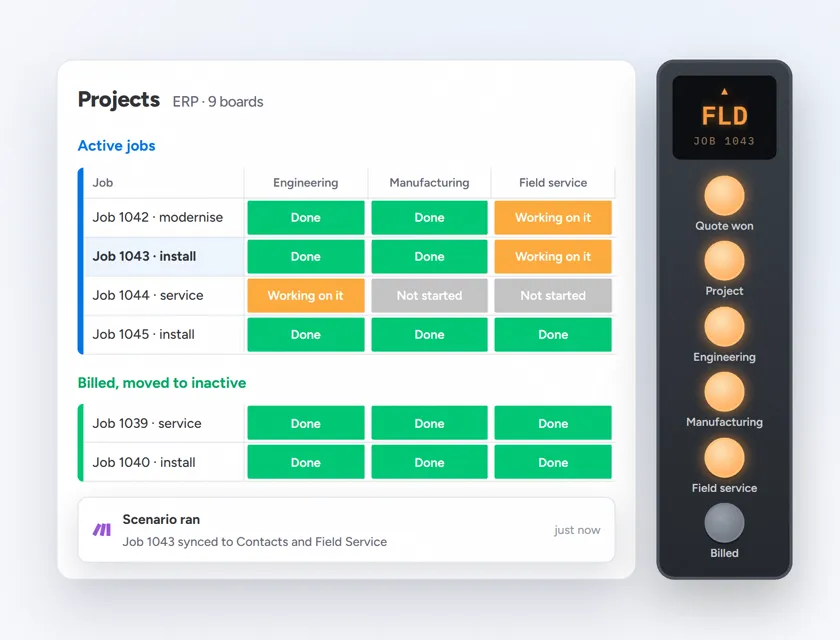
 monday.com
 monday.com automations
An elevator company's documentation said 14 automations were live on monday.com. A four-day audit found none. The rebuild delivered 25 automations across 9 boards, live-tested with real records including the cross-board cases where one contact has several jobs. Native monday.com automations where they fit, Make.com where they do not.
Built by Prem Patel, Make Level 5 Expert and Zapier Certified Professional; Nex Automations is listed in both official partner directories. This is one of the 1,200+ systems we have shipped, and the case we point to when a client asks why we audit before we build.
The situation
A US elevator and field-service company was moving from an old CRM to monday.com and had documentation saying 14 or 15 automations were already running. The audit found none of them were live. Nothing was wrong with any single board. The problem was the gaps between them: quotes, orders, installation and service lived in separate boards with people carrying the record between them.
A migration had been declared done on paper.
The 3 problems
- Documentation without reality. Fourteen automations existed in a document and zero in the account.
- Boards without a spine. Contacts, Field Service, Manufacturing and Engineering did not know about each other.
- Nobody could see the whole job. A won quote, its installation and its service history were three unrelated records.
What was built
Audit first: four days, fixed fee. Every planned automation mapped to the business process it served, with what existed, what did not and what was worth building.
How it flows
- A won quote creates the project
- Three boards (Field Service, Manufacturing, Engineering) keep their stages in sync with the Contacts board
- Completion dates roll up to the project
- A billed job moves the record to inactive
- Purchase-order alerts and deal-won notices go to the right people in Slack
- Each role gets its own board view
Native monday.com automations handle single-board rules. Make.com handles cross-board sync, rollups and anything touching an outside system.
Tools used
- monday.com boards, views and native automations
- Make.com for cross-board sync, rollups and the Slack integration
- Slack for purchase-order and deal-won alerts
Results
| Measure | Value |
|---|---|
| Automations documented before the audit | 14 to 15 |
| Automations actually live before the audit | 0 |
| Audit duration | 4 days, fixed fee |
| Automations delivered | 25 across 9 boards |
| Testing | Live records, including one contact with several jobs |
| Time saved | Not yet measured |
The team now has an ERP they can see and change themselves, on tools they already pay for.
Honest limits
- Time saved is not yet measured, so no hours or money figure appears here.
- A monday.com-native ERP suits a company that already lives in monday.com. We would not move a company onto it for this alone.
- Cross-board sync through Make.com adds a dependency the team did not have before. It is documented and monitored, and the native automations were preferred wherever they could do the job.
Related guides
- Automation by Industry in 2026
- What to Look For When Hiring an Automation Expert
- How Much Does Business Automation Cost in 2026
FAQ
Q: Should I audit my monday.com automations before adding more? A: Yes. In this case the documentation claimed 14 live automations and the audit found zero. A four-day audit produced the map the build then followed.
Q: When do you use Make.com instead of monday.com's own automations? A: Native automations for single-board rules; Make.com for cross-board sync, rollups and anything that touches an outside system like Slack or a CRM.
Q: Can monday.com work as an ERP for an elevator company? A: For an elevator and field-service company that already runs on monday.com, yes: quotes, projects, manufacturing, engineering and service stages can be kept in sync across boards with role-specific views, which is what this rebuild delivered.
Q: How long does a monday.com automation rebuild take? A: This one was a four-day audit followed by a build of 25 automations across 9 boards, live-tested with real records. Scope depends on the number of boards and the cross-board cases.
Told your automations are live and not sure they are?
Four days of audit tells you what exists, what does not and what is worth building.