Short answer. Choose Power Automate when the work lives inside Microsoft 365 or needs desktop RPA for software with no API. Choose Make when workflows cross many non-Microsoft apps, need branching logic or call arbitrary APIs, and you want to pay for what runs rather than per user. Every Microsoft fact below was read on microsoft.com and learn.microsoft.com on 17 October 2026, every Make fact on make.com the same day.
A disclosure before the tables: Nex Automations is a Make Silver Solution Partner and Prem Patel is a Make Level 5 Expert, so read the Make column with that in mind. We also build on Zapier and n8n, and we tell clients to stay on Power Automate when that is the cheaper answer. The Microsoft facts are Microsoft's own, linked at the end.
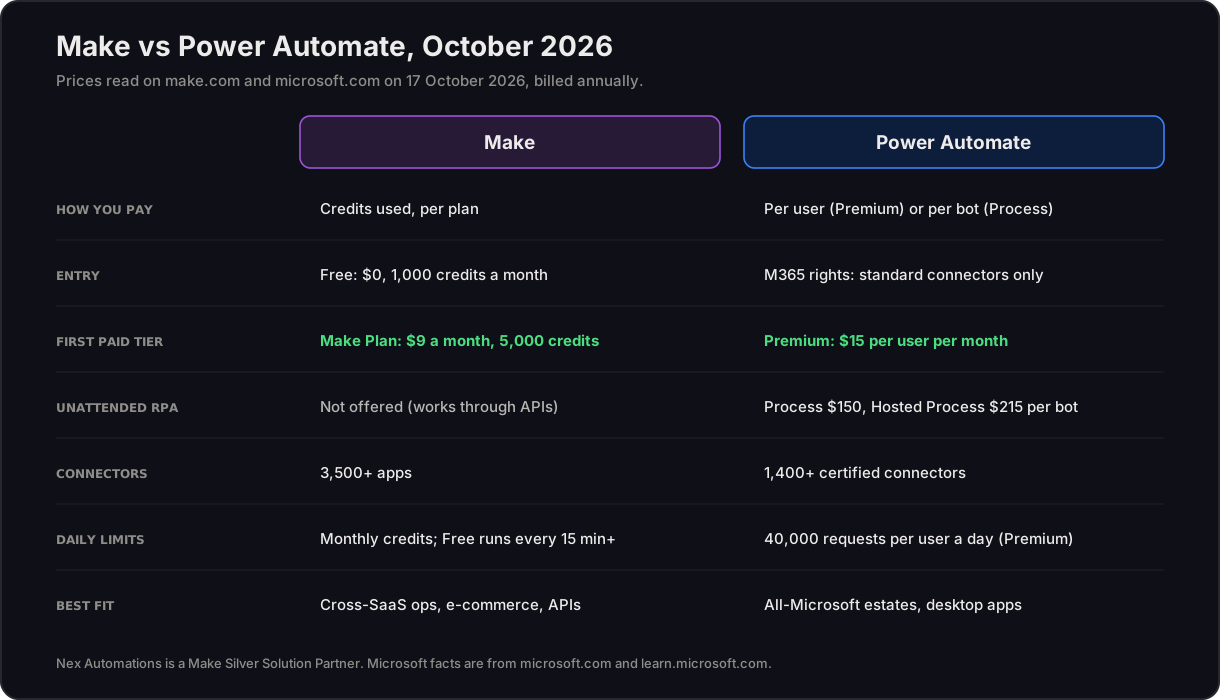
Make vs Power Automate at a glance (October 2026)
| Make | Power Automate | |
|---|---|---|
| How you pay | Credits used, per plan | Per user (Premium) or per bot (Process, Hosted Process) |
| Entry price | Free: $0 for 1,000 credits a month | Free licence and Microsoft 365 rights: standard connectors only |
| First paid tier | Make Plan: $9 a month billed annually, 5,000 credits | Premium: $15 per user per month, paid yearly |
| Unattended RPA | Not offered (Make works through APIs) | Process: $150 per bot per month; Hosted Process: $215 |
| Connectors | 3,500+ apps (make.com plan cards) | "More than 1,400 prebuilt, certified connectors" (microsoft.com) |
| Calling any API | HTTP module in the scenario | Premium and custom connectors need Premium, Process or Hosted Process |
| Daily limits | Credits per month; Free has a 15-minute minimum interval | Requests per 24 hours: Premium 40,000 per user, Process 250,000 per licence, Microsoft 365 and Free 6,000 per user |
| AI inside flows | AI modules and Make AI Agents (open beta) | Copilot builds flows; 5,000 AI Builder credits a month on paid plans until seeded credits end on 1 November 2026 |
| Agents | Make AI Agents, billed in credits | Agent flows billed through Copilot Studio in Copilot Credits ($0.01 a credit on pay-as-you-go) |
| Best fit | Cross-SaaS operations, e-commerce, agencies, API-heavy work | All-Microsoft estates, SharePoint and Teams approvals, legacy desktop apps |
Power Automate pricing in October 2026
Microsoft's pricing page on 17 October 2026 lists three paid plans and one add-on, all paid yearly:
| Plan | Price | What it covers |
|---|---|---|
| Power Automate Premium | $15 per user per month | Cloud flows with standard, premium and custom connectors, attended desktop flows, process and task mining |
| Power Automate Process | $150 per bot per month | One unattended bot running desktop flows, one flow at a time |
| Power Automate Hosted Process | $215 per bot per month | The same, on a Microsoft-hosted virtual machine |
| Process Mining add-on | $5,000 per tenant per month | Add-on to Premium only |
Two more options sit next to the plans. A pay-as-you-go meter, still in preview on Microsoft Learn, charges $0.60 for each premium cloud flow or attended desktop run and $3 for each unattended or hosted run; flows that use only standard connectors are not charged. And Microsoft 365 licences include Power Automate for cloud flows with standard connectors only, at 6,000 requests per user per 24 hours, with no premium or custom connectors, no RPA and no AI Builder.
The plan names changed over the last few years, which is why old guides confuse buyers: the per-user plan became Premium, the per-flow plan and the unattended RPA add-on became Process; P1 and P2 have not been sold since 31 December 2020.
Make pricing in October 2026
Make bills in credits, the unit it moved to in August 2025. New signups see three plans: Free, the Make Plan (one paid plan priced by a credit slider) and Enterprise. Existing Core, Pro and Teams subscribers keep their plans. On make.com on 17 October 2026, billed annually:
| Plan | Price billed annually | Credits a month | Notes |
|---|---|---|---|
| Free | $0 | 1,000 | 3,500+ apps, 15-minute minimum interval between runs |
| Make Plan | $9 a month | 5,000 | $1.80 per 1,000 credits at this tier; unlimited active scenarios |
| Make Plan | $16 a month | 10,000 | Same plan, next slider stop (read 16 October 2026) |
| Make Plan | $29 a month | 20,000 | Same plan (read 16 October 2026) |
| Enterprise | Custom | Custom | Overage protection, 24/7 support |
Annual billing saves 15% on Make's page. For how credits are counted per module and where AI steps cost more, see Make.com credits explained, and for Make against Zapier and n8n at the same volume, the October 2026 comparison and the platform cost calculator.
Worked example: a five-person operations team
A team of five automates order intake, approvals, invoicing and weekly reporting across Microsoft 365, a CRM and an e-commerce store.
| Make | Power Automate | |
|---|---|---|
| Licences | One plan sized to the credits the scenarios use | Five Premium users at $15 = $75 a month, paid yearly, because the CRM and store connectors are premium |
| If one legacy desktop app has no API | Not possible in Make; needs an API, an export or a different tool | Add one Process bot at $150 a month |
| If volume doubles | Buy more credits | Same licences, until a flow hits the request limit |
That is the pattern we see when scoping client work. Where the stack is mostly Microsoft and the flows are approvals and notifications, Power Automate is already paid for. Where most of the systems are not Microsoft, per-user premium licences become the largest line, and Make costs less for the same work.
When Power Automate is the right choice
- Your company already runs on Microsoft 365, and the flows stay inside Outlook, SharePoint, Teams and Excel. Standard-connector flows are included in the licence you pay for.
- You need RPA for desktop software with no API. Make cannot click through a desktop app; Power Automate Process can.
- Your IT team wants automation inside the Microsoft admin and identity model it already manages.
When Make is the right choice
- Workflows cross many non-Microsoft SaaS apps (Shopify, HubSpot, GoHighLevel, Airtable, Stripe, monday.com). Each premium connector in Power Automate pulls every user who runs the flow onto Premium.
- The logic branches: routers, iterators, error handlers and retries in one visible scenario.
- You call AI models or arbitrary APIs often, and you would rather pay for runs than seats.
- An agency or a small team builds for several departments. Credits follow the work, not the headcount.
How to automate tasks with Power Automate, in five steps
- Pick the trigger. A new email, a new SharePoint item, a form response, a schedule or a manual button.
- Add the actions. Choose connectors and map the fields. Copilot in Power Automate can draft the flow from a plain-language description, and you then correct it.
- Check the licence before you build. If any connector is premium or custom, everyone who runs the flow needs Premium (or the flow runs on pay-as-you-go).
- Test with real data, including the bad cases: a missing field, a duplicate, an attachment in the wrong format.
- Share and log. Give the flow a named owner, share it with the people who run the process and keep the run history, so a failure is found by the owner and not by a customer.
The same five steps apply in Make, with scenarios in place of flows. Whichever platform you choose, the governance questions are the same: see how companies govern automated and AI workflows.
Using Make and Power Automate together
Many companies keep both. Internal Microsoft 365 approvals and notifications stay in Power Automate, and cross-app work (CRM, e-commerce, finance tools, AI calls) moves to Make, connected by a webhook. The rule that keeps this safe is one owner and one log per process, whichever platform runs it. On a monday.com estate we audited, the documentation said 14 automations were live and the platform showed none; the rebuild delivered 25 automations across 9 boards, live-tested. Split platforms make that kind of gap more likely, not less.
A note on Gartner
Microsoft says it was named a Leader in the 2026 Gartner Magic Quadrant for Integration Platform as a Service, for the eighth year in a row. The products evaluated were Azure Integration Services, Logic Apps and API Management, according to Microsoft's own announcement of 30 March 2026. Power Automate is not named in it, so the Leader position should not be read as a ranking of Power Automate against Make. For the full 2026 quadrant, see our iPaaS landscape.
FAQ
Is Make or Power Automate better in 2026?
Power Automate is the better first choice when your work lives inside Microsoft 365 (Outlook, SharePoint, Teams, Excel) or when you need desktop RPA for software with no API. Make is the better choice when your workflows cross many non-Microsoft SaaS apps, need branching logic or call arbitrary APIs, because Make charges by credits used rather than per user, while Power Automate needs a premium licence for premium and custom connectors. Many companies run both.
How much does Power Automate cost in October 2026?
On Microsoft's pricing page on 17 October 2026: Power Automate Premium is $15 per user per month paid yearly (cloud flows plus attended desktop flows), Power Automate Process is $150 per bot per month (unattended desktop flows) and Hosted Process is $215 per bot per month on a Microsoft-hosted machine. Process Mining is a $5,000 per tenant per month add-on to Premium. A pay-as-you-go meter in preview charges $0.60 per premium cloud flow run and $3 per unattended run.
How much does Make cost compared with Power Automate?
Make prices by credits, not users. On 17 October 2026 make.com shows new signups Free at $0 for 1,000 credits a month and the Make Plan from $9 a month billed annually for 5,000 credits ($16 for 10,000, $29 for 20,000); existing Core, Pro and Teams subscribers keep their plans. Five people on Power Automate Premium cost $75 a month paid yearly before any bots; on Make the same workload is priced by the credits its scenarios use, however many people built them.
Is Power Automate free with Microsoft 365?
Partly. Microsoft 365 licences include Power Automate for cloud flows that use standard connectors only, with a limit of 6,000 requests per user per 24 hours. Premium connectors, custom connectors, desktop RPA and AI Builder are not included; they need Premium, Process or Hosted Process.
Does Power Automate count as a Gartner Leader for iPaaS?
Not by name. Microsoft says it was named a Leader in the 2026 Gartner Magic Quadrant for Integration Platform as a Service, its eighth year in a row, but the products evaluated were Azure Integration Services, Logic Apps and API Management (Azure blog, 30 March 2026). Power Automate is not named in that announcement.
How do you automate tasks with Power Automate?
Create a cloud flow, pick a trigger (a new email, a new SharePoint item, a schedule or a button), add actions from the connectors, test it with real data and share it with the people who own the process. Copilot in Power Automate can draft a flow from a plain-language description. Use desktop flows only for apps with no API, and check that every connector in the flow is covered by your licence before you build.
What happens to AI Builder credits in Power Automate?
Premium, Process and Hosted Process each list 5,000 AI Builder credits a month, but Microsoft Learn says seeded AI Builder credits will be removed on 1 November 2026, and new customers can no longer buy the AI Builder add-on and must buy Copilot Credits instead. Agent flows bill through Copilot Studio in Copilot Credits, at $0.01 a credit on pay-as-you-go.
Can Make and Power Automate work together?
Yes. A common split keeps internal Microsoft 365 approvals and notifications in Power Automate and moves cross-app work (CRM, e-commerce, finance tools, AI calls) to Make, with the two connected by a webhook. The rule that matters is that each process has one owner and one log, whichever platform runs it.
Sources
All read on 17 October 2026.
- Power Automate pricing, Microsoft
- Power Automate licence types, Microsoft Learn
- Deep dive on specific licences, Microsoft Learn
- Requests limits and allocations, Microsoft Learn
- Pay-as-you-go meters, Microsoft Learn
- AI Builder credit management, Microsoft Learn
- Power Automate product page, Microsoft
- Microsoft named a Leader in the 2026 Gartner Magic Quadrant for iPaaS, Azure blog, 30 March 2026
- Make pricing, Make
Related guides
- Zapier vs Make vs n8n, priced for October 2026
- iPaaS vs RPA vs suite-native: the automation platform landscape
- Make.com credits explained
- Hire a Make.com expert
Weighing Make against Power Automate for a real process? The automation audit decides the platform per workflow on your volume and licences, with the reasons written down. Or book a 30-minute call. Over 6 years we have built 1,200+ automations for 210+ clients.