An editorial team that had rejected one-shot AI writing now runs a five-stage pipeline on Make.com, Airtable and OpenAI with a human gate between every stage. Articles of 1,800 to 4,000 words ship with a source list, and any single stage can be re-run on its own. The client reports production time per article fell from six to nine hours to sixty to ninety minutes; that figure is the client's estimate, not a measured number.
Built by Prem Patel, Make Level 5 Expert and Zapier Certified Professional; Nex Automations is listed in both official partner directories. This is one of the 1,200+ systems we have shipped, and the pattern we reuse whenever an editor has to trust the output.
The situation
Most AI content pipelines fail at the same point: the editor stops trusting them and goes back to doing it by hand. The team had tried one-shot AI writing and rejected it: no sources, no way to fix one paragraph without regenerating everything, and no visibility into why the model wrote what it wrote.
This one was designed around the editor from the start.
The 3 problems
- No sources. A draft with no research trail cannot be checked, so every claim had to be re-verified by hand.
- All-or-nothing regeneration. Fixing one weak section meant regenerating the whole article and losing the parts that were fine.
- No visibility. Editors could not see what the model was given, so they could not correct the brief instead of the output.
What was built
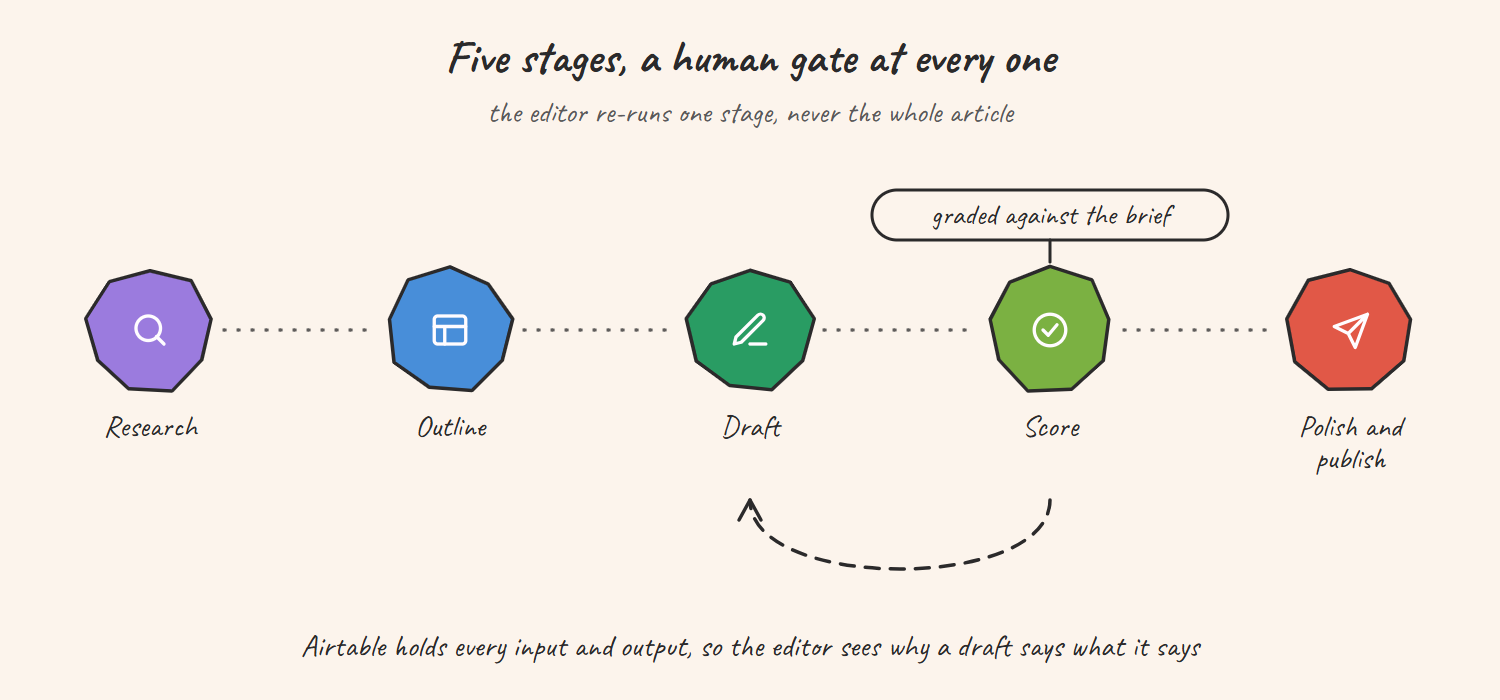
Five stages, each a Make.com scenario, each with a human checkpoint in Airtable: research, outline, draft, score, polish.
How it flows
- An editor creates the brief in Airtable; setting the status triggers the research scenario, which returns sources and notes
- Outline stage drafts the structure from the research; the editor approves or edits it in Airtable
- Draft stage writes section by section against the approved outline
- Score stage grades the draft against the brief for readability, coverage and fit before a human reads it
- Polish stage produces the final copy plus metadata: SEO title, description, headline variants and social versions
- Ten background automations handle the plumbing: Slack notices, source checks, formatting and hand-off to the CMS
Airtable is the control panel. A piece cannot move to the next stage until a person sets its status. Every stage stores what the model was given and what it returned, so an editor can see why a draft says what it says. Notes carry forward from one stage to the next, and if a draft is wrong, the editor re-runs that one stage, never the whole article.
Tools used
- Make.com for the five stage scenarios and the background automations
- Airtable as the editorial control panel and state store
- OpenAI and Claude for research, drafting and scoring, behind stage-specific prompts
- Slack for stage notices and review requests
Results
| Measure | Value |
|---|---|
| Article length | 1,800 to 4,000 words, with a source list per piece |
| Re-run granularity | One stage at a time |
| Background automations | 10 |
| Production time per article (client-reported) | 6 to 9 hours down to 60 to 90 minutes |
| Who runs it | The editorial team, without an engineer |
Honest limits
- The 70% time figure is the client's estimate. We have not instrumented editor hours, and we do not present it as a measured result.
- A scoring stage grades against the brief, not against truth. Source checking is still a human step, which is why the research trail is stored.
- Five human gates cost time. Teams that want fully automatic publishing should look at the Shopify daily SEO publishing case, which uses an independent AI quality gate and a draft-first rollout instead.
Related guides
- Shopify Blog Automation with Make and Airtable
- 12 AI Agent Use Cases That Hold Up in Production
- AI Agent vs Automation: Which One Do You Need?
FAQ
Q: How do you build an AI content pipeline editors will actually use? A: Split it into stages with a human gate between each, keep the state in Airtable so the editor sees inputs and outputs, and let them re-run one stage. That is the five-stage design here.
Q: Can Make.com orchestrate a multi-step AI writing workflow? A: Yes. Each stage is a scenario triggered by an Airtable status change, so the workflow is visible, pausable and editable by the team.
Q: Why not generate the whole article in one prompt? A: Because one weak section then costs the whole piece, and nobody can see why the model wrote what it wrote. Stage outputs are stored and re-runnable, which is what made the editors trust it.
Q: What does a five-stage AI article pipeline cost to run? A: Model usage per article is small compared with editor time; the main cost is the Make.com operations across five scenarios plus the background automations. We size the plan from expected articles per month on a scoping call.
Want content automation your editors trust?
If your team has rejected one-shot AI writing, the fix is the workflow, not a bigger model.