You can automate 70% of the work of publishing Shopify blog articles without publishing a single word a human never approved. The system that does it is a five-stage pipeline: Make.com runs the stages, Airtable is the control plane where every article lives as a record, and a human decision gates every stage transition. Built this way, an article that took 6 to 9 hours by hand takes 60 to 90 minutes of human attention, the store's blog grows on schedule, and nothing thin or off-brand ever goes live, which is exactly why it keeps ranking after the algorithm updates that wipe out fully automatic AI blogs.
I am Prem Patel, founder of Nex Automations, a Make.com Silver Solution Partner. I hold the Make Level 5 Expert certification and have built 1,200+ automations for 210+ clients. This article describes a system I have built twice for real businesses: once as a five-stage article engine for a content operation, and once for a US e-commerce owner running four Shopify stores with around 14,000 products. Both are in production. This is the architecture, the exact human gates and the mistakes the second build avoided because of the first.
Why fully automatic AI blogs stop ranking
The tempting version of this system is a cron job: AI picks a topic, writes the post, publishes to Shopify, repeat daily. It works for a few months, then two things kill it. Google's content updates specifically target scaled low-effort content, and your own catalog starts eating itself: the generator writes the same commercial article under six slightly different titles, and the store's blog competes against itself for one query.
The fix is not less automation. It is putting the automation under editorial control:
- A human approves every stage transition. The machine prepares, the human decides.
- The system knows what already exists. Before any topic is approved, it is checked against every article already published, at the level of search intent rather than title words.
- Draft-first publishing. The pipeline creates Shopify drafts, never live posts.
The architecture: Airtable is the brain, Make is the hands
Every article is one Airtable record moving through statuses:
Idea → Planned → Researched → Written → QA Passed → Approved → Published → Indexed
Airtable holds the fields (topic, target query, intent type, outline, draft link, QA scores, Shopify article ID, publish date). Make.com watches for status changes and runs the right scenario for each transition. You control the entire factory by changing a single-select field, from your laptop or your phone. That is the whole interface.
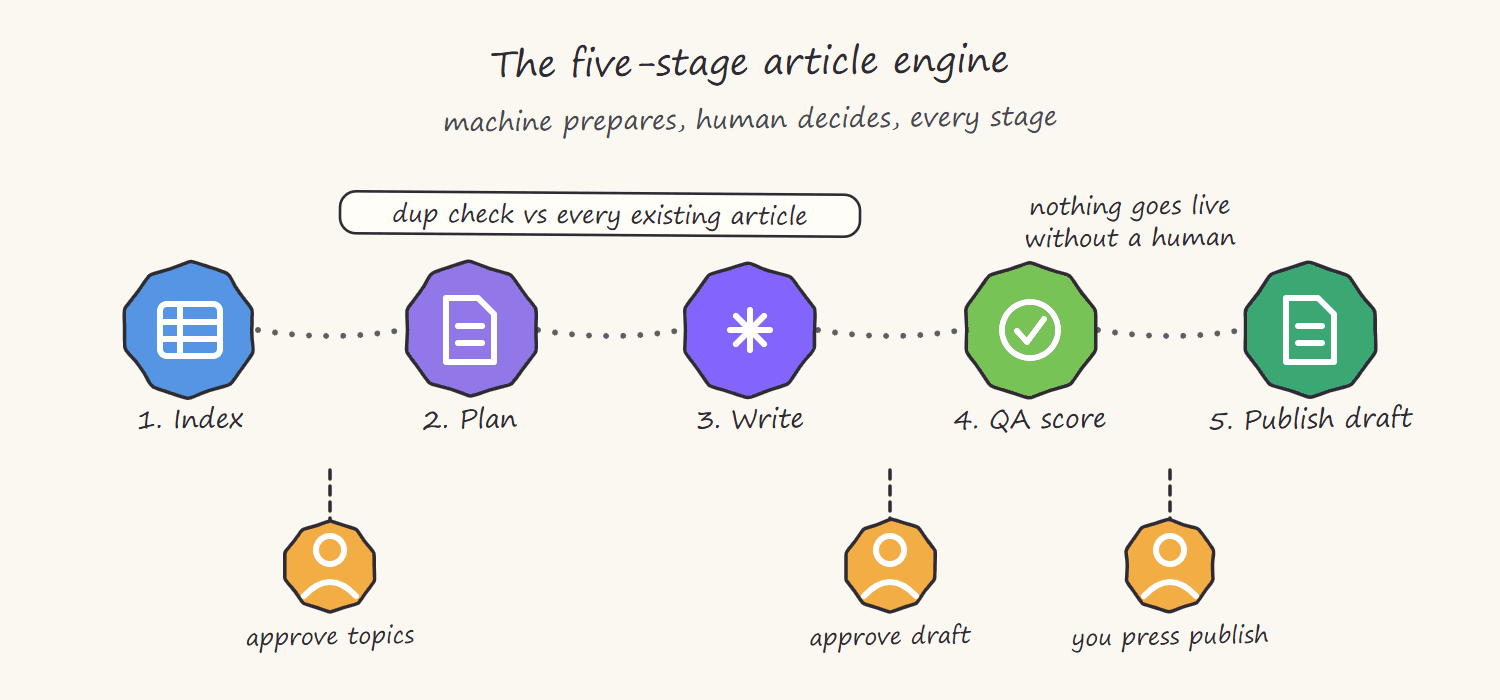
This is the pattern I call human-controlled automation: the human never does mechanical work, and the machine never makes an editorial decision.
Stage 1: Index what you already have
The first scenario reads your existing blog through the Shopify Admin API and builds the article index in Airtable: every published article, its target query and its intent (informational, comparison, commercial, how-to).
This index is what prevents self-competition. In the four-store build, every proposed topic is judged against 119 existing articles by an AI step that asks one question: would this new article target the same search intent as an existing one, even if the words differ? "Best sci-fi paperbacks under $10" and "cheap science fiction books" are different titles and the same intent. The dup judge catches that; a title comparison never would.
Human gate 1: you review flagged near-duplicates and decide merge, differentiate or drop.
Stage 2: Plan the month, not the day
A monthly planning scenario proposes a topic calendar: one record per article with target query, intent, angle and internal links to products and collections. It reads the index from stage 1, your product catalog and what competitors rank for.
Human gate 2: you approve, edit or reject each planned topic in Airtable. Ten minutes of list triage replaces an afternoon of topic research. Only records you flip to Planned move on.
Stage 3: Write in your voice, not the model's
The writing scenario drafts the article from the approved plan. Two things make the output usable rather than generic:
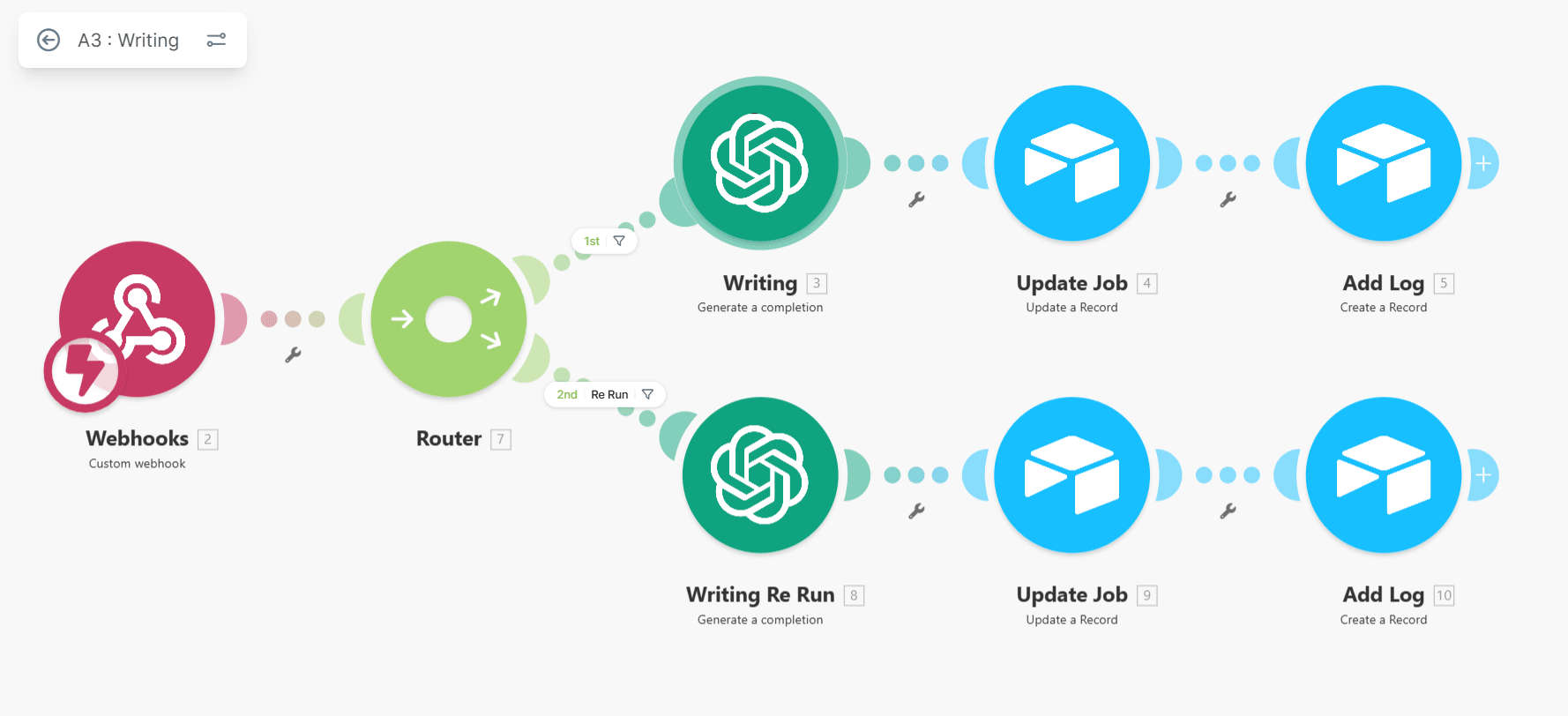
First, a brand-voice prompt pack: a maintained set of instructions holding your store's tone, banned phrases, required structure and linking rules. In the bookstore build, the voice pack was rebuilt from the owner's ten best-performing manual articles, so drafts arrive sounding like the store, not like a model.
Second, structure enforced in the prompt: answer-first opening for the target query, H2 sections, internal links to real products and collections pulled from the catalog, image slots marked. The draft lands in Airtable as a document link with status Written. Nothing publishes from here.
Stage 4: QA that is independent of the writer
The QA scenario is a separate AI pass with a different job description: score this draft against a rubric, do not rewrite it. The rubric covers accuracy against the product catalog, search-intent match, brand-voice compliance and internal-link correctness. Scores land in the Airtable record.
The reason this stage exists as a separate step: a writer model asked to check its own work says yes. An independent scorer with a narrow rubric says what a tired human editor would say, at 2% of the cost, and it never skips the checklist.
Human gate 3, the one that matters most: you read the draft with its scores and flip the status to Approved, Needs Edits or Rejected. In the five-stage engine this human pass plus fixes takes 60 to 90 minutes per article, versus 6 to 9 hours writing from scratch. That is the 70% saving, with a human's name still honestly on every piece.
Stage 5: Publish as a draft, log everything
The publishing scenario takes Approved records and creates the article in Shopify through the Admin API (GraphQL): title, body HTML, images through the image pipeline, author, tags, SEO title and description. Three production details that came from the client builds:
- Draft first. The scenario creates Shopify drafts; a human presses publish inside Shopify. On the four-store build this rule survived every request to fully automate it, deliberately.
- Idempotent creates. Every record carries the Shopify article ID after creation; the scenario checks it before creating. Run twice, one article, no duplicates.
- Log every run. Each publish writes a row to a log (Sheets or Airtable) with timestamps and IDs. When something looks wrong three weeks later, the log answers in seconds.
After publishing, the record flips to Published, and the index from stage 1 updates itself. The system that prevents duplicates is fed by the system that publishes.
The same queue works for social posts
Strip the research and QA stages away and what is left is a general publishing queue: work waits in Airtable until a human approves it, goes out at the scheduled time, and the result is written back to the record.
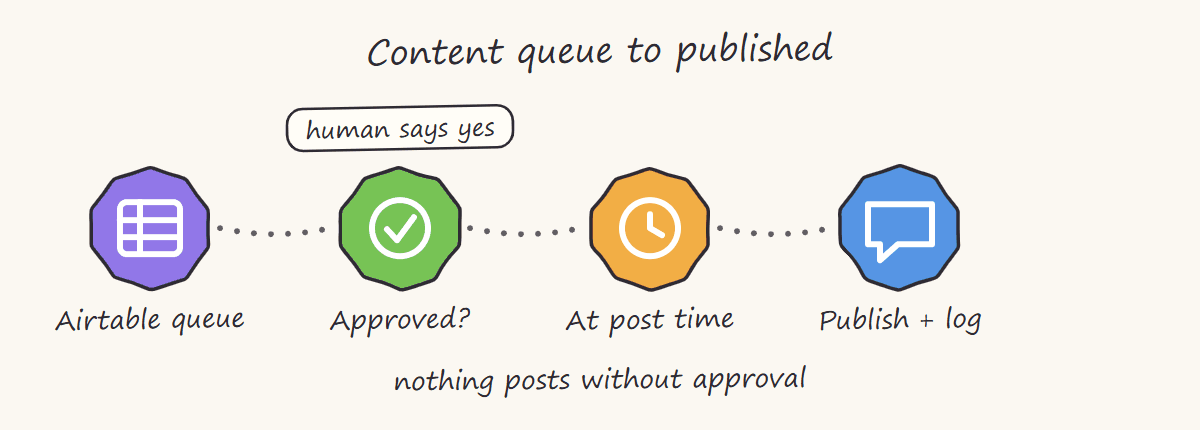
That is the version to build first if your bottleneck is approvals rather than writing. Point the publish step at the LinkedIn API instead of the Shopify Admin API and the rest of the pipeline is unchanged, roughly eight hours of work, and the approval bottleneck moves from someone's inbox to a single status field.
What this costs and what it returns
Running costs are modest: Make credits for five scenarios plus AI token usage for planning, writing and QA, typically a few dollars per article all-in. The return in the two production builds: 6-9 hours of human work per article down to 60-90 minutes, a monthly calendar that actually ships, zero duplicate-intent articles published since the dup judge went in, and drafts a store owner trusts enough to approve from a phone.
If you want the same architecture for your store, this is exactly the kind of system we build: https://nex-automations.com/contact.
AI blogger apps vs a custom pipeline: what a quality gate changes (2026)
If you searched for Shopify blog automation, automated blog posts for Shopify or an AI blog writer for Shopify, the app store will offer you one-click tools. They share a design choice: they publish everything they write. A custom pipeline makes the opposite choice, and the difference shows up in production.
In September 2026 we switched on this exact architecture for a US used-book retailer with 125 existing articles. The first batch was five articles, reviewed by an independent QA step with a pass mark of 85:
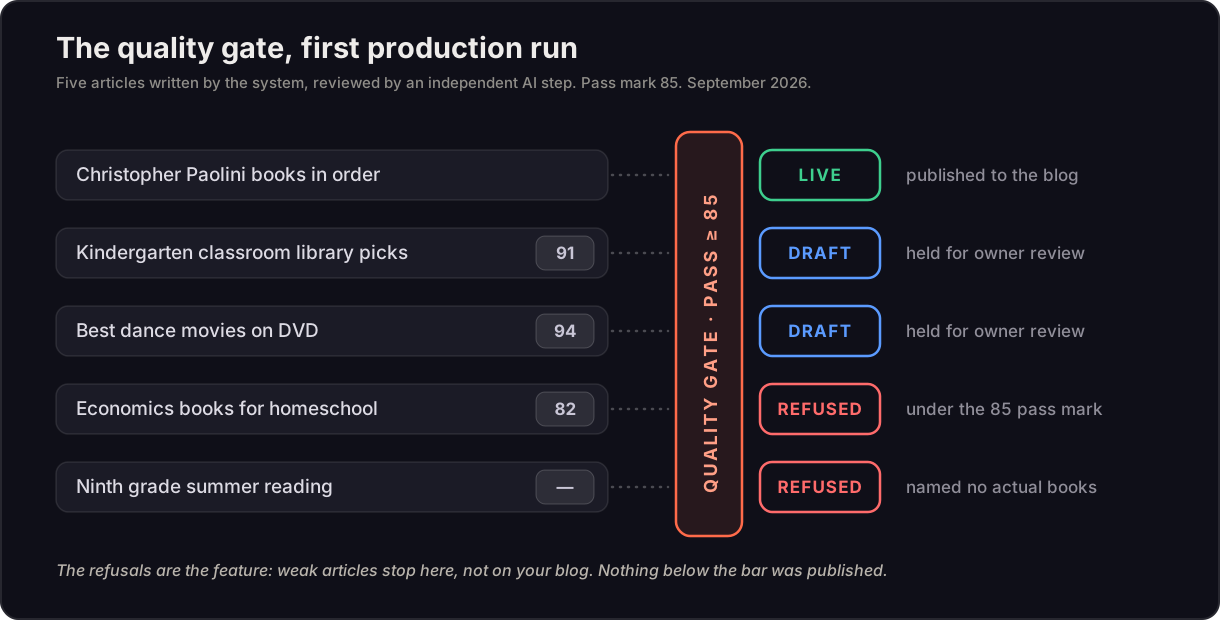
One article went live, two were held as drafts for the owner, and two were refused, one for scoring 82 and one for recommending books without naming any. The comparison against the store's existing blog: typical article length went from 526 words to 1,300+, articles with zero shop links went from 94% to 0%, and the owner's closing line went from appearing in 28% of articles to 100%. The refusals are the feature. An app that publishes everything makes your blog bigger; a gate that refuses weak drafts makes it better.
FAQ
Q: Can AI blog posts hurt my Shopify SEO? A: Yes, in two specific ways: duplicate or near-duplicate topics competing with your own pages, and thin articles with no internal links that add crawl volume without adding value. Both are design problems, not AI problems. An intent-level duplicate check against your existing catalogue and a quality gate that refuses weak drafts remove the mechanisms that cause the damage.
Q: What does Shopify blog automation cost? A: A single-blog pipeline with topic planning, duplicate checking, a QA gate and draft-first publishing is typically $900 to $1,500 to build, with running costs of roughly $15 to $40 a month depending on model, article length and image choices (2026). Live research per article, multiple blogs or theme work push a build toward $3,500.
Q: Should articles link to products or collections? A: Collections and search pages. On a store where inventory turns over, product links die when items sell out; collection links survive. Place them near the beginning, middle and end, tagged so you can trace clicks to orders.
Can I build this without writing code?
Yes. Make.com handles the Shopify Admin API, Airtable and the AI models through native modules and HTTP calls, all visual. The technical skills are exactly the phases in my Make.com learning path: mapping, iterators, routers, error handling, then AI steps.
Why Airtable instead of running everything inside Make?
Because the control plane must be visible to humans. Airtable gives every article a record, a status and a history that a store owner can read and change without opening Make. Make scenarios stay stateless workers; the state lives where the human works.
Will Google penalize AI-assisted articles?
Google's guidance targets low-quality scaled content, not AI assistance. The system above exists precisely to keep quality human-controlled: human-approved topics, brand-voice drafting, independent QA scoring and a human reading every article before it goes live.
How is duplicate content prevented?
Every proposed topic is compared against the full index of existing articles at search-intent level by a dedicated AI judging step, before planning is approved. Intent-level matching catches duplicates that title comparison misses.
Does this work outside Shopify?
The pattern is platform-independent: swap the publish scenario's Shopify modules for WordPress, Webflow or any CMS with an API. The five stages, the Airtable control plane and the human gates stay identical.
Start free on Make (no card required): make.com
1 month of Pro free (10,000 credits + AI tools): make.com/en/register?pc=prime
Get it built for your store: book a free consult or send the fit-check