AI agents are worth building for exactly one reason: they handle work that needs judgment, not just repetition. After 1,200+ automations for 210+ businesses, these are the 12 use cases where agents consistently earn their place in production, plus the ones where a plain automation is the smarter buy.
I'm Prem Patel, Make Level 5 Expert and Zapier Certified. Everything below comes from systems I have actually shipped, not from a demo video. Where I reference a real build, I link the case study.
TL;DR: the 12 use cases at a glance
| # | Use case | Best for | Agent or automation? |
|---|---|---|---|
| 1 | Email triage and routing | Every team | Agent |
| 2 | Lead qualification and follow-up | Sales, agencies | Agent |
| 3 | Customer support first response | Support teams | Agent with escalation |
| 4 | Document and PDF data extraction | Ops, finance | Agent |
| 5 | Product catalog generation | E-commerce | Agent |
| 6 | Invoice validation and processing | Finance, logistics | Agent + automation |
| 7 | Content generation pipelines | Marketing | Agent + automation |
| 8 | Real-time alerts with judgment | Trading, ops | Automation + AI step |
| 9 | Sales and operations reporting | Leadership | Automation + AI summary |
| 10 | Knowledge base answers (RAG) | Internal teams | Agent |
| 11 | CRM data hygiene and enrichment | Sales ops | Agent |
| 12 | Approval workflows with AI pre-checks | Ops, finance | Automation + AI step |
What counts as an AI agent (and what does not)
An AI agent decides how to complete a goal. You give it tools, context and a target, and it plans the steps itself. A normal automation follows a fixed sequence you designed. That difference matters because agents cost more to run, are harder to test and fail in less predictable ways. The rule I use with clients: if you can draw the flowchart, build an automation. If the flowchart has a box that says "a human reads this and decides", that box is your agent.
I covered the mechanics in the Make.com AI agents guide and the Claude side in the Make + MCP guide. This article is about where agents actually pay for themselves.
1. Email triage and routing
The highest-ROI starting point for most teams. An agent reads every inbound email, categorises it (sales, support, billing, spam), extracts what matters and routes it: CRM for leads, ticket queue for support, a Slack ping for anything urgent. A rules-based filter breaks the first time a customer writes something unusual. An agent handles the phrasing it has never seen before, which is the entire job.
Typical stack: Gmail or Outlook, Make.com, Claude or Gemini, Slack and your CRM. Build cost: $300 to $1,200.
When it earns its place: shared inboxes handling 30+ mixed emails a day. Below that, folders and filters are fine.
2. Lead qualification and follow-up
A form fill or DM comes in. The agent enriches the lead, scores it against your ideal customer profile, drafts a personalised first reply and books qualified leads straight into your calendar. Unqualified leads get a polite nurture path instead of silence. Speed is the point: replying in 2 minutes instead of 5 hours is often the whole difference in close rate.
Typical stack: your form or DM channel, an enrichment source, Make.com or n8n, HubSpot or GoHighLevel, Google Calendar. Build cost: $800 to $2,500.
When it earns its place: any business where leads arrive faster than a human replies to them.
3. Customer support first response, with escalation
The agent answers the questions your docs already answer, asks clarifying questions and escalates to a human the moment confidence drops or the customer shows frustration. The escalation rule is what separates a production system from a liability. A support agent without a clean handoff path is how you end up apologising on social media.
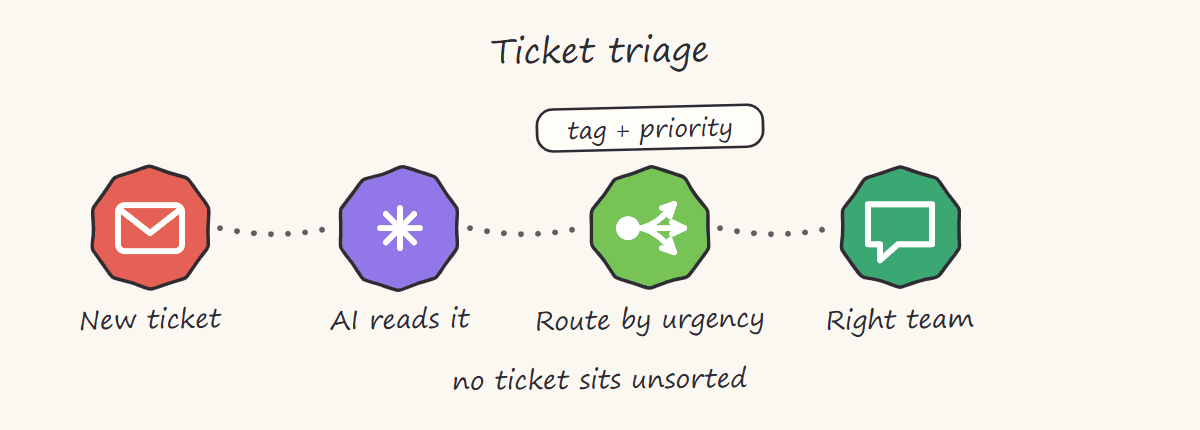
If you want a smaller first version of this, build the triage half and stop there: the agent reads and tags every new ticket, a router sends it to the right queue by urgency, and humans still write every reply. That is around a five-hour build and it removes the sorting work without putting a model in front of a customer.
Typical stack: Zendesk, Freshdesk or Intercom, Make.com or n8n, Claude grounded in your docs. Build cost: $1,500 to $5,000 with escalation and grounding; the triage-only version lands around $300 to $800.
When it earns its place: recurring question patterns and a real knowledge base to ground answers in. See use case 10.
4. Document and PDF data extraction
Invoices, contracts, receipts, forms. An AI step reads the document, pulls structured fields and validates them before anything touches your accounting system. Validation is the part most people skip and the part that matters most. I wrote up the full approach in AI PDF extraction with Make and Gemini, including why you should never trust extraction output blindly. If you are comparing this build against dedicated IDP software like Rossum, Nanonets or ABBYY, the document AI landscape maps all four classes with honest volume thresholds.
Typical stack: email or Drive intake, Make.com, Gemini or Claude, your accounting system. Build cost: $300 to $2,500.
When it earns its place: 50+ documents a month in inconsistent formats. Consistent formats can use templates and skip the AI cost.
5. Product catalog generation
One of my favourite production examples: a vendor sends unstructured product photos and notes over Telegram, an OpenAI vision model reads them and the system writes SEO-ready Shopify listings with titles, descriptions and tags. No human touches the listing unless a confidence check fails. Full case study here.
Typical stack: Telegram or WhatsApp intake, an OpenAI vision model or Gemini, Make.com, Shopify. Build cost: $1,500 to $5,000.
When it earns its place: catalogs that grow weekly from messy supplier input.
6. Invoice validation and processing
For a US transportation provider I combined Make, Retool and GoHighLevel with Claude as a validation layer. The AI checks each invoice line against trip logs before export, and processing time dropped from 30+ days to 7, a 77% reduction. The pattern that works: automation moves the data, AI judges the edge cases, humans approve the exceptions. Case study.
Typical stack: Make.com, Retool, Claude as the validation layer, your accounting export. Build cost: $2,500 to $8,000 for a full operational stack.
When it earns its place: invoice flows with enough variation that rules alone keep breaking.
7. Content generation pipelines
Not "AI writes your blog". The production version: a content calendar in Notion, Claude drafting against a proven format library, n8n scheduling and posting through the platform API, and performance data flowing back to inform the next batch. I run this exact system on Threads, where one account reached 1.15M views in 27 days. The breakdown is here.
Typical stack: Notion, Claude, n8n, the platform's posting API. Build cost: $1,000 to $3,500.
When it earns its place: you already know what good content looks like and need volume with consistency, not ideas.
8. Real-time alerts with judgment
Pure speed problems are automation problems: my TradingView to Telegram pipeline delivers branded alerts in under 2 seconds with zero AI in the hot path, because latency matters more than judgment there. Add an AI step only where enrichment is worth milliseconds: summarising why an alert matters or filtering noise before it hits a human.
Typical stack: TradingView or your event source, Make.com or n8n webhooks, Telegram or Slack. Build cost: $500 to $1,500.
When it earns its place: alert volume so high that people started ignoring the channel.
9. Sales and operations reporting
Automation pulls the numbers, AI writes the narrative. For a premium DTC brand I built a pipeline that walks 100K to 250K BigQuery records and emails leadership a KPI digest they actually read. The AI summary layer turns tables into "what changed and why it matters". Case study.
Typical stack: BigQuery or your database, n8n or Make.com, Gemini or Claude for the narrative, email or Slack delivery. Build cost: $1,500 to $5,000.
When it earns its place: anyone still assembling weekly reports by hand.
10. Knowledge base answers (RAG)
Your docs, policies and past tickets become a searchable brain. The agent retrieves the relevant passages and answers with citations, internally for your team or externally for customers. This is also the foundation that makes use case 3 safe: support agents should answer from your knowledge, not from the model's imagination.
Typical stack: your docs and past tickets, a vector store, Claude or Gemini, Slack or a web widget. Build cost: $2,000 to $6,000.
When it earns its place: the same internal questions keep interrupting your senior people.
11. CRM data hygiene and enrichment
Duplicate contacts, missing fields, stale deal stages. An agent runs on a schedule, merges duplicates, enriches records from public sources and flags what it cannot resolve. Boring, high-value and nobody ever does it manually.
Typical stack: HubSpot, Pipedrive or GoHighLevel, an enrichment source, Make.com or n8n on a schedule. Build cost: $800 to $2,500.
When it earns its place: your CRM is 2+ years old and reports have stopped being trustworthy.
12. Approval workflows with AI pre-checks
Expenses, discounts, refunds, contract clauses. The AI checks each request against policy, auto-approves the obvious cases and routes only genuine judgment calls to a manager with a one-line summary of what to look at. Approvers stop rubber-stamping and start deciding.
Typical stack: your form or expense tool, Make.com, Claude checking against your policy doc, Slack approvals. Build cost: $800 to $2,500.
When it earns its place: approval queues where 80% of items are obvious yeses.
AI agent applications by department
The same 12 use cases, sorted by who owns the problem. If you are scoping a first agent for a specific team, start in this row:
| Department | Start with | Typical first build | First-build cost |
|---|---|---|---|
| Sales | Lead qualification (#2), CRM hygiene (#11) | Speed-to-lead agent on inbound forms and DMs | $800 to $2,500 |
| Customer support | Support triage (#3), knowledge base (#10) | Ticket triage and tagging, humans still reply | $300 to $800 |
| Finance and ops | Document extraction (#4), invoice validation (#6), approvals (#12) | Invoice or document pipeline with validation | $300 to $2,500 |
| Marketing | Content pipelines (#7), catalog generation (#5) | Content production line against a proven format library | $1,000 to $3,500 |
| Leadership | Reporting (#9) | Automated KPI digest with an AI narrative layer | $1,500 to $5,000 |
| Every team | Email triage (#1) | Shared-inbox triage and routing | $300 to $1,200 |
Which one should you start with?
Start where these three lines cross: high volume, clear rules for most cases and a painful cost when it goes wrong slowly (not catastrophically). For most businesses that is email triage, lead follow-up or document extraction. Do not start with the fully autonomous everything-agent. Autonomous agents still complete a small fraction of long multi-step tasks reliably, which is why every system above keeps a human on the exceptions.
On cost: most single-purpose builds land in the same bands I published in the Make.com automation cost guide. Simple flows start in the hundreds, serious multi-step systems run $1,500 to $5,000 and full operational stacks go beyond that. Running costs are mostly AI tokens plus platform credits and stay modest when the agent only handles exceptions.
Want the shortcut? I scope this exact decision on a free 30-minute call: which use case, which platform and what it should cost. Book a free consult or check the fit first.
Frequently asked questions
What is the difference between an AI agent and an automation?
An automation follows a fixed sequence you design in advance. An AI agent receives a goal plus tools and decides the steps itself. Automations are cheaper, faster and easier to test. Agents win when inputs are messy or the next step depends on understanding content, like reading an email or judging an invoice.
What is the easiest AI agent use case to start with?
Email triage. Volume is high, the failure mode is gentle (a mis-routed email, not a lost customer) and results show up in the first week. Lead qualification is the close second because it ties directly to revenue.
How much does an AI agent cost to build?
Single-purpose agents typically cost about the same as a serious multi-step automation, $1,500 to $5,000 built properly with error handling and documentation. Simple AI-assisted steps inside an existing flow cost far less. Full agent systems with RAG, escalation and reporting run higher. Platform credits and AI tokens usually add tens of dollars a month, not hundreds.
Should I build agents on Make, n8n or custom code?
Make for speed and maintainability when a business team will own the system. n8n when you need self-hosting, high volume at low cost or deeper code control. Custom code only when the logic outgrows both. I use all three and compared them in Zapier vs Make vs n8n, and the 2026 automation platform landscape places them against the enterprise and RPA platforms if your shortlist is wider.
What are the most common applications of AI agents in business?
As of August 2026, the four most common first builds across our client base are email triage, lead qualification and follow-up, document and invoice extraction and customer support triage. They share one profile: high volume, messy inputs and a clear win the moment response time drops from hours to minutes.
Which AI agent use case has the highest ROI?
Lead qualification, when leads currently wait hours for a reply: cutting response time to minutes changes close rates directly, so the build pays for itself on the first recovered deal. Invoice and document processing is the close second because the saving is a hard cost in manual entry hours, and it compounds monthly. Email triage has the fastest payback on effort because it is the cheapest to build.
Are AI agents worth it for a small business?
Yes, above specific volume thresholds: roughly 30+ mixed emails a day, 50+ documents a month or leads arriving faster than anyone replies. Below those numbers, filters, templates and a plain automation cost less and break less. A first agent build starts around $300 to $1,200, not five figures, and the running cost at small-business volume is usually tens of dollars a month.
Do AI agents replace employees?
In practice they replace tasks, not roles. Every system above removes the repetitive slice of a job and routes the judgment calls to a person with better context. Teams end up handling more volume with the same headcount, which is usually the actual goal.