How to Control Make.com Automations from Claude Using MCP (2026 Complete Guide)
Claude thinks, Make executes. Here is how to connect Claude to Make.com with the MCP server, run scenarios from chat and build the conversational operations layer properly.
How to Control Make.com Automations from Claude Using MCP (2026 Complete Guide)
You can control Make.com automations directly from a Claude chat using the Make MCP server, an official integration that exposes your Make scenarios as tools Claude can discover and run. You connect Claude to Make either through OAuth at mcp.make.com or with an MCP token, mark the scenarios you want available as active and on-demand, and from that point Claude can trigger them, pass them inputs, read their outputs and chain them together in plain conversation. The practical result: Claude becomes the thinking layer that decides what to do, and Make becomes the execution layer that does it, reaching the 2,000+ apps Claude cannot touch natively.
I am Prem Patel, founder of Nex Automations, an AI systems studio. I hold the Make Level 5 Expert certification, and we have built 1,200+ automations for 210+ clients across Make, Claude and the wider AI stack. The Claude plus Make MCP combination is the most significant change in how automation gets built and operated since no-code tools arrived, and almost nobody is explaining it properly yet.
This guide covers what the Make MCP server actually is, how to connect Claude to Make step by step, how to design scenarios that work well as Claude tools, what this architecture makes possible and the limits and security realities you need to know.
What is the Make MCP server?
The Make MCP server is Make.com's official implementation of the Model Context Protocol, the open standard that lets AI assistants connect to external tools and services. MCP started as an Anthropic project and has since become an industry standard governed by the Linux Foundation, with thousands of servers now available across the ecosystem.
What the Make MCP server does specifically: it exposes your Make scenarios to an AI client like Claude as callable tools. Claude can see which scenarios are available, understand what each one does from its description, run them with the right inputs and receive their outputs back into the conversation. It can also, with management scopes on paid plans, view and modify account contents like scenarios, connections, webhooks and data stores.
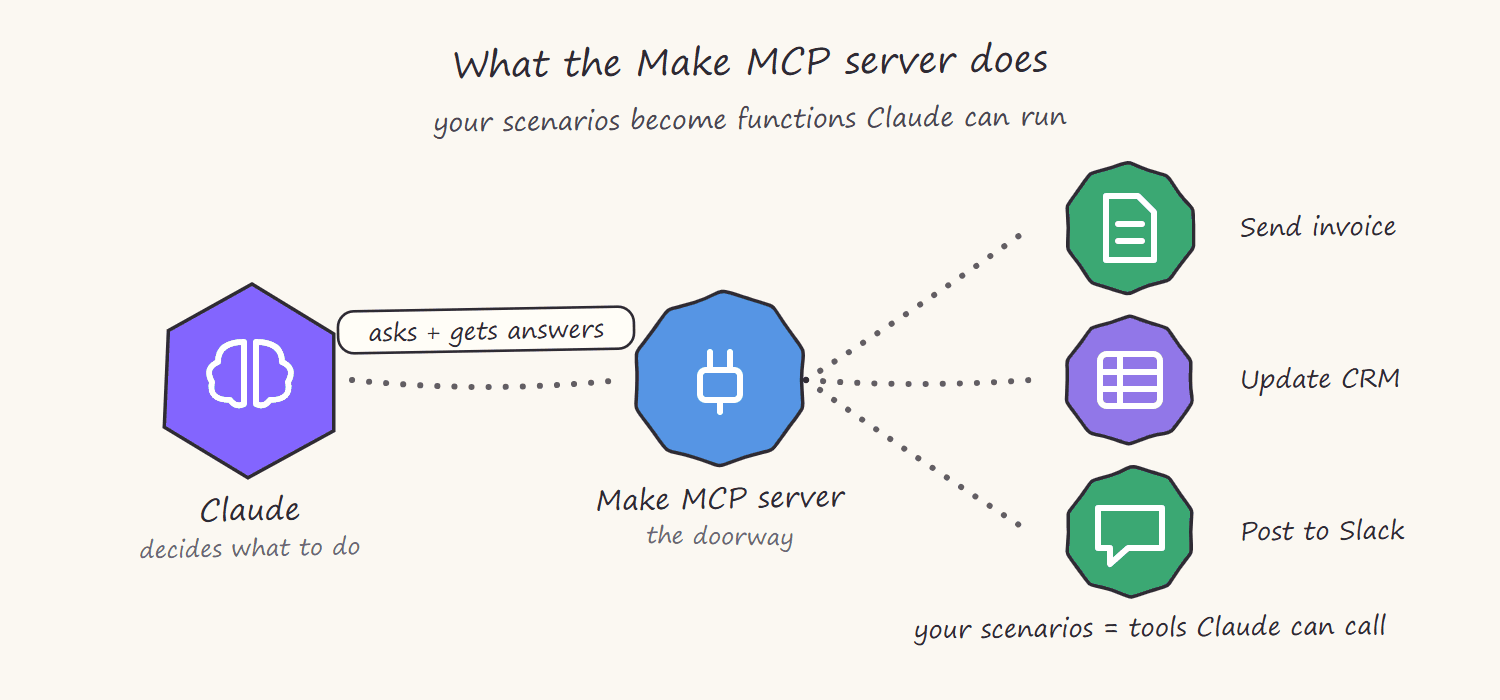
The simplest way to think about it: Make scenarios become functions Claude can call. You ask Claude in plain language to do something, Claude picks the right scenario, fills in the parameters and runs it. The automation infrastructure you already built in Make becomes an extension of the conversation.
Why this architecture matters: Claude thinks, Make executes
Claude on its own is a reasoning engine. It can read, write, analyse and decide, but it cannot natively reach into your CRM, send a WhatsApp message, update a Shopify product or post to a spreadsheet, at least not across the thousands of business apps a real operation uses. Make is the opposite: it connects to 2,000+ apps and executes flawlessly, but it has no judgement, every decision path must be designed in advance.
The MCP connection merges the two. Claude provides the judgement: understanding a vague request, deciding which workflow applies, extracting the right parameters from context, interpreting the result and deciding what to do next. Make provides the reach and the reliability: authenticated connections, error handling, rate limit management and execution across every app in the stack.
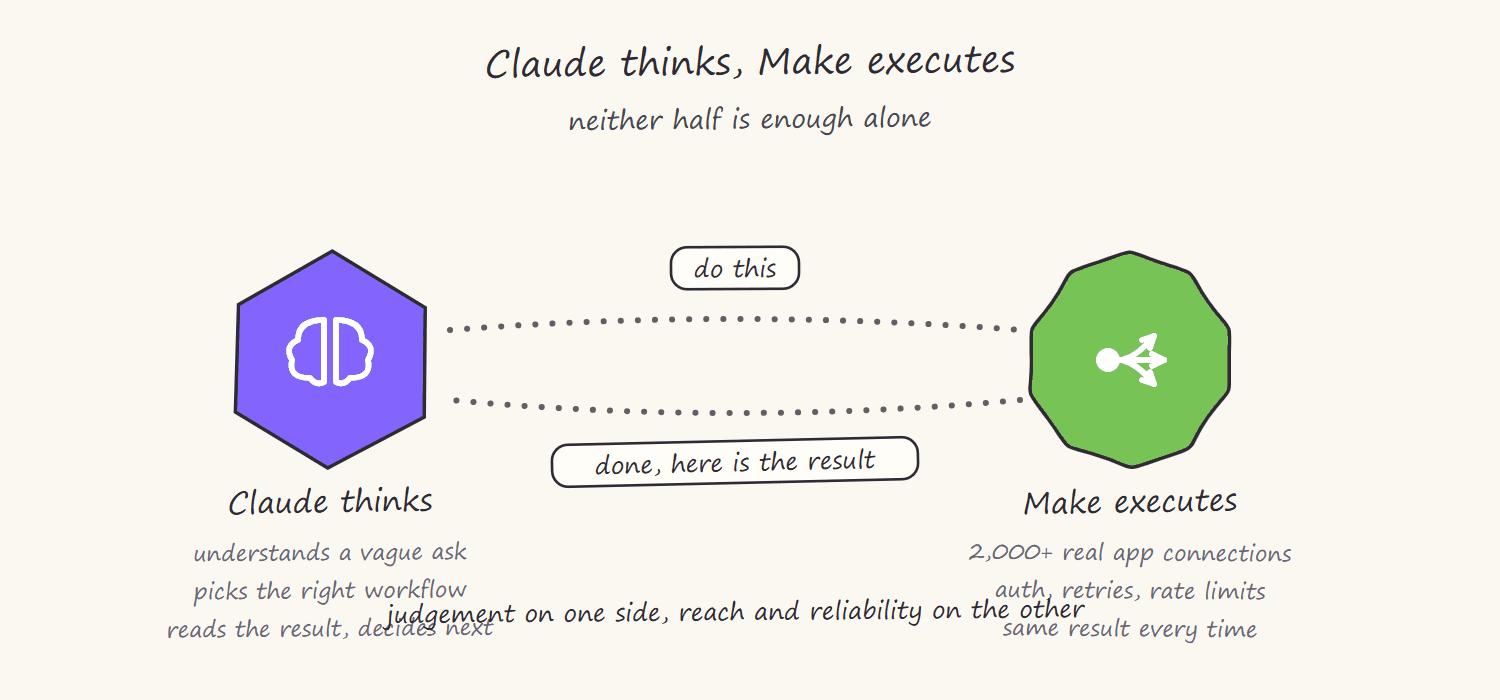
This is genuinely different from both traditional automation and standalone AI:
- A traditional Make scenario runs the same way every time and must anticipate every case.
- A standalone Claude conversation can reason about anything but execute almost nothing.
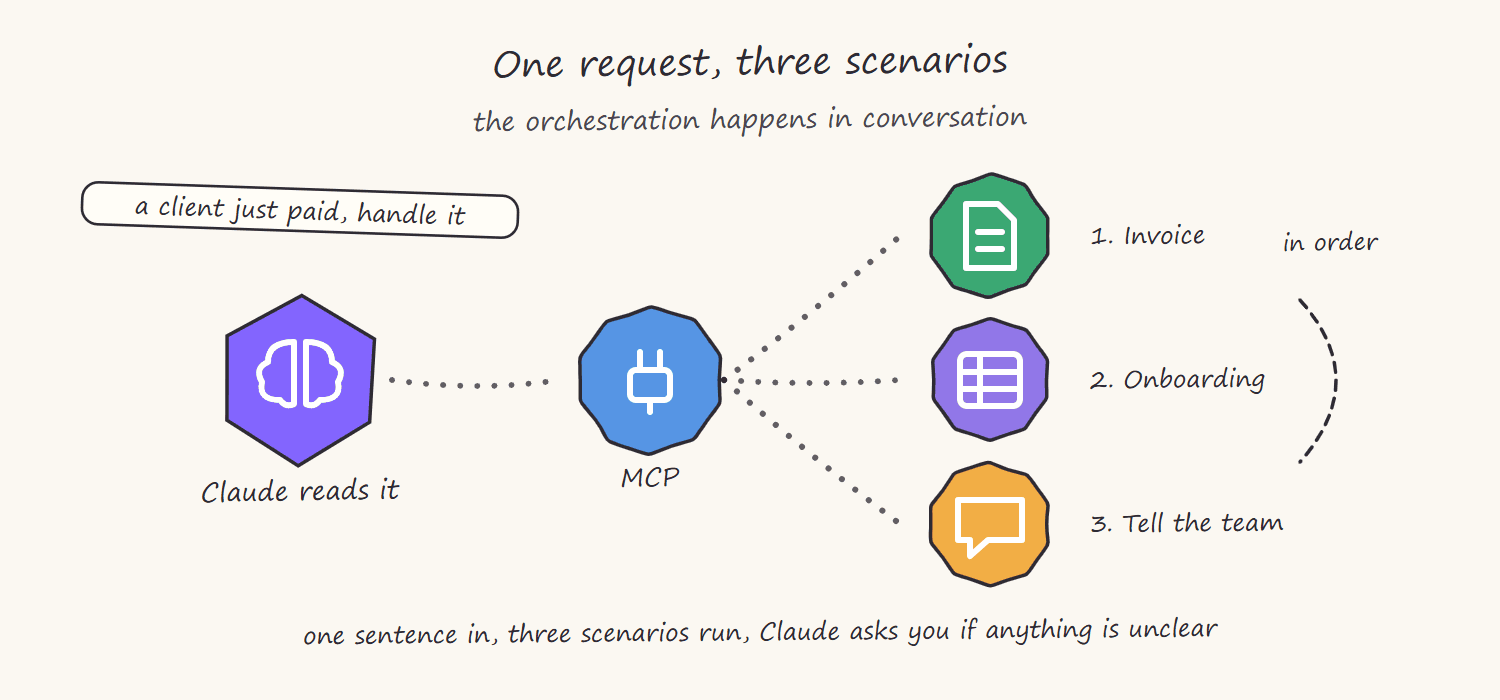
- Claude plus Make MCP can take "a client just paid, handle it" and decide that means running the invoice scenario, then the onboarding scenario, then posting a summary to the team channel, in the right order, with the right data, asking you when something is ambiguous.
The orchestration moves from pre-designed flowcharts to live conversation. That is the shift.
How to connect Claude to Make.com step by step
There are two connection methods. OAuth is the simpler path for most people; tokens give finer control. If you have never built a Make scenario before, the complete Make.com guide covers the foundations first. The technical details below are verified against Make's MCP server documentation, which is the reference to re-check as Make iterates.
Method 1: OAuth (recommended to start). Add the Make MCP server to your Claude client using the endpoint mcp.make.com. In Claude's connector or MCP settings, add it as an HTTP server with that URL. When you connect, Make runs an OAuth consent flow where you pick the organization and grant scopes. The "Run your scenarios" scope lets Claude see and run your on-demand scenarios; management scopes (paid Make plans) add account management abilities.
Method 2: MCP token. Generate a token in your Make profile under the API access tab. The endpoint then includes your Make zone and token, in the form https://YOUR-ZONE.make.com/mcp/u/YOUR-TOKEN. Tokens support precise access control through URL parameters: you can restrict Claude to one organization, one team or even specific scenarios only, which is the right setup when you want Claude to have exactly one or two tools and nothing else. Treat the token as a secret, anyone holding it can run whatever it permits.
Making a scenario available as a Claude tool. A scenario does not appear to Claude automatically. It must be set to active status with on-demand scheduling, and it needs defined scenario inputs (which become the tool's parameters) and scenario outputs (which become what Claude reads back). The single most underrated step: write a detailed scenario description, because Claude chooses tools based on their names and descriptions. A scenario called "Scenario 47" is invisible in practice; one called "Generate and email a branded invoice PDF from order data" with a clear description gets used correctly.
Timeouts to know. Scenario runs through OAuth time out at 25 seconds, token connections at 40 seconds. If a scenario runs longer, the response returns an execution ID and the scenario keeps running in Make for up to 40 minutes; Claude can poll for the result. This shapes design: fast scenarios feel conversational, long ones need the async pattern.
Designing Make scenarios that work well as Claude tools
Building a scenario for MCP use is a different discipline from building one for a schedule or webhook. The principles that matter:
One clear job per scenario. Claude composes complex work by chaining simple tools. A scenario that does one thing with three well-named inputs beats a mega-scenario with twenty optional parameters. Let the intelligence live in Claude, keep the execution atomic in Make.
Name inputs and outputs like documentation. Claude reads these to decide how to call the tool. "customer_email, the email address the confirmation is sent to" gets filled correctly; "field_2" gets guessed at. Use specific data types rather than Any.
Return useful outputs. A scenario that returns "success" tells Claude nothing it can reason with. Return the created record ID, the generated document URL, the amount processed, whatever the conversation might need next. The output is what lets Claude chain the next step intelligently.
Design for the timeout. Keep conversational tools under the limit. For heavy work, build the scenario to acknowledge fast and process async, or accept the execution-ID polling pattern.
Keep credits in mind. Every Claude-triggered run consumes Make credits like any other run, and since Make moved to the credit model in August 2025, AI-step-heavy scenarios cost more per run. A chatty agent that triggers scenarios liberally can burn through a credit allowance, so scope what Claude can run and right-size the plan. The Make.com cost guide breaks down how the credit model prices out in practice.
What this makes possible: real patterns
The patterns that work today, drawn from real builds:
Conversational operations. "Pull this week's sales from the tracker and send the summary to the team" becomes one sentence instead of a dashboard visit, a copy-paste and a Slack message. Claude runs the reporting scenario, reads the output, writes the summary, runs the notification scenario.
Lead handling with judgement. A Tally or Typeform lead lands in Notion or Airtable. Instead of a rigid routing scenario trying to anticipate every lead type, Claude reads the lead, decides its category and urgency and triggers the matching Make scenario: the enterprise nurture sequence, the quick-quote flow or the disqualify-politely email.
Document workflows on demand. "Generate the contract for this client with these terms" triggers the contract scenario with Claude-extracted parameters, then Claude confirms the output URL and can trigger the delivery scenario. The same generation and extraction systems covered in the document automation guide become conversational.
Cross-tool design sessions. With management scopes, Claude can inspect existing scenarios, explain what a complex build does and help restructure it. The expert's assistant for maintaining the automation estate itself.
The agent pattern. The endpoint of all this: a Claude agent with a scoped set of Make tools, a clear system prompt and guardrails, operating a slice of the business conversationally, with humans approving the consequential steps.
The limits and security realities
This architecture is powerful and young, and honesty about its edges is what separates a working build from a demo:
- Claude can pick the wrong tool or the wrong parameters. Tool descriptions reduce this; they do not eliminate it. For consequential actions (payments, client-facing sends, deletions), design a confirmation step rather than full autonomy. Reliability comes from the same place it always has: validation and human gates at the points that matter.
- Access scoping is your main security control. Token-level scenario restrictions exist precisely so Claude can hold two tools instead of your whole account. Use them. Never give a conversational agent management scopes unless it genuinely needs them.
- Tokens are secrets. Anyone with the token URL can run what it permits. Never commit tokens to version control or share them in docs.
- Timeouts shape what is conversational. A 25-40 second window means heavy scenarios need async design, not hope.
- Costs are real. Claude usage plus Make credits per run. Efficient scenario design matters more, not less, when an AI can trigger runs freely.
How we build Claude plus Make systems at Nex Automations
When we build this architecture for a client, most of the work is not the connection, which takes minutes, it is the design around it. We define exactly which scenarios Claude should hold as tools and scope access to only those. We rebuild those scenarios to be atomic, well-described and fast, with outputs Claude can reason over. We put confirmation gates on every consequential action and validation on every input. And we document the whole system so the team understands what their AI can and cannot trigger.
The result is not a demo where Claude impressively runs a workflow once. It is an operating layer the business can trust: conversational control over the automation estate, with the guardrails that make autonomy safe. That gap between the demo and the dependable system is where the engineering actually lives.
If you want a Claude plus Make system built properly, you can book a call and we will map which of your workflows belong in the conversational layer first. And if you are weighing whether to build with us or someone else, the guide to hiring a Make.com expert covers exactly how to vet a builder for work like this.
FAQ
Q: Can Claude control Make.com automations? A: Yes. The official Make MCP server exposes Make scenarios as tools Claude can discover and run. You connect via OAuth at mcp.make.com or with an MCP token, set the scenarios you want available to active and on-demand and Claude can then trigger them with inputs and read their outputs in conversation.
Q: What is the Make MCP server? A: It is Make.com's implementation of the Model Context Protocol, the open standard (governed by the Linux Foundation) that lets AI assistants connect to external tools. It turns your Make scenarios into callable functions for AI clients like Claude, and on paid plans can also expose account management abilities.
Q: How do I make a Make scenario appear as a tool in Claude? A: The scenario must be active with on-demand scheduling, have defined scenario inputs and outputs and be covered by the granted scope. A clear name and detailed description matter most in practice, because Claude selects tools by reading them. Vague names get ignored or misused.
Q: Is it safe to let Claude run my Make automations? A: It is safe when scoped properly. Use token-level access control to expose only the specific scenarios Claude needs, keep management scopes off conversational agents, treat tokens as secrets and add confirmation steps before consequential actions like payments or client-facing sends. Unscoped full-account access to an autonomous agent is the mistake to avoid.
Q: What is the difference between using Claude with Make and just using Make alone? A: Make alone executes pre-designed workflows the same way every time. Claude plus Make adds a judgement layer: Claude interprets vague requests, chooses which scenario applies, extracts parameters from context and chains workflows in the right order, while Make supplies authenticated execution across 2,000+ apps. Orchestration moves from pre-built flowcharts to live conversation.
Q: Does running scenarios from Claude cost extra on Make? A: Each Claude-triggered run consumes Make credits exactly like any other run, and AI-heavy scenarios cost more per run under the credit model Make introduced in August 2025. Efficient scenario design and scoping what Claude can trigger keep the cost predictable.
Related guides
- Google Workspace Studio + Gemini Automation Guide
- Automate Document and PDF Workflows with Make.com
- How Much Does Make.com Automation Cost?
- Hire a Make.com Expert: Full Vetting Guide
Want a Claude plus Make system built to production standard? Book a free consult: 30 minutes to map which workflows belong in your conversational layer first. For a fixed-scope build, see the Fiverr's Choice Make.com automation gig. To start experimenting yourself, Make.com's free plan is enough to build your first on-demand scenario. Or take 1 month free with 10,000 credits on my partner link.
Want this built this week?
Tell us the apps and the process. Single automations ship in 3 to 7 days with error handling, alerting and a handover walkthrough.
Nex Automations is an automation studio led by Prem Patel, a Make.com Level 5 Expert, Make Silver Solution Partner and Zapier Solution Partner, based in Ahmedabad and working globally. 1,200+ automations built for 210+ clients across 8+ industries in 12+ countries.
- Have it builtThe fit-check takes two minutes. Prem reads every one and replies within 24 hours.
- Automation systems we buildSixteen system types across lead automation, order operations, AI agents, reporting and payments.
- Book a free consult30 minutes to scope the process you want automated.
More from Nex Automations
- ServicesWhat we build and who it is for.
- Case studiesProduction systems with real numbers.
- Automation libraryGuides, insights and mini builds.
- About Prem PatelCredentials, background and how we work.
- ContactBook a call or reach us on any channel.