There are four ways to automate Google Workspace, and most teams use the wrong one first. Level 0 is the built-in switches: Gmail filters, Sheets notification rules, Calendar appointment schedules, free and live in five minutes. Level 1 is Apps Script, the free JavaScript layer inside Sheets, Docs, Gmail and Drive. Level 2 is an integration platform like Make.com, Zapier or n8n that connects Workspace to your CRM, WhatsApp and payment tools. Level 3 is the AI layer: Gemini and Workspace Studio agents inside Google, and AI steps inside the integration platforms, for work that needs judgement rather than rules. This guide covers all four levels basic to mid depth, with real screenshots, what each level costs and exactly when to step up to the next one.
I am Prem Patel, founder of Nex Automations, an AI systems studio in Ahmedabad. I hold the Make Level 5 Expert and Zapier Certified Professional certifications, and Nex Automations is the only company in India listed in both the official Make and Zapier partner directories. Over 6 years we have shipped 1,200+ automation systems for 210+ clients, and a large share of them run on or through Google Workspace. Everything below reflects how we actually decide, on paid projects, which layer a job belongs to.
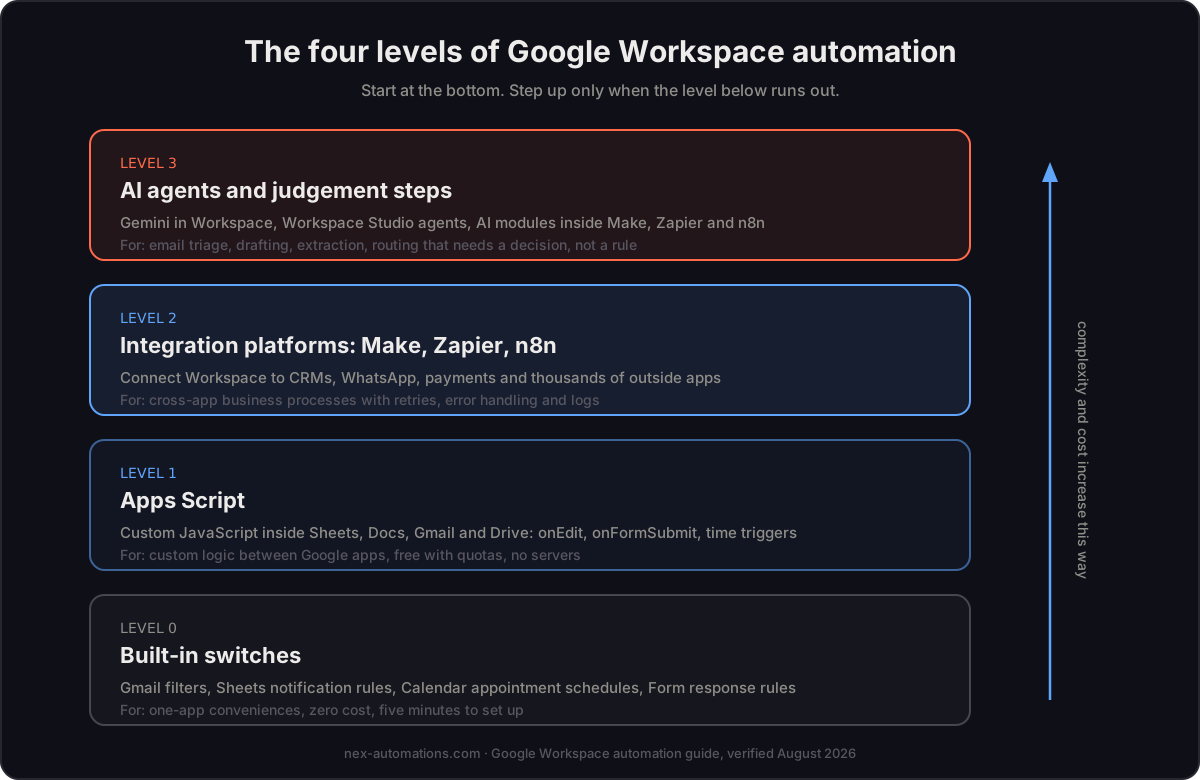
Level 0: the built-in switches almost nobody fully uses
Before writing a line of code or paying for any tool, Workspace ships automation switches inside every app. They are free, cannot break and take minutes. Most teams we audit have used fewer than half of these.
| App | Built-in automation | Set up in |
|---|---|---|
| Gmail | Filters that label, archive, forward and star by sender, subject or keywords; templates; scheduled send; smart reply | 5 min |
| Sheets | Notification rules on edit or form submit; conditional formatting; data validation; recorded macros | 5 min |
| Calendar | Appointment schedules with booking pages; working-hours auto-decline; event auto-add from Gmail | 10 min |
| Forms | Response validation; section branching; auto-collect into a linked Sheet; response receipts | 5 min |
| Drive | Shared drives with inherited permissions; priority workspace suggestions; offline sync rules | 10 min |
| Docs | Building blocks (meeting notes tied to Calendar events, email drafts that open in Gmail); smart chips linking people, files and dates | 2 min |
The honest rule: if a one-app convenience is the problem, Level 0 already solves it. The moment the sentence contains "and then", as in "when the form comes in, and then update the tracker, and then email the client", you have a workflow, and workflows live at Level 1 or above.
Level 1: Apps Script, the free automation engine inside Workspace
Google Apps Script is a JavaScript platform built into every Google account, including free Gmail accounts. It can read and write Sheets, Docs, Slides, Gmail, Drive, Calendar and Forms without any API keys, servers or subscriptions, because it runs on Google's infrastructure inside your account's own permissions.
It hides in plain sight. In any spreadsheet: Extensions, then Apps Script.
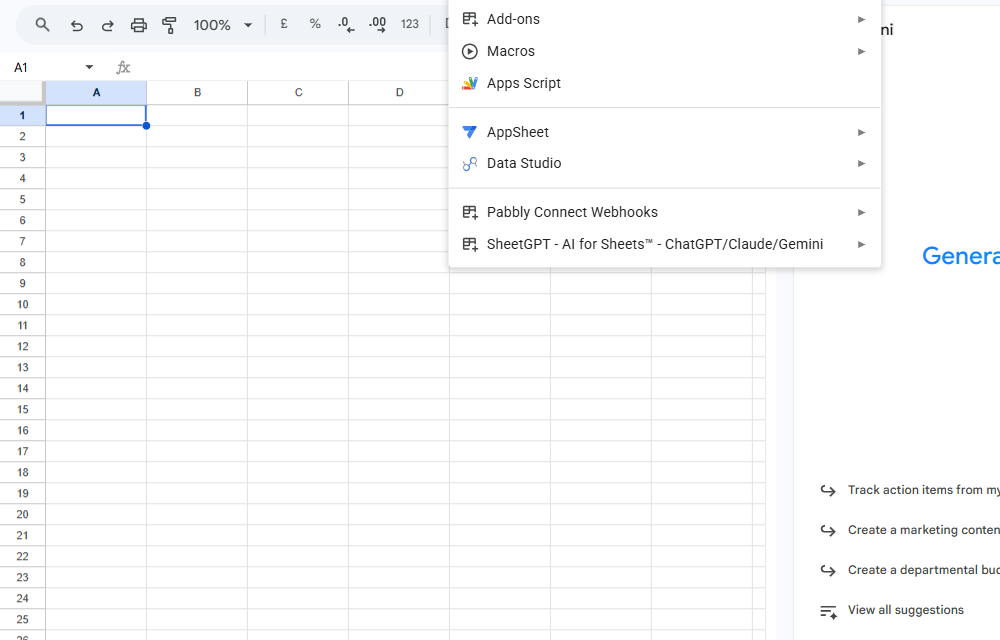
That menu also holds Macros, which is Apps Script for non-programmers: hit record, do the steps once by hand, and Sheets writes the script for you. Recording a macro and then reading the generated code is genuinely the best way to start learning what Apps Script can do.
A real example: the two-line automation that replaces a habit
Here is a working script from the editor. When anyone sets the Status column of a tracker to Done, it stamps the completion time in the next column automatically:
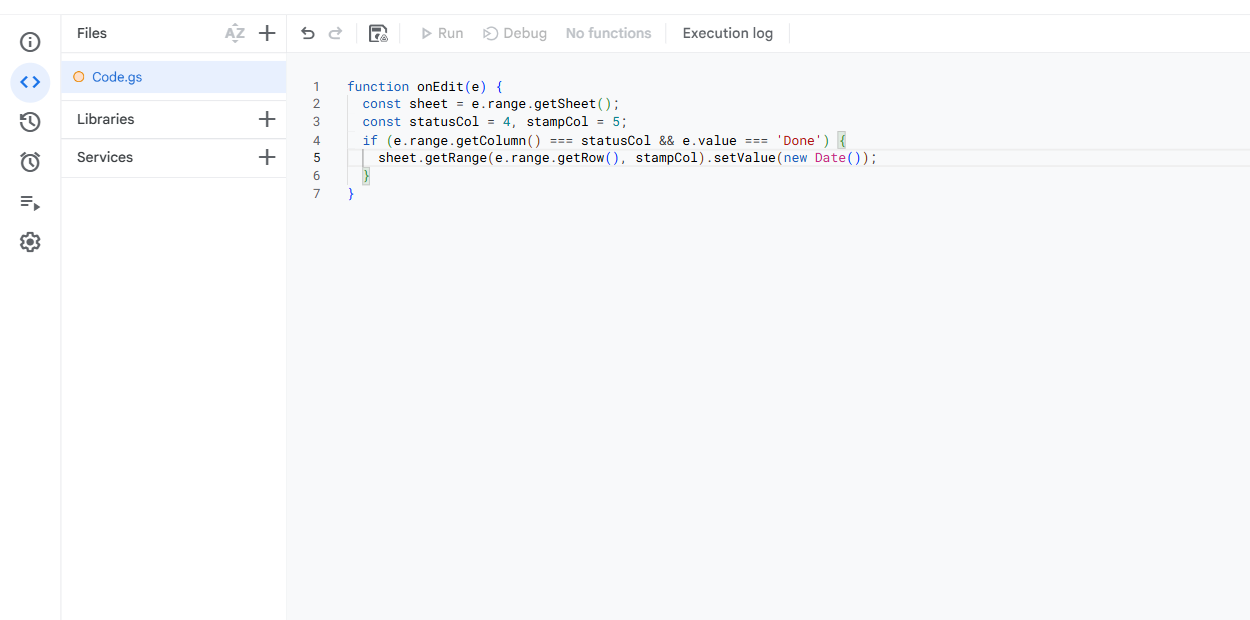
That is the whole automation. No servers, no subscription, no API setup. The onEdit name is what Apps Script calls a simple trigger: name a function onEdit, onOpen or onFormSubmit and it runs automatically on that event. Beyond those, installable triggers add time-driven schedules (every hour, every Monday at 9), on-change events and Calendar updates.
What Apps Script is genuinely good at
- Sheets as a database with rules: timestamps, auto-numbering, row routing between tabs, approval columns that email the approver
- Docs and Slides generation: merge a Sheets row into a Doc or Slides template, export PDF, save to Drive, email it. Invoices, certificates, reports and proposals are all this one pattern
- Gmail housekeeping: auto-label and archive by rules too complex for filters, draft replies from templates, digest unread threads into one morning email
- Drive provisioning: create a standard folder tree per new client or project, set permissions, drop template files in
- Custom functions: your own formula (=PROFIT_MARGIN(A2)) available in every cell
- Form pipelines: on submit, validate, write to the tracker, generate the PDF, email the requester
Where Apps Script stops being the right answer
Honest limits, because they are exactly where paid platforms earn their fee:
- Six-minute execution cap per run. Long batch jobs need chunking logic, which turns simple scripts into engineering.
- No retries, no error routes, no run log worth the name. When a script fails at 2 am, it fails silently unless you built your own alerting.
- Non-Google apps mean raw API code. Connecting a CRM or WhatsApp means writing and maintaining HTTP calls, auth token refresh and pagination by hand.
- Single-owner risk. Scripts run as the person who made them. When that person leaves, automations break with their account.
- Maintenance is code maintenance. Every tweak needs someone willing to open the editor.
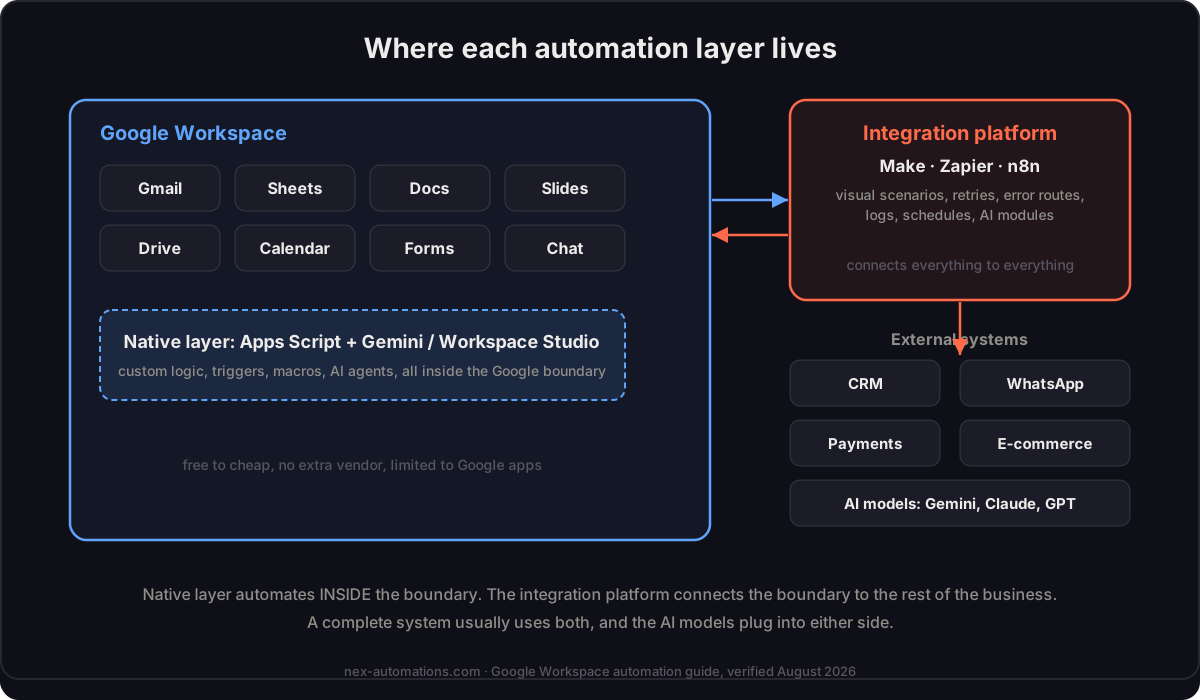
A useful rule from 1,200+ shipped systems: Apps Script for logic INSIDE Google apps, an integration platform the moment a third-party tool or reliability guarantee enters the picture.
Level 2: Make, Zapier or n8n, the integration platforms
When the workflow leaves the Google boundary, integration platforms replace custom code with visual scenarios, and more importantly they add the operational layer Apps Script lacks: automatic retries, error routes, execution logs and schedules you can hand to a non-developer.
All three treat Google Workspace as a first-class citizen: dedicated Gmail, Sheets, Docs, Slides, Drive, Calendar and Forms modules with managed authentication, no API code.
| Make.com | Zapier | n8n | |
|---|---|---|---|
| App coverage | 3,000+ apps + HTTP module for any API | 9,000+ apps, the longest tail | 524 core nodes + 5,800+ community nodes + Code node |
| Workspace modules | Deep: iterate rows, watch changes, batch operations | Broadest triggers, simplest setup | Full CRUD + raw API access when needed |
| Error handling | Error routes per module, retries, incomplete-run storage | Auto-replay on paid plans | Full control: retry logic, error workflows |
| Pricing model | Per operation, generous at SMB volume | Per task, punishing past ~5,000 tasks/month | Self-hosted free, cloud from ~$24/month |
| AI steps | Native AI modules + Make MCP server | Zapier Agents across the full app stack | 70+ LangChain nodes, deepest for developers |
| Best fit | SMB cost-efficiency + visual clarity | Non-technical speed + niche app coverage | Developer teams + data control |
The full head-to-head with verified pricing math lives in our Zapier vs Make vs n8n comparison; the short version for Google-centric stacks: Make.com usually wins on cost and clarity for SMB operations, Zapier wins when a niche tool in your stack exists nowhere else, n8n wins when your team writes code and wants the data on its own servers.
What a Level 2 build looks like in practice, from our own shipped work: a form submission or e-commerce order lands in Sheets, the platform watches the sheet, generates the invoice from a Docs template, gets it approved on WhatsApp, files the PDF in the right Drive folder and updates the tracker. That exact shape cut invoice cycle time 77% for a US logistics client (the full case study).
Level 3: the AI layer, where judgement enters the workflow
Everything up to here is deterministic: rules you define, executed exactly. The AI layer handles the steps that need reading and deciding.
Inside Google: Gemini and Workspace Studio. Gemini is now built across Gmail, Docs, Sheets and Drive on Business and Enterprise plans, and the Gemini app passed 950M+ monthly active users by July 2026 (Google earnings). Google Workspace Studio, generally available since December 2025, lets you build Gemini-powered agents from plain-language descriptions: read incoming email and route by priority, summarise a document before sending it on, draft the reply for review. Our full Workspace Studio guide covers what it does well and its real limits (no batch processing, Google-only triggers, monthly run caps).
Inside the platforms: AI steps and agents. Make, Zapier and n8n all embed AI models directly into workflows: a Make scenario can send every inbound lead to Gemini or Claude for scoring before it touches the CRM; Zapier Agents work across its full app stack; n8n builds full agent pipelines with memory and vector stores. And through the Model Context Protocol, an AI assistant like Claude can call your Make scenarios directly, turning your automation library into tools the AI uses on demand.
The pattern that actually works in production, from our builds: AI for judgement, platform for execution. The AI reads, classifies, extracts and drafts. The deterministic layer moves the data, calls the systems and keeps the logs. An "AI agent for Google Workspace" that works is almost always this pairing, not a single magic agent. We catalogued where that pairing pays for itself in the 12 AI agent use cases guide, with per-use-case stacks and build costs.
What Google Workspace automation actually costs
Real ranges from our project history, stated so you can budget rather than guess. Platform subscription costs are separate from build costs and often zero to start.
| Path | Typical build cost | Monthly running cost | Fits |
|---|---|---|---|
| Level 0 switches, DIY | Free (an afternoon) | Free | One-app conveniences |
| Apps Script, DIY via macros + tutorials | Free (your learning time) | Free | Simple in-Google logic |
| Apps Script, built for you | $150 to $800 per script system | Free | Custom in-Google logic with no subscription appetite |
| Integration platform build (Make/Zapier/n8n) | $300 to $2,500 for most SMB systems | $0 to $50 platform fees at SMB volume | Cross-app business processes |
| AI agent system (platform + AI layer) | $1,500 to $8,000 depending on scope | Platform + model usage, usually $20 to $100 | Judgement-heavy operations at volume |
Two honest notes on those numbers. First, they are our real quoting bands as an India-based studio serving global clients; US and EU dev shops quote several times higher for equivalent outcomes, which we broke down in the AI agent cost guide. Second, the cheapest correct answer is often a lower level: we regularly close audits by recommending a free Gmail filter or a recorded macro instead of a paid build. Charging for a Level 2 system when Level 0 solves it is how this industry burns trust.
Choosing your path: five common situations
- Solo founder or small team, everything lives in Google, no budget. Level 0 switches this week, then record macros and adapt them. The structured way to learn the platform layer later exists when you outgrow this.
- SMB fully on Google, one recurring document workflow eating hours. One Apps Script build (invoice, certificate or report generation) or a small Make scenario. Cheapest paid win in the list.
- SMB with a CRM, WhatsApp or e-commerce in the stack. Straight to Level 2, Make.com first look. Wiring Workspace to outside tools is exactly what it is for, and Apps Script would become custom API maintenance.
- Operations drowning in email triage, document intake or lead qualification. Level 3 pairing: AI reads and decides, platform executes. This is where the ROI concentrates: judgement work is usually the expensive human hours.
- Developer team, data-control requirements, EU-style compliance. Self-hosted n8n talking to Workspace APIs, with Apps Script only for in-sheet conveniences.
DIY or hire: the honest split
Learn and build Levels 0 and 1 yourself: the switches table above plus recorded macros will genuinely get you far, and nothing there can run up a bill. Consider hiring at Level 2 when the workflow touches revenue (orders, invoices, leads) and an error costs real money, and at Level 3 almost always, because AI steps that are not properly fenced produce confident nonsense at volume.
If you do hire, verify certifications in the official directories rather than trusting website badges; the complete verified list of certified Make and Zapier partners in India shows the whole field, and the hiring guide covers pricing and the questions worth asking. We are in those lists, and platform-neutral about which level and tool your problem actually needs, which is the point of this guide.
FAQ
Q: Can I automate Google Sheets without coding? A: Yes, three ways: built-in notification rules and conditional formatting for alerts, recorded macros (Extensions, Macros, Record) which write the code for you, and no-code platforms like Make.com or Zapier that watch and update Sheets through visual workflows.
Q: Is Google Apps Script free? A: Yes. Apps Script is included with every Google account, including free Gmail accounts, with daily quotas. Runs are capped at six minutes each, and Workspace plans get higher daily limits than free accounts.
Q: What is the best automation tool for Google Workspace? A: It depends on the boundary. Inside Google apps only: Apps Script, free and native. Connecting Workspace to outside tools: Make.com for SMB cost-efficiency, Zapier for the widest app coverage (9,000+), n8n for developer teams wanting self-hosting. AI judgement steps: Gemini and Workspace Studio inside Google, or AI modules inside the platforms.
Q: Can Gemini automate Gmail? A: Yes, within limits. Gemini in Gmail drafts, summarises and answers questions about your mail, and Workspace Studio agents can read, label, route and draft responses automatically. Auto-sending is restricted on some plans, and complex multi-app flows still need Apps Script or an integration platform.
Q: Apps Script vs Zapier: which should I use? A: Apps Script when the entire workflow stays inside Google apps and you are comfortable with light code: it is free and has no per-run charges. Zapier or Make when third-party apps are involved or when you need retries, logs and error handling without writing them yourself.
Q: How much does Google Workspace automation cost? A: DIY is free at the native and Apps Script levels. Professionally built: $150 to $800 for Apps Script systems, $300 to $2,500 for most SMB integration-platform builds, $1,500 to $8,000 for AI agent systems, plus platform fees that start at $0 to $50 monthly. These are India-studio rates serving global clients; Western dev-shop quotes for equivalent outcomes run several times higher.
Q: Do I need a paid Workspace plan for automation? A: No for Apps Script and the integration platforms, they work with free Gmail accounts too. Yes for Gemini in-app features and Workspace Studio, which need Business or Enterprise plans.
Running your business on Google Workspace and losing hours to work a machine should do? Book a free consult and you will get an honest read on which level your problem belongs to, including when the answer is a free filter and not a paid build.