Yelp does have a Leads API, but it is partner-gated, and Zapier's Yelp Leads app is the only no-code route into it. That single fact settles most of the confusion around automating Yelp. You cannot build this on Make or n8n, not because those platforms are weaker, but because Yelp does not expose lead messaging to them. Make's Yelp app is the public Fusion API only: business search, reviews and events, with no lead or message modules. Verified against the live app directory on 26 August 2026. And if you searched for a Yelp auto responder, auto reply or answering service: Yelp has no native auto-reply for quote requests, and the section on the 2026 market below maps every option against Yelp's own rules.
What you can build on Zapier is substantial, and cheaper than almost anyone expects: Yelp Leads steps are unlimited free tasks under Zapier's partner deal, so a first-reply automation costs only its AI step, one to three tasks per lead.
This guide covers the exact triggers and actions available, the real cost model, what 25 real Yelp threads from one advertising business say about how leads actually behave, the agent patterns worth building beyond a first reply, and the part almost nobody covers: what Yelp's own Leads Program Agreement says about AI replies.
I am Prem Patel, founder of Nex Automations, an AI systems studio in Ahmedabad. I hold the Make Level 5 Expert and Zapier Certified Professional credentials, and Nex Automations is listed in both official partner directories. Everything below was verified against Yelp's developer documentation, Zapier's published task rules and a live production Zap in August 2026, across 1,200+ automations shipped for 210+ businesses.
Getting access: the part most guides get wrong
Two claims circulate widely and both are false.
"Yelp has no API for leads." It does. The Leads API exists, with webhooks. It is disabled by default and reserved for official advertising, listing-management and Insights partners, and lead access is limited to advertising businesses. The accurate statement is that there is no self-serve API, not that there is no API.
"You can connect Yelp leads with Make or n8n." Not as of August 2026. Yelp's own Leads API page points non-partner businesses to Zapier, and names its native partners: Housecall Pro, Hatch, Chiirp, Avoca and Niche. If a proposal tells you it will wire Yelp leads into Make, ask which connector, because the one that exists reads public business data. Our trigger and action map covers how to check what a platform can genuinely reach before you scope a build around it.
| Route | What it reaches | Who it suits |
|---|---|---|
| Zapier Yelp Leads app | Full lead and message surface, both directions | Almost everyone. The practical default |
| Yelp Leads API direct | Everything, including webhooks (delivery typically inside a minute, 99% target within 100 seconds) | Approved partners only. The webhook payload carries just a lead_id, so you fetch the detail |
| Native partner tools | Prebuilt flows, no assembly | Businesses already on Housecall Pro, Hatch, Chiirp, Avoca or Niche |
| Email parsing | The initial quote request only | A fallback with a hard ceiling, see below |
One trap on that last row: Yelp lets a business reply by email only to the initial quote request. Every later message has to go through the Yelp inbox or app. So an email-parsing build can catch the first message and cannot hold the conversation.
What the Zapier Yelp Leads app actually gives you
This is the part worth knowing before scoping anything, because it defines the ceiling.
| Type | Available | What it unlocks |
|---|---|---|
| Trigger | New Lead | The core: fires when a lead arrives |
| Trigger | New Consumer Message | Reply detection, follow-up cancellation, escalation |
| Trigger | New Business Message | Logging what your own team sends, including manual replies |
| Trigger | Phone Availability | Routing by whether a phone number was shared |
| Action | Create Message | Sends into the Yelp thread. This is what makes real automation possible |
| Action | Mark Lead as Replied | Keeps Yelp's responsiveness state accurate |
| Action | Mark Message as Read | Inbox hygiene |
| Action | Get Business Details / Get Lead Details | Enrichment before drafting |
The data model matters too. A lead carries structured project fields: event dates, guest count, duration, ZIP, job category, attachments, a relay email and sometimes a phone number. The opening text a customer writes is not a lead field, it is the first message event. Every message from either side is an event tagged CONSUMER or BIZ. Build against that shape and the rest is straightforward.
The cost model, which is the pleasant surprise
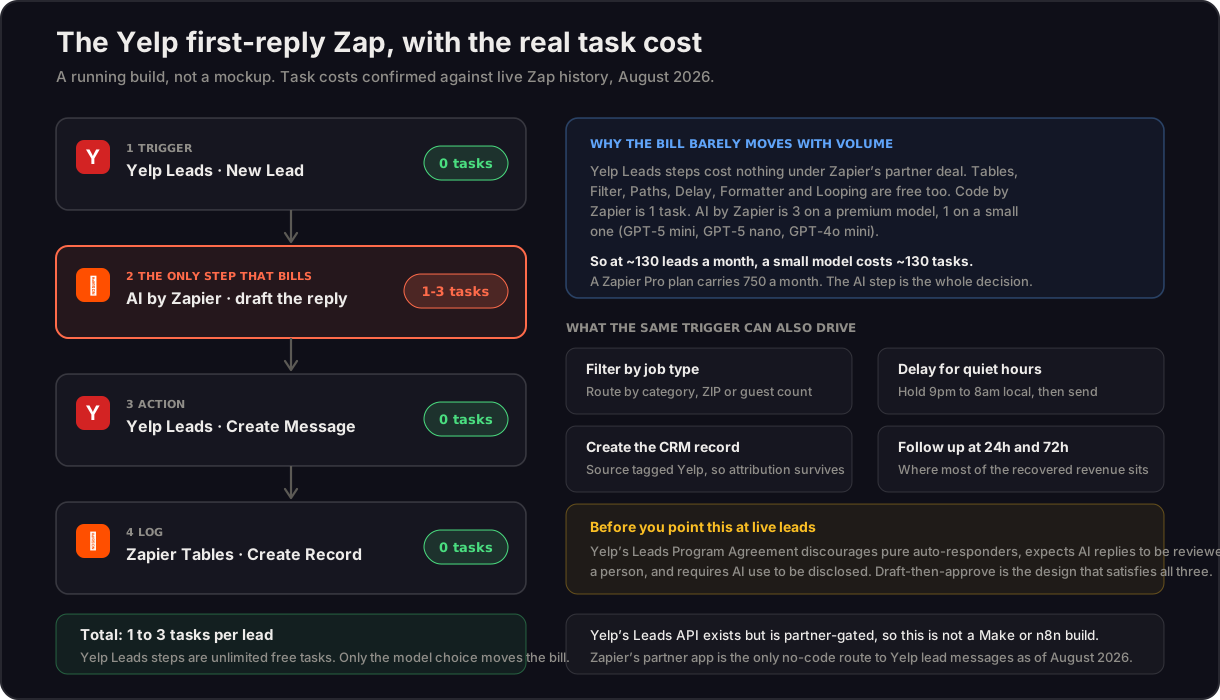
Yelp Leads steps on Zapier are unlimited free tasks. That is a partner arrangement Zapier publishes, and it holds up in live Zap history. Zapier Tables, Delay, Filter, Paths, Formatter, Looping and Storage are free as well. Code by Zapier is 1 task. AI by Zapier bills 3 tasks per run on premium models and 1 on small models such as GPT-5 mini, GPT-5 nano and GPT-4o mini.
The arithmetic follows: a Yelp first-reply Zap costs one to three tasks per lead, and all of it is the AI step. A business taking 130 leads a month on a small model spends about 130 tasks. Zapier Pro carries 750 a month at $239.88 a year, with overage at $0.0334 a task. The model picker is broad, running on Zapier's key, so you can tune cost per lead without touching the architecture.
That is the opposite of how most people budget this. The lead volume is nearly free. The model choice is the entire bill.
What 25 real Yelp threads say about lead behaviour
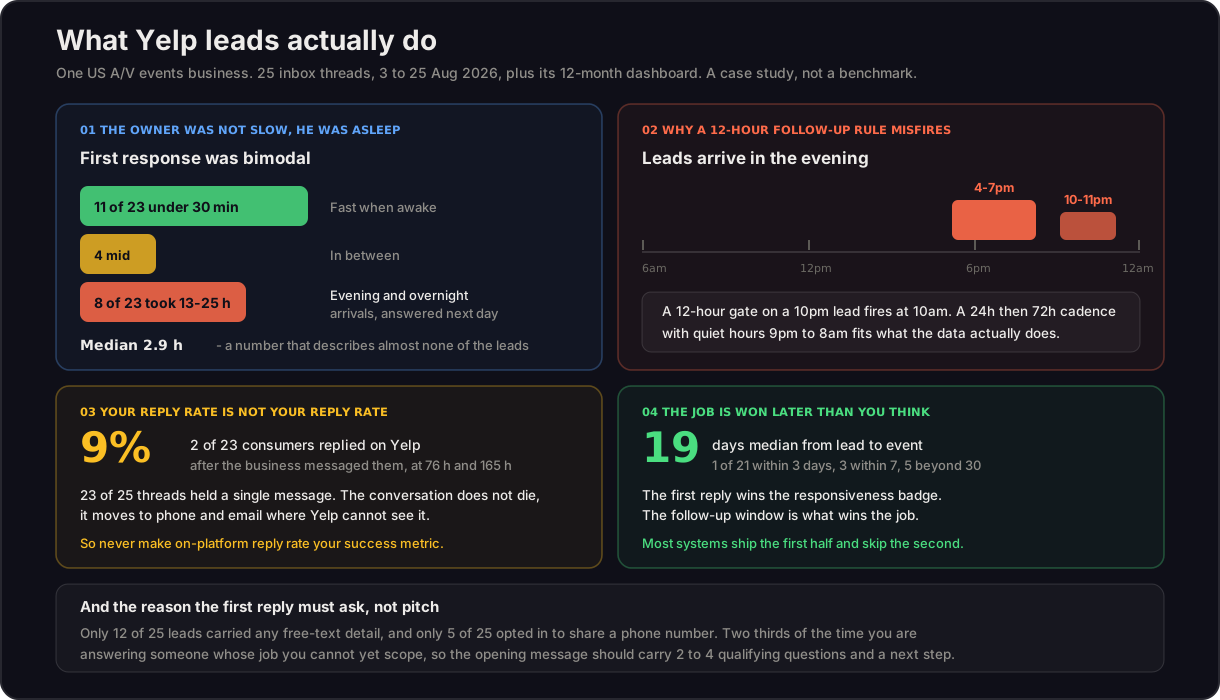
The numbers below come from one US audio-visual events business: 25 inbox threads between 3 and 25 August 2026, plus its 12-month Yelp dashboard, read on 26 August 2026. Treat this as a case study, not an industry benchmark. One business, one month, one category.
For context on scale: this business sees roughly 100 to 180 leads a month, averaging about 130, so over 1,500 a year, with a spring peak and a December trough. Between 75 and 80 percent come from Yelp ads, with organic flat at 25 to 45 a month. It holds a 2-hour responsiveness badge at a 100% response rate.
Four findings changed how we design these systems.
The owner was not slow, he was asleep. Median first response was 2.9 hours, but that median describes almost no actual lead. Eleven of 23 were answered inside 30 minutes and eight took 13 to 25 hours. The slow ones were evening and overnight arrivals. Speed was never the problem, coverage was.
Leads arrive in the evening. Arrivals cluster 4 to 7pm and again 10 to 11pm local time, and Tuesday alone accounted for 10 of 25. This breaks the standard 12-hour follow-up rule, which on a 10pm lead fires at 10am the next morning, often before the first reply has even been read. A 24-hour then 72-hour cadence with quiet hours from 9pm to 8am local fits the data far better.
Your reply rate is not your reply rate. Only 2 of 23 consumers replied on Yelp after the business messaged them, a 9% on-platform reply rate, and those two came at 76 and 165 hours. Twenty-three of 25 threads held a single message. The conversation is not dying, it is moving to phone and email where Yelp cannot see it. Never make on-platform reply rate your success metric. Measure booked jobs with the source tagged.
The job is won later than you think. Median gap from lead to event was 19 days, with just 1 of 21 inside three days and 5 beyond 30. The first reply wins the responsiveness badge. The follow-up window wins the job. Most builds ship the first half and skip the second.
One more, which shapes the message itself: only 12 of 25 leads carried any free-text detail, and only 5 of 25 shared a phone number. Two thirds of the time you are answering someone whose job you cannot yet scope, so the first message has to ask two to four qualifying questions and offer a next step, not pitch.
What Yelp's rules actually say about AI replies
This section is the one competing guides skip, and it is the one that decides whether your build survives contact with Yelp.
Yelp's Leads Program Agreement, effective 28 May 2026, is explicit in three places:
- Clause 5.d: auto-responders are discouraged. AI-generated responses must be reviewed by human staff. Templating is acceptable, but word choice should vary between responses.
- Clause 5.g: AI use in responses must be clearly disclosed to consumers.
- Data: no training or fine-tuning AI on customer data, and delete or de-identify data once the lead lifecycle ends. TCPA liability for any SMS or calls sits with the partner, not Yelp.
There is a real tension here worth naming plainly: Yelp and Zapier both publish "reply to new Yelp leads with ChatGPT" templates, so unattended AI replies are clearly tolerated in practice. But tolerated is not the same as permitted, and the account at risk is yours.
The design that satisfies all three clauses is draft-then-approve. The AI writes the reply, it lands in a review queue on a phone, a human taps approve, and it sends. You keep almost all the speed, because approving a written draft takes seconds while composing one takes minutes. You keep variation, because the model is generating rather than pasting. And you have a defensible answer if Yelp asks.
Where a client wants fully unattended sending, we build it with a disclosure line in the message and say clearly that clause 5.d makes it a judgement call they are taking, not a rule we have found a way around.
Two operational rules from Yelp are worth wiring into any build as hard constraints: messaging auto-disables after 7 days without replying to a new message, and after 30 days without any reply. And Yelp reports that businesses responding in under a day see about 4x more requests, which is the actual commercial argument for this whole category.
The Yelp auto responder question, and what changed in 2026
If you searched "Yelp auto responder", "Yelp auto reply" or "Yelp answering service", here is the honest map of that market.
Yelp has no native auto-reply for Request a Quote messages. The gap is real, which is why a vendor category exists to fill it. What Yelp does sell, since 2026, is AI call answering: Yelp Host for table-service restaurants (from $149/month) and Yelp Receptionist for local businesses (from $99/month), which answer the phone, ask qualifying questions, record, transcribe and drop a summary into your inbox. Useful, and a different problem: neither touches the Request a Quote thread, which is where this article lives.
The auto responder vendors (LeadTruffle, LeadWinner, Casey and similar) sell instant RAQ replies as a subscription. What their pages skip is everything above: clause 5.d's human-review expectation, the AI disclosure requirement, the masked email, the phone number arriving on a separate event, and the 7 and 30-day auto-disable rules. A subscription responder and a build on your own CRM both work; the difference is who owns the system, whether it survives an account review, and whether the lead lands in your CRM or in another vendor's inbox.
Three 2026 changes raise the stakes on reply quality:
- Response Quality is now scored by AI. Yelp shows the score in the business inbox with real-time guidance, and eligible businesses get an AI-awarded badge on the public page. The scoring rewards replies that acknowledge project details, ask a relevant follow-up and give a quote or availability, exactly what a good draft-then-approve desk produces and exactly what a generic "call us" template fails.
- Yelp Assistant now starts quote requests. Since April 2026, Yelp's consumer AI can initiate Request a Quote across 450+ categories, so a growing share of leads arrive already structured by an AI intake.
- Yelp leads are coming to ChatGPT. Yelp's partnership with OpenAI (announced July 2026) feeds reviews, photos and quote requests into ChatGPT with branded links, and Yelp has said Request a Quote will be available inside ChatGPT local-services searches. When a lead can start in a chatbot, the business that answers in minutes with a specific, human-approved reply is the one that books the job.
The agent set worth building beyond a first reply
A first-reply Zap is the entry point. The systems that change the numbers go further.
Qualification and routing. One model call reads the lead and the structured fields, classifies job type, size and urgency, and routes it. The general pattern is covered in 12 AI agent use cases. In the case above, roughly two thirds of requests fell into one bread-and-butter category with a long tail of specialised ones, and job sizes clustered into three clear bands. Run that breakdown on your own inbox: those clusters are your routing rules and pricing tiers, already written, just not written down.
Quiet-hours-aware follow-up. A Delay step holds an evening lead until 8am, then runs a 24-hour and 72-hour sequence, cancelled the moment a New Consumer Message trigger fires. This is the single highest-return addition, because it targets the 19-day window where the job is actually won.
CRM write-through with the source intact. Create the record on first contact, tagged Yelp, so that when the booking lands weeks later the attribution survives. Most local businesses genuinely cannot say what Yelp is worth to them, because attribution dies at the first reply.
Phone and SMS branch. When the lead opts in to share a number, route differently. Note the TCPA liability sits with you, so this branch needs consent handling, not just a connector.
Review monitoring. Reviews decide whether anyone messages you at all. Speed-to-lead systems for other local categories follow the same shape, as in automation for real estate. This runs on the public Yelp data API, so it is the one piece you can build on Make or another platform if that is where your stack lives.
Conversions API push. For larger advertisers, sending conversion data back to Yelp lets you measure and optimise ad spend against actual booked jobs rather than lead counts. Given 75 to 80% of leads in the case above came from ads, this closes the most expensive loop on the board.
What it costs to build
| System | What you get | Build cost |
|---|---|---|
| First-reply Zap | New Lead trigger, AI draft, Create Message, logged to Tables | $300 to $800 |
| Draft-then-approve desk | The above with a mobile review queue, disclosure line and variation controls | $1,200 to $2,500 |
| Qualified routing and follow-up | Classification, quiet hours, 24h/72h cadence with reply cancellation, CRM write-through | $2,500 to $5,000 |
| Full Yelp revenue system | Adds review monitoring, phone/SMS consent branch, Conversions API and reporting | $5,000 to $9,000 |
Running cost is the surprise: platform tasks are near zero because Yelp steps are free, so budget the AI step and your Zapier plan. Our business automation cost guide covers how these bands compare to what agencies charge for the same work.
The payback maths is unusually clean for local services. If your average job is worth $400 and the system converts one additional lead a month that you would otherwise have lost overnight, it repays a $2,000 build inside five months. At 130 leads a month with 8 of every 23 previously waiting until morning, recovering one is a low bar.
Honest limits
This does not work outside Zapier today. If your stack is Make or n8n, the Yelp lead surface is closed to you. We will say so rather than sell you a workaround that reads public review data and calls it lead automation.
AI replies are not unattended-by-default under Yelp's rules. Anyone promising you a fully hands-off Yelp bot is either unaware of clause 5.d or hoping you are.
The case numbers above are one business. They are directionally useful and they are not your benchmark. Read your own inbox before designing a cadence.
On-platform metrics will understate your results. If the system works, most of the conversation leaves Yelp. Instrument the CRM, not the Yelp thread.
FAQ
Q: Does Yelp have an auto reply feature for leads? A: No. Yelp has no native auto-reply for Request a Quote messages as of August 2026. Yelp sells AI call answering separately (Yelp Host from $149/month for restaurants, Yelp Receptionist from $99/month for local businesses), but RAQ thread replies need either a third-party responder subscription or a build on Zapier's Yelp Leads app, reviewed by a human per Yelp's own agreement.
Q: What is a Yelp answering service and do I need one? A: Two different products share the name. Call answering (including Yelp's own Receptionist) picks up the phone; a lead-response system answers Request a Quote messages, follows up and writes the lead into your CRM. Most service businesses leaking revenue on Yelp are losing the written enquiries, not the calls, so check your RAQ response time before buying anything.
Q: Will Yelp leads really come through ChatGPT? A: Yelp and OpenAI announced in July 2026 that Yelp data now appears in ChatGPT with branded links, and Yelp has said Request a Quote will be available inside ChatGPT local-services searches. Treat it as one more entry point into the same inbox: the constraints, the response scoring and the value of a fast, specific reply do not change.
Q: Does Yelp have an API for leads? A: Yes, but it is partner-gated. The Yelp Leads API exists with webhook support, and it is disabled by default, reserved for official advertising, listing-management and Insights partners, with lead access limited to advertising businesses. The accurate framing is that there is no self-serve API, not that there is no API. Non-partner businesses are pointed to Zapier by Yelp's own documentation.
Q: Can Make.com or n8n connect to Yelp leads? A: No, as of August 2026. Make's Yelp app covers the public Fusion API only: business search, reviews and events, with no lead or message modules. Zapier's partner app is the only no-code route to Yelp lead messaging. Review monitoring can be built on Make, because that uses the public data API.
Q: How much does it cost to automate Yelp lead replies on Zapier? A: Very little in platform terms. Yelp Leads steps are unlimited free tasks under Zapier's partner deal, and Tables, Delay, Filter, Paths, Formatter and Looping are free too. Code by Zapier is 1 task, and AI by Zapier is 3 tasks per run on premium models or 1 on small models. A first-reply Zap therefore costs 1 to 3 tasks per lead, all of it the AI step. Zapier Pro is $239.88 a year for 750 tasks a month.
Q: Does Yelp allow AI auto-replies to leads? A: With conditions. Yelp's Leads Program Agreement effective 28 May 2026 discourages auto-responders in clause 5.d, requires AI-generated responses to be reviewed by human staff, and requires varied word choice rather than identical templates. Clause 5.g requires AI use to be clearly disclosed to consumers. The agreement also prohibits training AI on customer data and requires deletion or de-identification at the end of the lead lifecycle. A draft-then-approve design satisfies all of it while keeping nearly all the speed.
Q: What triggers and actions does the Zapier Yelp Leads app have? A: Triggers are New Lead, New Consumer Message, New Business Message and Phone Availability. Actions are Create Message, Mark Lead as Replied, Mark Message as Read, Get Business Details and Get Lead Details. Create Message is the one that makes genuine two-way automation possible rather than notification-only.
Q: How fast should you reply to a Yelp lead? A: Yelp reports that businesses responding in under a day see about 4x more requests. Beyond speed, two hard rules matter: Yelp messaging auto-disables after 7 days without replying to a new message, and after 30 days without any reply. In the case study above, leads clustered in the evening, so the practical problem was overnight coverage rather than daytime speed.
Q: Why do so few Yelp leads reply to my messages? A: They usually have replied, just not on Yelp. In 25 threads from one advertising business, only 2 of 23 consumers responded on-platform after the business messaged them, and 23 of 25 threads held a single message. The conversation moves to phone and email. Judge the system on booked jobs with the source tagged in your CRM, not on Yelp thread activity.
Q: What should the first automated reply actually say? A: Ask, do not pitch. Only 12 of 25 leads in the case study carried any free-text detail and only 5 shared a phone number, so most of the time you cannot scope the job from the lead alone. Two to four qualifying questions plus a clear next step outperforms a capability pitch, and it gives a human something to work with when they pick the thread up.
Q: Should an AI agent quote prices to Yelp leads? A: No. A written number is a commitment, and a Yelp lead rarely contains enough scope to price honestly. Qualify, answer questions, and book the call or visit where a human can quote properly.
Q: What is the best follow-up cadence for Yelp leads? A: In the case study the median gap from lead to event was 19 days, with only 1 of 21 inside three days. A 24-hour then 72-hour sequence with quiet hours from 9pm to 8am local, cancelled automatically when a New Consumer Message trigger fires, matched the data far better than a standard 12-hour rule, which on an evening lead fires before dawn.
Facts on this page were verified against Yelp's developer documentation and Leads Program Agreement, Zapier's published task-usage rules and live Zap history, and Make's app directory, in August 2026. Case numbers come from one business and are labelled as such. Rules and platform behaviour change, so re-check before building.
Running Yelp ads and losing evening leads to whoever answers first? Book a free consult and you will get a straight scope, including the honest answer if a $300 first-reply Zap is all you actually need.