Yes, one self-hosted n8n instance can run many workflows. There is no Hostinger or DigitalOcean plan that translates cleanly into “N workflows.” A saved workflow mostly occupies database records; the expensive part is what happens when workflows execute at the same time.
Security update, 16 October 2026: self-hosting means applying n8n's fixes yourself. The security update of 14 October 2026 lists 15 advisories, four rated high on GitHub, fixed in 2.43.5 on the stable line (GitHub shows 2.43.6 as current stable on 15 October). n8n Cloud was patched automatically. Details: automation platform updates for October 2026.
The practical rule is:
Size n8n for peak concurrent executions, execution duration, payload size, code or file processing, retained history and recovery requirements, not the number of workflow canvases.
Written by Prem Patel, a Make.com Level 5 Expert and Zapier Certified Expert who also runs n8n in production, including the Threads growth system behind 1.15M views in 27 days. For what n8n Cloud charges and what the Sustainable Use License allows, read n8n pricing, licensing and self-hosting first. This guide explains the architecture and provides dated Hostinger and DigitalOcean cost examples. Prices were checked on September 10, 2026. They exclude tax, exchange-rate effects, add-ons and any n8n commercial license. Use the interactive cost calculator for your own workload and verify checkout prices before purchasing.
What “one n8n self-host” actually means
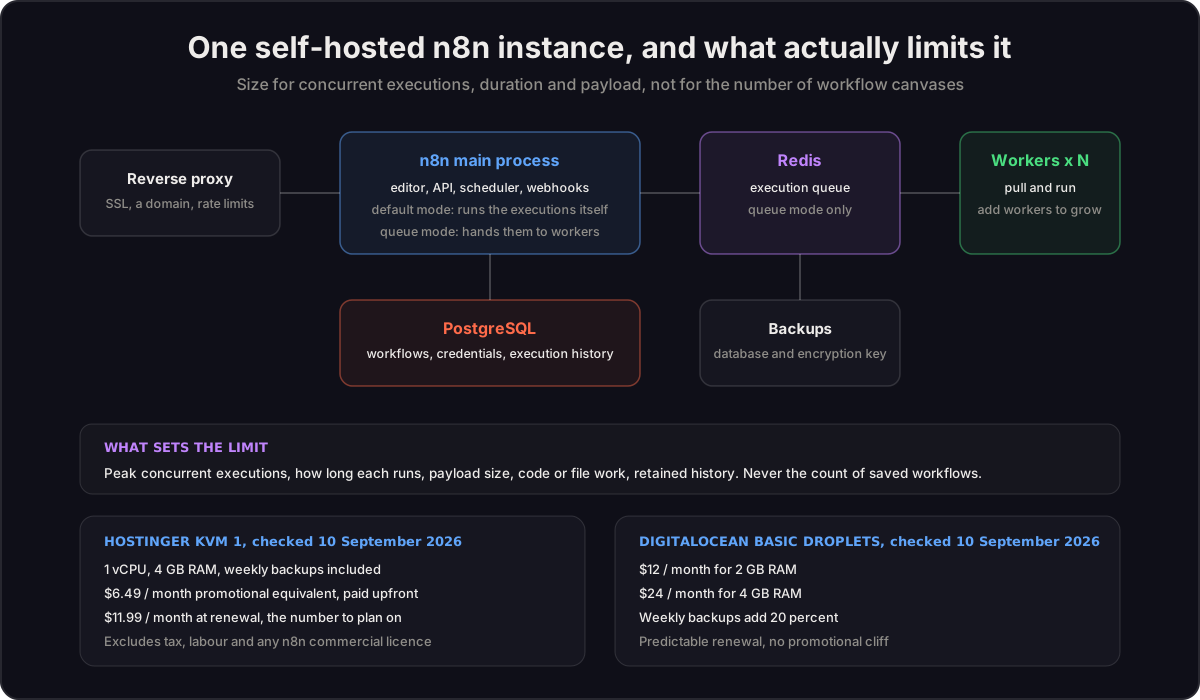
A basic self-hosted installation usually has four pieces:
- The n8n application, which serves the editor, receives triggers and runs workflows.
- A database, which stores workflows, encrypted credentials, settings and execution history. Small installations often keep SQLite or Postgres on the same VPS.
- Persistent storage, including the n8n data directory and any locally stored binary data.
- A reverse proxy and TLS certificate, so webhooks and the editor are reached securely over HTTPS.
All of those can live in Docker containers on one VPS. That is still one computer and one failure domain: if the VPS, disk, database or deployment fails, every workflow on that instance is affected.
n8n's official queue-mode documentation describes a scaled design with a main process, worker processes, Redis and a shared Postgres database. Workers can be added to process more jobs. Running those containers on one larger VPS may improve process separation, but it does not create high availability because the host is still shared.
Does n8n limit the number of workflows?
n8n's pricing page lists unlimited workflows on its plans and defines an execution as a complete workflow run regardless of its node count. Community Edition does not add a vendor charge for each execution.
That does not mean a server has unlimited capacity. One inactive workflow and 500 inactive workflows can have a small difference in storage, while five heavy workflows firing together can exhaust a small server.
The factors that matter are:
- how many production runs overlap at the busiest moment;
- how long each run stays active;
- whether nodes wait on APIs or use CPU for code and transformation;
- the number and size of JSON items, files, images and documents;
- whether manual executions copy data to the browser during development;
- how much successful and failed execution history is retained;
- whether retries arrive in a burst after an external service recovers;
- whether one host is acceptable or recovery and redundancy are required.
n8n's memory guidance specifically identifies JSON volume, binary data, node count, Code nodes, manual runs and simultaneous workflows as memory factors. Its execution-data guidance says pruning is enabled by default and currently uses a 14-day or 10,000-execution default threshold. Changing retention changes disk and database requirements.
A useful concurrency estimate
A planning calculator can estimate average concurrency with:
monthly executions × average duration in seconds ÷ 2,592,000 seconds in a 30-day month
Suppose 40,000 runs each take 15 seconds:
40,000 × 15 ÷ 2,592,000 = 0.23 average concurrent runs
Average demand is not the production peak. If traffic arrives in short batches, retries pile up, or a campaign sends many webhooks together, the peak can be many times higher. Applying a 20× burst factor gives a planning peak of about 4.6 concurrent runs.
This formula is an estimate, not a hardware benchmark. Two workflows with the same duration can consume very different memory and CPU. Use it to reject obviously unsuitable plans, then run representative load tests with real payloads.
Hostinger n8n VPS cost snapshot
Hostinger offers an n8n one-click image, but it is still a self-managed VPS. Its official VPS page says plans are paid upfront, displays the monthly equivalent, includes automatic weekly backups, and lists these public USD prices at the verification date:
| Plan | Resources | Promotional monthly equivalent | Renewal monthly equivalent |
|---|---|---|---|
| KVM 1 | 1 vCPU, 4 GB RAM, 50 GB NVMe | $6.49 | $11.99 |
| KVM 2 | 2 vCPU, 8 GB RAM, 100 GB NVMe | $8.99 | $14.99 |
| KVM 4 | 4 vCPU, 16 GB RAM, 200 GB NVMe | $12.99 | $28.99 |
| KVM 8 | 8 vCPU, 32 GB RAM, 400 GB NVMe | $25.99 | $49.99 |
The promotional number is not a forever price. For ongoing comparisons, the calculator defaults to the renewal rate. Hostinger's backup documentation says weekly backups are enabled by default. A provider snapshot is useful, but a serious setup should also test whether the complete n8n data directory, database and encryption key can actually be restored.
DigitalOcean n8n cost snapshot
DigitalOcean uses on-demand Droplets with monthly caps. Its official Droplet pricing listed these Basic shared-CPU configurations at the verification date:
| Plan | Resources | Monthly cap |
|---|---|---|
| Basic | 1 vCPU, 1 GB RAM, 25 GB SSD | $6 |
| Basic | 1 vCPU, 2 GB RAM, 50 GB SSD | $12 |
| Basic | 2 vCPU, 2 GB RAM, 60 GB SSD | $18 |
| Basic | 2 vCPU, 4 GB RAM, 80 GB SSD | $24 |
| Basic | 4 vCPU, 8 GB RAM, 160 GB SSD | $48 |
| Basic | 8 vCPU, 16 GB RAM, 320 GB SSD | $96 |
The $6 plan is a price point, not a universal production recommendation. One gigabyte leaves little room when n8n, a database, operating-system services and concurrent workflow data share memory.
DigitalOcean's Droplet product page prices weekly backups at 20% of Droplet cost. Therefore a $24 Droplet plus weekly provider backups is approximately $28.80 per month before labour or external services.
If a design separates stateful services, DigitalOcean's managed database pricing listed entry pricing of $15.15 per month for 1 GB managed Postgres and $15 per month for 1 GB managed Valkey. These are optional architecture costs, not mandatory additions to every n8n installation.
Real monthly cost examples
These examples show known infrastructure only. Labour and commercial licensing are separate.
| Architecture | Known monthly infrastructure | What it means |
|---|---|---|
| Hostinger KVM 1 at renewal | $11.99 | One 4 GB VPS; weekly provider backup included |
| DigitalOcean 2 GB Droplet + weekly backup | $14.40 | $12 compute + $2.40 backup |
| DigitalOcean 4 GB Droplet + weekly backup | $28.80 | $24 compute + $4.80 backup |
| Two DigitalOcean 4 GB servers + managed Postgres + managed Valkey + server backups | $87.75 | $48 compute + $9.60 backups + $15.15 database + $15 queue |
The last row is not automatically highly available. A production HA design may also need redundant main processes, load balancing, database redundancy, queue redundancy, monitoring, secrets management and tested recovery. Those requirements should be scoped rather than hidden inside a single “VPS” line.
What maintenance belongs in total cost of ownership?
Self-hosting transfers operations to you. Monthly ownership can include:
- n8n and container updates;
- operating-system security patches;
- database checks and storage pruning;
- credential, secret and TLS-certificate management;
- monitoring, alert review and capacity checks;
- backup verification and restore testing;
- investigating failed, stuck or duplicated executions;
- scaling before campaigns or known traffic peaks;
- incident response when the instance is unavailable.
The calculator multiplies your estimated maintenance hours by your internal hourly cost. It does not impose a universal number because a stable internal tool and a regulated customer-facing system have very different operating requirements.
The licensing boundary agencies need to understand
Infrastructure price and software permission are separate questions.
n8n's Sustainable Use License permits internal business use and consulting or support around a company's internal instance. It does not permit white-labelling n8n or charging customers for access to hosted n8n as a service.
n8n's official use-case guidance says that hosting and managing clients' workflows and credentials inside your own agency instance requires an Enterprise license. Consulting on a client-owned internal instance is treated differently.
Use these planning categories:
| Ownership model | Calculator treatment |
|---|---|
| One company runs its own internal workflows | Community Edition may fit; verify features and license |
| An agency builds on a client-owned internal instance | Confirm the client owns and operates it |
| An agency hosts multiple clients and their credentials in one agency instance | Commercial license required; add a live n8n quote |
| Customers receive access to a white-labelled automation product | Commercial or Embed terms need direct review |
This is operational guidance, not legal advice. Confirm unusual business models directly with n8n.
When one VPS is sensible
A single VPS is often a sensible starting architecture when workflows are internal, downtime has a tolerable manual fallback, payloads are moderate, bursts are controlled, and someone owns backup restoration and security updates.
Start with enough memory for the chosen workload, set an explicit production concurrency limit, prune unneeded execution history, monitor memory and disk, and test a restoration before calling the system production-ready.
When to separate services or use queue mode
Consider a larger or distributed design when:
- webhook bursts create long execution queues;
- CPU-heavy Code nodes or file processing compete with the editor and triggers;
- one workflow can consume enough memory to affect every other workflow;
- maintenance must occur without stopping all executions;
- recovery objectives cannot tolerate one VPS as the only copy;
- execution volume is less important than the business impact of downtime.
In queue mode, Redis coordinates jobs and workers read and write execution state through Postgres. Filesystem binary storage is not supported as shared queue-mode storage; n8n's external-storage documentation says S3-backed external storage is a self-hosted Enterprise feature. This can make binary-heavy scaled systems a licensing and architecture decision, not just a server-size decision.
Hostinger or DigitalOcean: which should you choose?
Choose Hostinger when you want the lowest simple entry cost, an n8n-oriented one-click deployment, more RAM per displayed dollar and included weekly VPS backups. Budget using the renewal price and remember that the plan is paid upfront.
Choose DigitalOcean when you prefer hourly or per-second infrastructure billing, clearer composable cloud services, managed Postgres or Valkey options, and a path toward separating the application, workers and stateful services. The equivalent simple server can cost more once backups are included.
Choose n8n Cloud instead when nobody on the team should own patching, recovery, monitoring or capacity. A higher subscription can be the cheaper operating decision if self-hosting creates fragile ownership.
A safe decision sequence
- List monthly executions for each workflow group.
- Measure or estimate average run duration.
- Identify the busiest minute or retry burst, not only the monthly average.
- Classify the workload as light API I/O, mixed, or code/file/AI heavy.
- Decide whether one-host downtime is acceptable.
- Add backups, database, queue, monitoring and labour to the server price.
- Confirm whether the use is internal, client-owned or agency-hosted.
- Load-test the selected plan with representative payloads.
- Test a complete restore, including the database, data directory and encryption key.
The bottom line: one n8n instance can run many workflows, but “unlimited workflows” is a licensing and billing description, not a server-capacity guarantee. Model the work that overlaps, the data it carries and the recovery obligation. If you would rather have it sized for your actual workflows, book the free 30-minute consult and bring them; what a build costs is on the services page.
Frequently asked questions
How many workflows can one self-hosted n8n instance run?
n8n does not price Community Edition by saved workflow count. Practical capacity depends on concurrent executions, duration, payload size, workload type, retention and the server resources. Load testing with representative data determines the real limit.
What does n8n cost on Hostinger?
At the 10 September 2026 snapshot, Hostinger KVM 1 displayed a $6.49 promotional monthly equivalent and an $11.99 renewal monthly equivalent, paid upfront, with 1 vCPU, 4 GB RAM and weekly backups included.
What does n8n cost on DigitalOcean?
At the 10 September 2026 snapshot, suitable Basic Droplet examples ranged from $12 a month for 2 GB RAM to $24 for 4 GB RAM. Weekly Droplet backups add 20 percent, before labour or managed services.
Can an agency host several clients in one Community Edition n8n instance?
n8n's official use-case guidance says hosting and managing clients' workflows and credentials inside an agency-owned instance requires an Enterprise licence. Client-owned internal instances are treated differently.
Sources
- n8n pricing and execution definition
- n8n queue-mode architecture
- n8n memory guidance
- n8n execution-data retention and pruning
- n8n Sustainable Use License
- n8n licensing use-case guidance
- Hostinger VPS pricing and included backups
- Hostinger VPS backup documentation
- DigitalOcean Droplet pricing
- DigitalOcean Droplet backup pricing
- DigitalOcean managed database pricing