

Who it is for. Online stores on Shopify that want a daily blog without thin or duplicate posts, and people who build Make scenarios for stores. If you sell online on another platform, the structure still applies; the Shopify step and the prompts change (see what it does not do).
The result it was built for. On a US used-book store, against the store's 125 existing articles, typical length went from 526 words to 1,300+ in the first run, and articles with no links into the shop went from 94% to 0% (first production run, September 2026). The full case is on the case study page.
How it works
It runs once a day at 09:00 (the blueprint's schedule). Every module retries twice, 5 minutes apart, before the run stops.
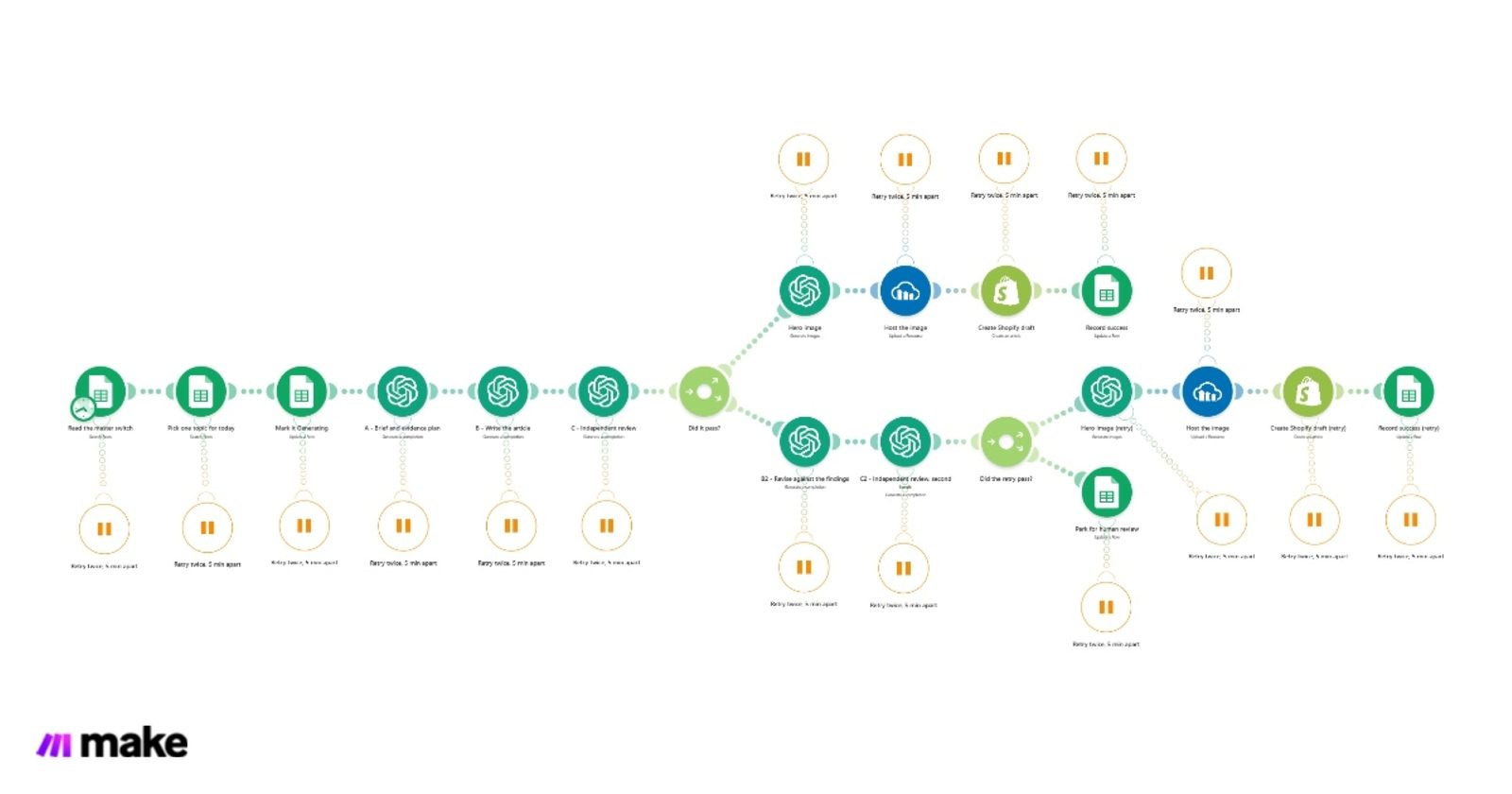
- Read the master switch. The
Configtab saysautomation_enabled=TRUE, or nothing runs. Your off switch is a cell. - Pick one topic for today from the
Content_Queuetab: a row dated today with statusPlanned, or aSpareorFixrow. It skips anything alreadyPublishedor already holding a Shopify article ID, and marks the rowGenerating. - A, the planner (OpenAI) turns the topic into a brief: what is safe to claim, what to steer clear of and the two store searches to link to.
- B, the writer (OpenAI) writes the article to that brief, with exactly three tracked links into the store and a meta description, summary, tags, handle and image alt text.
- C, the editor (OpenAI, its own prompt) scores the draft on 8 checks and lists blocking issues. Nothing grades its own work.
- Passed (overall 85 or more and no blocking issue): a hero image is generated, hosted on Cloudinary, and the article is created in Shopify as a draft. The sheet row gets the score, the article ID, the URL and the date.
- Failed once: B2 rewrites against the editor's instruction and C2 reviews again. Passed now: same as step 6.
- Failed twice: the row is set to
Needs_reviewwith both scores and the editor's note. It never reaches the blog.
The editor's 8 scores
The editor scores each of these from 0 to 100, then gives an overall score that is "your honest overall judgement, not an average" (the editor's prompt, in the blueprint).
| Score | What it asks |
|---|---|
intent_coverage | Does it answer what the searcher wanted? A "best books like..." article that never recommends fails. |
factual_safety | No claim the brief does not support, no invented quote, no fake first-hand testing, no stock promises such as "in stock now". |
seo | Keyword use without stuffing, a meta description of 165 characters or less, alt text with the keyword. |
geo_aeo | Written so AI answers can lift it: question-shaped sections and direct answers. |
readability | Plain, useful sections, no filler, no thesis voice. |
brand_voice | The store's voice, not a made-up owner story. |
conversion_linking | All three supplied store links, each with an anchor that matches the article, and no other links. |
structure_html | Clean HTML, at least 4 H2 sections, no H1 inside the body, at least 800 words. |
Pass rule: overall 85 or more and no blocking issue. One blocking issue fails the draft whatever the score. The editor also writes a revision instruction under 400 characters, which the writer reads on the second attempt and a person reads in the sheet.
What you need
- A Make account. Each run uses one credit per module that runs, plus the OpenAI calls, so check your plan's credits before you schedule it daily.
- An OpenAI API key. The blueprint uses a text model for the planner, writer and editor and an image model for the hero image; you can change both in the modules.
- A Shopify store with a blog, connected to Make with permission to create articles.
- A Cloudinary account to host the hero image.
- A Google Sheet with two tabs, set up below.
Running cost for a single blog is about $15 to $40 a month in AI and hosting (our estimate, 2026), on top of your Make plan.
Set up the sheet
Tab 1: Config. Cell A1 automation_enabled, cell B1 TRUE. Set B1 to FALSE to stop every run.
Tab 2: Content_Queue. One topic per row, with these 12 columns in this order (row 1 is the header):
id date topic category primary_keyword status qa_score shopify_article_id article_url notes published_date image_url| Column | You fill | The scenario writes |
|---|---|---|
| A id | Any short ID, used in the link tracking | |
| B date | The day to write it, as YYYY-MM-DD | |
| C topic, D category, E primary_keyword | What to write about | |
| F status | Planned, Spare or Fix | Generating, then Draft or Needs_review |
| G qa_score | The editor's overall score | |
| H shopify_article_id, I article_url | The Shopify draft and its URL | |
| J notes | Optional notes for the planner | A run summary, or the editor's note when parked |
| K published_date, L image_url | The date and the hosted hero image |
The scenario reads columns by position, so keep the order even if you rename the headers.
Copy it and set it up, step by step
Copy the scenario. Sign in to Make, open the shared scenario and copy it into your own team. It arrives with every connection empty.
Google Sheets. Connect your Google account in the 6 Sheets modules (master switch, topic pick, mark Generating, the two "Record success" updates and "Park for human review") and pick your spreadsheet. That replaces
REPLACE_WITH_YOUR_SHEET_ID.OpenAI. Connect your API key in the planner, writer, editor, revise, second review and both image modules.
Cloudinary. Connect it in the two "Host the image" modules.
Shopify. Connect your store in both "Create Shopify draft" modules and put your blog's ID in place of
REPLACE_WITH_YOUR_BLOG_ID. Open the blog in your Shopify admin (Blog posts, Manage blogs): the ID is the number at the end of its address. Change the author name from "Store Owner".Your store's address. Replace
https://www.your-store.comin the planner, editor and "Record success" modules, and the blog path in the article URL, with your own.Rewrite the voice and rules for your store. The prompts were written for a used-book store: the facts the editor checks are about books, authors and editions, and the house phrasing is about browsing a book catalogue. Rewrite those parts for what you sell. This is the step that decides the quality.
Test once. Add one row dated today with status
Planned, set the switch toTRUEand click Run once. Check the Shopify draft and the sheet row.Schedule it. Turn the scenario on; it runs at 09:00 daily. Keep reading the drafts for the first weeks. It creates drafts, not published posts, until you change that.
What the blueprint does not do
The shared scenario is the daily writer and editor. In the production system it is one of three scenarios:
- No duplicate check against your existing articles. In production, an Article Index Reader labels every live article by search intent, and a Monthly Topic Planner rejects new topics that overlap. Without them, you choose topics that do not repeat yourself.
- Prompts for one store. Your products, voice, fact rules and link targets need their own prompts.
- Drafts only. Publishing on its own, interlinking older articles, live research with citations, custom image styles and SEO metafields are not in it.
Quick answers
Is the blueprint free?
Yes. Make shares it publicly in its Scenario of the Month Hall of Fame. You pay only for what it uses: Make credits, OpenAI calls and Cloudinary hosting, about $15 to $40 a month for one blog on top of your Make plan (our estimate, 2026).
Does it publish to my blog by itself?
No. It creates Shopify drafts. A draft that fails the editor twice is not created at all; it is parked in the sheet for a person.
What decides whether an article passes?
An overall score of 85 or more from the independent editor and no blocking issue, such as an invented claim, a missing store link or a recommendation article that never recommends.
Does it work on WooCommerce, WordPress or Wix?
It is built for Shopify. The same structure works with another platform's Make app in place of the Shopify step, but the links, fields and prompts change with it.
Does it help with AI search?
One of the editor's 8 scores is GEO and AEO: question-shaped sections and direct answers that AI answers can quote. Measuring whether AI answers cite your store is part of a custom build.
Sources
- Make Community Team, "Hall of Fame: Scenario of the Month", September 2026 edition, posted 7 Oct 2026: community.make.com.
- The shared scenario "Daily Article Producer", read 15 Oct 2026: us2.make.com. Modules, filters, schedule, retries and prompt rules on this page are read from it.
- First production run numbers: the case study (September 2026).