Accounting and CA firms are the single best-fit business type for automation, and among the slowest to adopt it. The work is high-volume, document-heavy, deadline-driven and rule-based, which is exactly the profile automation handles well. Yet most firms still run client onboarding through email threads, chase documents by WhatsApp manually and rebuild the same reconciliation spreadsheet every month. This guide covers the nine systems that consistently pay for themselves in a practice, what each costs to build, and the three that are not worth automating yet.
I am Prem Patel, founder of Nex Automations, an AI systems studio in Ahmedabad. I hold the Make Level 5 Expert and Zapier Certified Professional credentials, and Nex Automations is listed in both official partner directories, the only India-based company on both as of August 2026. Document-heavy back-office work is a large share of the 1,200+ systems we have shipped, including an invoice pipeline that cut cycle time 77%.
Why accounting practices automate well
Four properties make a process automatable: high volume, stable rules, structured or semi-structured inputs, and a clear failure cost. Accounting work scores on all four in a way most industries do not. The catch is that the inputs arrive in the worst possible formats, as email attachments, WhatsApp photos, scanned PDFs and client spreadsheets that change shape every quarter. That is why the winning systems in this list all start with intake and extraction, not with the accounting software.
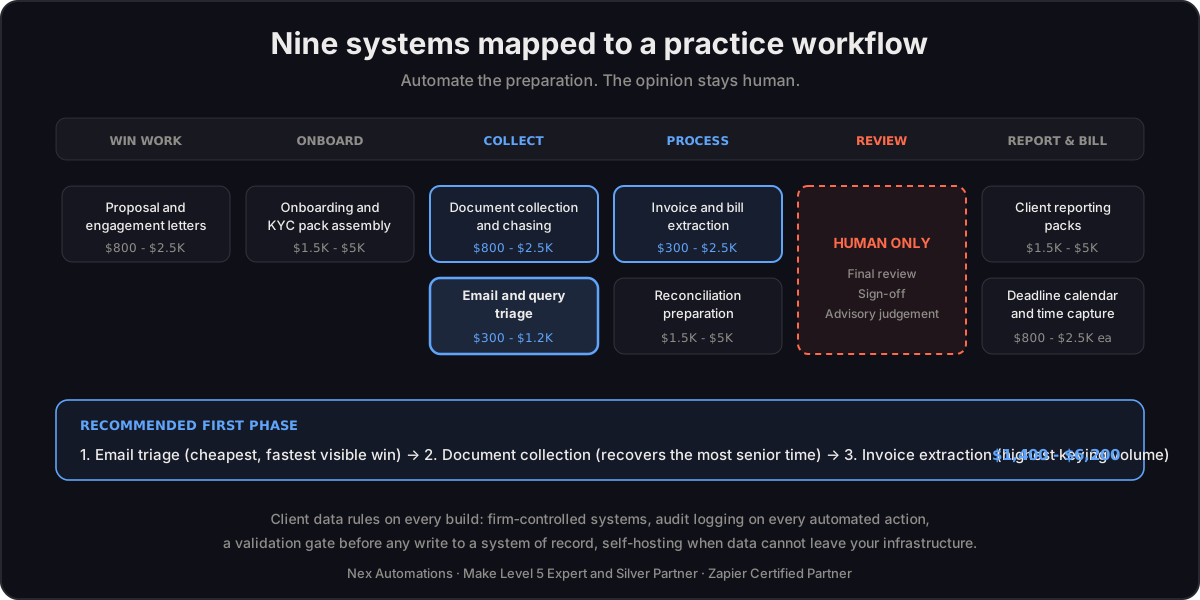
The 9 systems, with real build costs
1. Client document collection and chasing
2. Invoice and bill data extraction into the ledger
3. Bank statement and reconciliation prep
4. Client onboarding and KYC pack assembly
5. Deadline and compliance calendar automation
6. Practice-management and time-capture sync
7. Client reporting packs
8. Query and email triage
9. Proposal and engagement-letter generation
What not to automate yet
| Process | Why not |
|---|---|
| Final review and sign-off | Professional judgement and regulatory liability. Automate the preparation, never the opinion |
| Complex advisory work | Low volume, high variance, the value is the thinking |
| Anything with an undecided workflow | If two partners do it differently, fix the process first. Automating an undecided process makes the confusion faster |
Practical sequencing for a firm
Start with email triage (system 8) because it is cheap and visible, then document collection (system 1) because it recovers the most senior time, then invoice extraction (system 2) because it removes the highest-volume keying. Those three typically land between $1,400 and $6,200 total, and most firms recover 15 to 20 hours a week across them. The larger reconciliation and reporting systems are worth building after the team has seen the first three work, because adoption, not technology, is what usually fails in a practice.
On platform choice: most accounting-firm systems run comfortably on Make or Zapier with the practice's existing tools, and the full comparison with pricing math is in our platform guide. For what the whole engagement costs including who you hire, see the business automation cost breakdown.
Data handling, stated plainly
Accounting data is client-confidential and often regulated. Three rules we apply on every practice build: keep data inside systems the firm already trusts and controls where possible, log every automated action so there is an audit trail, and never let an AI step write to a system of record without a validation gate or a human approval. Self-hosted options exist when data cannot leave your infrastructure, and that decision belongs at the start of the project, not after.
FAQ
Q: What can accounting firms automate? A: Client document collection and chasing, invoice and bill data extraction, reconciliation preparation, client onboarding and KYC packs, compliance deadline calendars, time capture, client reporting packs, email and query triage, and proposal generation. Final review, sign-off and advisory judgement stay human.
Q: How much does automation cost for an accounting firm? A: Individual systems run $300 to $5,000 to build. A practical first phase of three systems (email triage, document collection, invoice extraction) typically totals $1,400 to $6,200 plus $0 to $60 a month in platform fees. Full multi-system practice stacks run higher and usually include a maintenance retainer.
Q: Can AI do bookkeeping automatically? A: AI reliably reads documents, extracts fields and drafts commentary, which removes most of the keying and preparation work. It should not post to a system of record without validation rules or human approval, and it does not replace professional judgement or sign-off. The pattern that works is AI for reading and drafting, deterministic automation for moving data, humans for decisions.
Q: What is the best automation software for accounting firms? A: For most practices, Make or Zapier connected to the accounting and practice-management tools already in use, with an AI model for document reading. n8n suits firms that need self-hosting for data-residency reasons. Dedicated IDP software earns its subscription only at high document volume or extreme layout variance.
Q: Is client data safe in automated accounting workflows? A: It can be, when the build is designed for it: keep data in systems the firm already controls, log every automated action for audit, gate every write to a system of record, and choose self-hosted infrastructure when data cannot leave your environment. These are build decisions made at the start, not settings added later.
Running a practice and unsure which process to automate first? Book a free consult and you will get a straight answer on sequencing and cost for your firm, including the processes we would tell you to leave alone.