I've built 1,200+ automations for 210+ businesses. Most of them save hours. This one saved a company's cash flow.
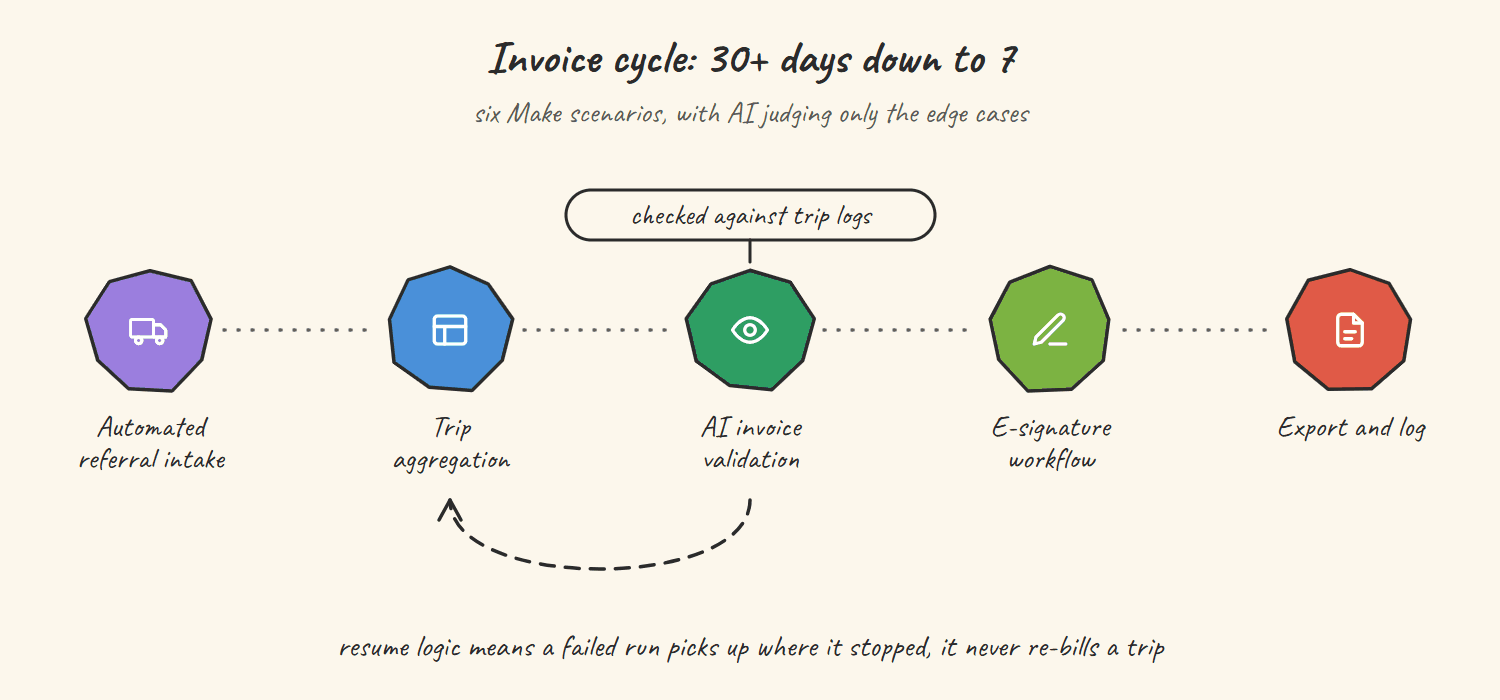
A US state-contracted transportation provider came to me with a specific and painful problem: their invoices were taking 30+ days to compile and submit. Government contracts reimburse on invoice submission. Thirty days of delay is not a process inefficiency. It is a cash flow crisis happening every single month.
Today, their invoices go out in 7 days. That is a 77% reduction in processing time. Thirty-one hours per week returned to the team. Invoices paid 23 days faster.
This post breaks down exactly how I built it: the architecture, the 6 Make scenarios, how GoHighLevel handles the communication layer, how Retool gave the team dashboards they could actually use and how Claude AI eliminated a 2 to 3 day human QA step in under 60 seconds.
[!TIP] Special Offer: If you're starting with Make, sign up using this link to get the Pro plan (worth $18) for free for one month, including 10,000 operations (instead of the usual 1,000 on the free plan). This is the best way to test production-grade workflows without hitting limits early.
Why Transportation Companies Struggle with Invoice Processing
Transportation providers that operate on government contracts face a uniquely difficult billing environment. They are not just tracking revenue. They are tracking compliance.
Every trip has to be logged against a specific referral. Every referral has to be tied to an approved client. Every client document has to be signed. Every invoice has to be formatted to state specifications before submission. And if any piece of that chain is broken (missing signature, wrong date or uncategorized trip) the invoice gets rejected and the payment cycle starts over.
The company I worked with had ten-plus team members across multiple regions. Their virtual assistants were logging trips manually in scattered spreadsheets. Managers were chasing email signatures for trip log documents. The team compiling monthly invoices was pulling data from three or four different places, normalizing it by hand and hoping nothing was wrong before sending to the state.
The result: 30+ days from trip completion to invoice submission. Every month.
The fix was not more people or better spreadsheets. It was a system where every piece of data entered once and flowed automatically from there.
The Stack: Make + GoHighLevel + Retool + NocodeBackend + Claude AI
Before getting into the architecture, here is why these tools specifically:
Make is the orchestration layer. It connects everything, handles the routing logic, manages the iteration through hundreds of client records and triggers the right actions at the right time. As a Make Level 5 Expert (top 1% globally), this is where I spend most of my design thinking. The scenario architecture here is more complex than most projects I build.
GoHighLevel (GHL) is the CRM and client communication layer. It stores client contacts, handles e-signature workflows and is the trigger point for the intake process. If you are running a service business that deals with client-facing documents and approvals, GHL's pipeline and automation features are underutilised by most operators.
Retool provides the internal dashboard. VAs log trips here rather than in spreadsheets. Managers approve weekly reports here. The interface validates data against the approved referral list before any trip is logged, which eliminated an entire class of errors before they could enter the system.
NocodeBackend (NCB) is the central database, the single source of truth. Every client record, every trip log and every document reference lives here. Make reads from and writes to NCB throughout all 6 scenarios.
Claude AI (Anthropic) handles the invoice validation step that previously required a human to spend 2 to 3 days checking fields. More on this below.
The System Architecture: How Data Flows
Here is the full flow, end to end:
New referral intake → GHL creates contact → Make generates client ID → NCB stores record
↓ Daily
VAs log trips in Retool (validated against approved referrals)
↓ Every Friday
Make compiles weekly trip report → Manager reviews and approves in Retool
↓ After approval
Make generates trip log document → GHL sends for client e-signature
↓ 2nd of every month
Make + Claude AI aggregate all trips → validate against state schema → format invoice → export to Google Sheets
Nine steps. Zero manual data entry after the initial trip log. Every document auto-generated. Every signature handled by GHL. Every invoice validated by Claude before it leaves the system.
The 6 Make Scenarios
Scenario 1: Client Intake
Every new referral starts in GoHighLevel. When a contact is created, Make fires immediately. It generates a unique client ID, updates the GHL contact with that ID, creates a corresponding record in NocodeBackend and logs the entry to Google Sheets.
The critical design decision here was the router. When a webhook fires, there are three possible situations: the client is genuinely new, the client already exists in the system or there is a data error. A single-path flow breaks on scenario two and three. I built a 3-path router with a resume module for the error path. No referral ever falls through a gap. The system retries failed lookups automatically rather than silently dropping them.

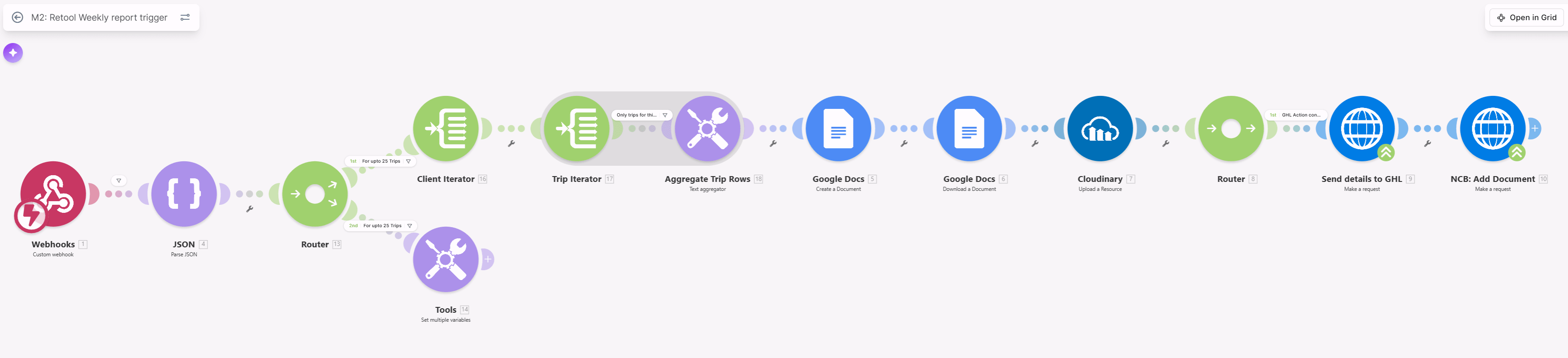
Scenario 2: Weekly Report Trigger
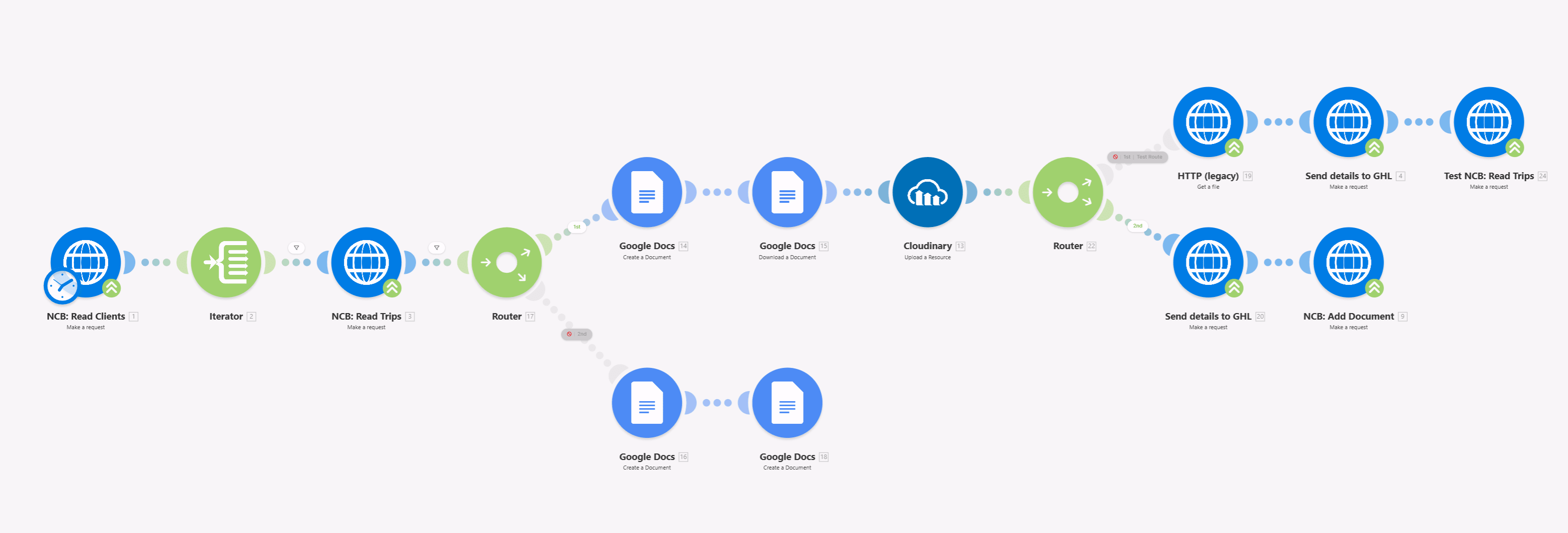
Every Friday, this scenario fires from a Retool webhook trigger. Make pulls all active clients from NocodeBackend, iterates through each one, filters for trips logged in the past week, aggregates the trip rows and creates a formatted Google Doc. That document is then uploaded to Cloudinary for storage and sent to GHL, which notifies the relevant manager that their weekly report is ready for review.
Scenario 3: Monthly Report Trigger
Same architecture as Scenario 2 but scoped to the full billing month rather than a single week. This runs on a monthly schedule and produces the comprehensive client-level trip aggregation that feeds into the invoice generation step.

The key distinction between weekly and monthly triggers is the aggregation logic. Monthly reports need to account for edge cases: trips logged late, corrections submitted and partial-month referrals that do not appear in weekly snapshots.
Scenario 4: Monthly Scheduled Report + Client E-Signature
After the monthly aggregation, NocodeBackend is read again for all active clients. Make iterates through each, reads their trip records, creates a Google Doc formatted to the trip log specification, downloads it, uploads to Cloudinary and then dispatches via GoHighLevel for client e-signature.
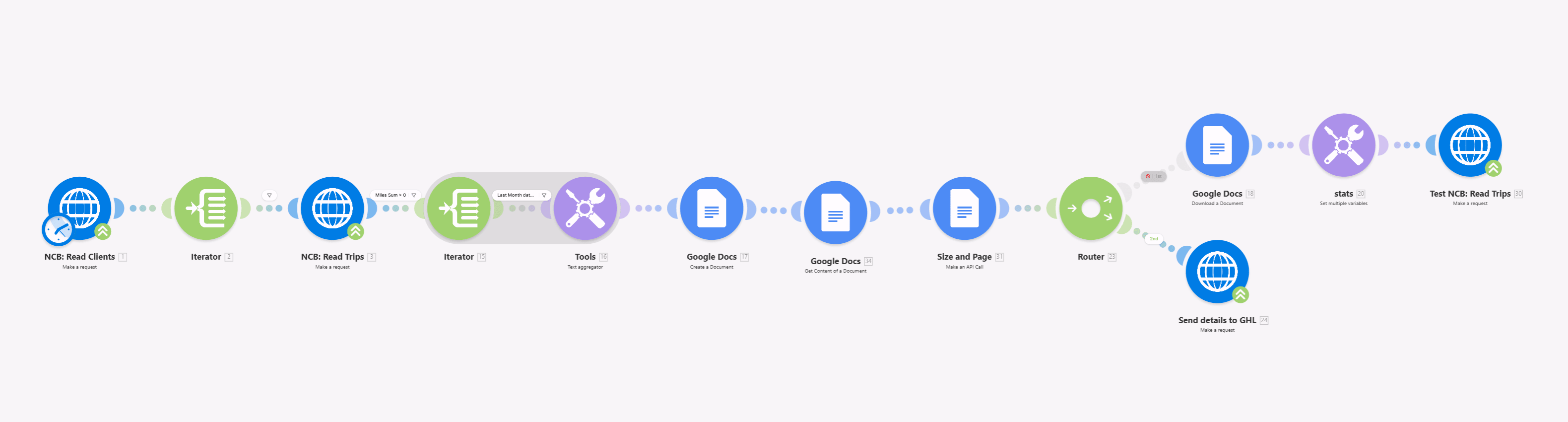
Once signed, the document reference is logged back to NocodeBackend. The audit trail is complete: every trip, every document and every signature timestamped and stored.
Before this system, the team was chasing signatures by email, sometimes for weeks. Now GHL sends the signature request automatically and follows up if it is not completed within the configured window.
Scenario 5: Invoice Export with Claude AI (2,181+ Operations)
This is the one that changed the economics of the whole project. 2,181+ operations per run. Four parallel branches. Claude AI doing in 60 seconds what used to take a human 2 to 3 days.
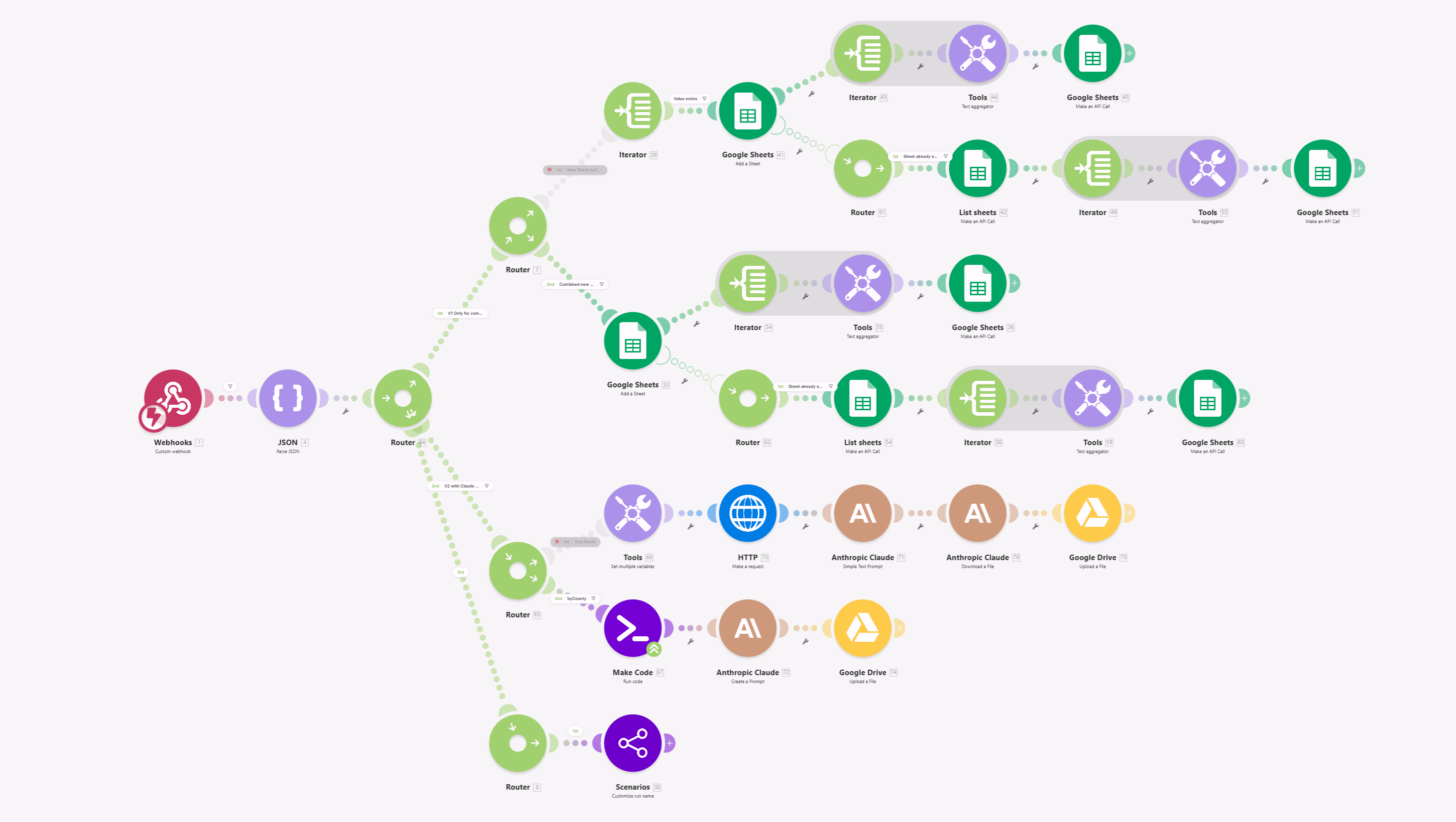
The scenario is triggered from Retool when invoice generation is initiated. The router splits into four branches:
Branch 1: Standard Google Sheets Export. Formats trip data into the state-mandated invoice layout and writes it to a new Google Sheet.
Branch 2: Existing Sheet Update. If a sheet already exists for this client/month combination, updates it rather than creating a duplicate. This handles corrections and resubmissions cleanly.
Branch 3: Claude AI Invoice Validation. Make sends the raw trip data as a structured JSON payload to Claude via the Anthropic API. Claude's prompt instructs it to validate each field against the state contract schema, checking for missing values, date format errors, mileage anomalies and referral ID mismatches. It returns a confidence score for each line item and flags anything that needs human review before submission.
Branch 4: Scenarios Runner. Triggers downstream Make scenarios for cascading actions: archiving, notification and audit logging.
The Claude AI integration replaced what was previously a manual QA step where a team member would spend 2 to 3 days cross-referencing trip logs against the state schema before the invoice was sent. That step now happens in under 60 seconds with higher accuracy and a full audit log of what was checked.
Scenario 6: Weekly Scheduled Report
The final scenario runs on a weekly schedule independent of the Retool trigger in Scenario 2. It reads active clients and their trips from NocodeBackend, creates the weekly Google Docs, uploads to Cloudinary and dispatches to the relevant managers and coordinators via GHL.
The Results
| Metric | Before | After | Change |
|---|---|---|---|
| Invoice processing time | 30+ days | 7 days | ↓ 77% |
| Team on unified platform | 0 | 10+ | ✅ Unified |
| Compliance audit trail | None | Full digital record | ✅ Built |
| Trip log compilation | Manual | Fully automated | ✅ 100% |
| Manual report compilation | Weekly & monthly | Zero | Eliminated |
| Claude AI QA step | 2 to 3 days human | 60 seconds | ↓ 97%+ |
Time saved per week: 31 hours across VAs, managers and coordinators
Annual labour saving: ~$29,000 at blended rates (conservative estimate)
Cash flow impact: Invoices paid 23 days faster on state government contracts
Conservative total annual value: $40,000+
Build time: 60 days from kickoff to all 6 scenarios in production
"I've spent several years looking for the solution you are offering. I've tried so many different options that did not help." Founder, US Transportation Provider
The Design Principle Behind This Build
The biggest mistake in projects like this is automating what already exists. I did not digitise the old paper process. I rebuilt the foundation around a single design principle: every piece of data enters the system once and flows from there automatically.
Trip data enters through Retool, validated against the approved referral list before it is accepted. From that point, Make handles every downstream action: aggregation, document creation, signature collection, invoice generation and validation. No data is re-entered. No document is manually formatted. No invoice is sent without Claude checking it first.
The other decision that matters: centralising on NocodeBackend as the single source of truth. This project involved GHL, Retool, Google Docs, Google Sheets, Cloudinary and Claude all interacting with the same client and trip data. Without a central database, you get six systems with six versions of the truth. With NCB, every tool reads from and writes to the same record.
Phase 2 (same-day invoicing) is now technically possible. The foundation supports it. It is just a scheduling change away.
What This Means for Your Business
This build was for a transportation company, but the architecture applies to any business where:
- You deal with client-facing compliance documents
- You have a team logging data in spreadsheets that should be in a database
- Your invoicing is delayed by a manual data aggregation step
- You need GoHighLevel and Make to talk to each other in real time
- You need AI-powered document validation before anything goes out
The transportation context is specific. The pattern is universal.
FAQ
Q: How do you automate invoice processing for a transportation company?
A: Build a single source of truth for trip data, then automate the compilation, approval, signature and invoice generation as a connected sequence. In this build, I used NocodeBackend as the central database, Retool for trip logging and manager approvals, Make for all the orchestration logic, GoHighLevel for client communication and e-signatures and Claude AI for invoice validation before submission.
Q: Can Make integrate with GoHighLevel?
A: Yes. I have built production systems connecting Make with GoHighLevel for contact management, pipeline updates, automated document dispatch, e-signature workflows and bidirectional data sync between GHL custom fields and external databases.
Q: Can Make work with Claude AI for document validation?
A: Yes. Make sends structured JSON to the Anthropic Claude API via the HTTP module. Claude validates each invoice field against the contract schema, returns a confidence score per line item and flags anomalies. This replaced a 2 to 3 day manual QA process with a 60-second automated check.
Q: How long does it take to build a transportation invoice automation system?
A: A full compliance-grade system like this takes 45 to 60 days. Simpler systems covering just trip logging and invoice generation can be built in 2 to 3 weeks.
Q: What is the ROI of invoice automation for transportation companies?
A: This specific build returned ~$40,000/year in labour savings plus 23 days of faster payment on state government contracts. Most clients see full ROI within 8 to 12 weeks of go-live.
Q: Can automation handle state compliance requirements?
A: Yes, and it handles them better than manual tracking. The system creates a complete digital audit trail: every trip, every document and every signature is timestamped and stored. The state invoice exports in the exact format required. Claude AI validates compliance fields before submission.
View the full case study with all 6 Make scenario screenshots →
Related guides
Ready to build something like this? Book a free consult → | Fiverr gig →