GoHighLevel + Make Automation: The Complete Guide for Agencies
I've built 1,200+ automations for 210+ businesses as a Make Level 5 Expert. The combination I get asked about most by agencies in 2025 and 2026 is GoHighLevel connected to Make.
[!TIP] Special Offer: If you're starting with Make, sign up using this link to get the Pro plan (worth $18) for free for one month, including 10,000 operations (instead of the usual 1,000 on the free plan). This is the best way to test production-grade workflows without hitting limits early.
And for good reason. GHL is where your clients' leads, contacts, pipelines and communications live. Make is the automation layer that connects GHL to everything else: invoicing, Slack, Airtable, Google Sheets, AI, WhatsApp and more. The two together give agencies a level of operational automation that neither tool can achieve alone.
This is the guide I'd want to have before building my first GHL + Make integration.
Why GHL's Native Automation Isn't Enough
GoHighLevel has solid built-in workflows. Trigger on contact created, send an email, wait 2 days, send another. For basic drip sequences and simple follow-up, GHL's native automation handles it fine.
But the moment you need GHL to talk to something outside its ecosystem, like your accounting software, your team's Slack channel, your client's Airtable database, a custom API, an AI model, you hit walls. GHL's native workflows don't connect to arbitrary external tools. They're designed for marketing automation inside the platform.
That's the gap Make fills. It's the automation layer that sits between GHL and everything else. GHL fires a webhook when something happens. Make catches that webhook and does whatever you need. In any tool, with any logic, at any complexity.
The Foundation: GHL Webhooks → Make
Every GHL + Make integration starts here. GHL can send webhook notifications when specific events occur. Make has a Custom Webhook module that listens for those notifications and triggers a scenario.
Setting Up the Webhook in Make
In Make, create a new scenario. Add a Webhooks → Custom Webhook module as the trigger. Make generates a unique URL. Copy it.
Configuring the Webhook in GHL
In GHL, go to Settings → Integrations → Webhooks (or within a specific workflow using the Webhook action). Paste the Make.com URL as the destination.
GHL fires webhooks for these key events:
- Contact created
- Contact updated
- Opportunity created / stage changed
- Appointment booked / confirmed / cancelled
- Form submitted
- Payment received
- Task created
- Conversation message received
For each event type, GHL sends a JSON payload to Make.com with all the relevant data: contact name, email, phone, pipeline stage, form field values, appointment time and more.
Parsing the Webhook Payload
After your first test trigger in GHL, Make's webhook module automatically maps the data structure. You'll see all the fields available from the GHL payload as variables you can use in downstream modules.
Key fields to know:
body.contact.email          → Contact email
body.contact.phone          → Contact phone
body.contact.firstName      → First name
body.contact.lastName       → Last name
body.contact.tags           → Array of tags
body.opportunity.name       → Opportunity title
body.opportunity.pipelineStage → Current pipeline stage
body.appointment.startTime  → Appointment time
body.formData               → Form submission fields
The 6 Most Valuable GHL + Make Integrations
1. New Lead → Instant Multi-Channel Follow-up
The problem: A new lead fills out a form or comes in through a GHL funnel. Someone on your team has to manually check GHL, see the lead and follow up. During busy periods, this takes 30-90 minutes. You lose deals to whoever responds first.
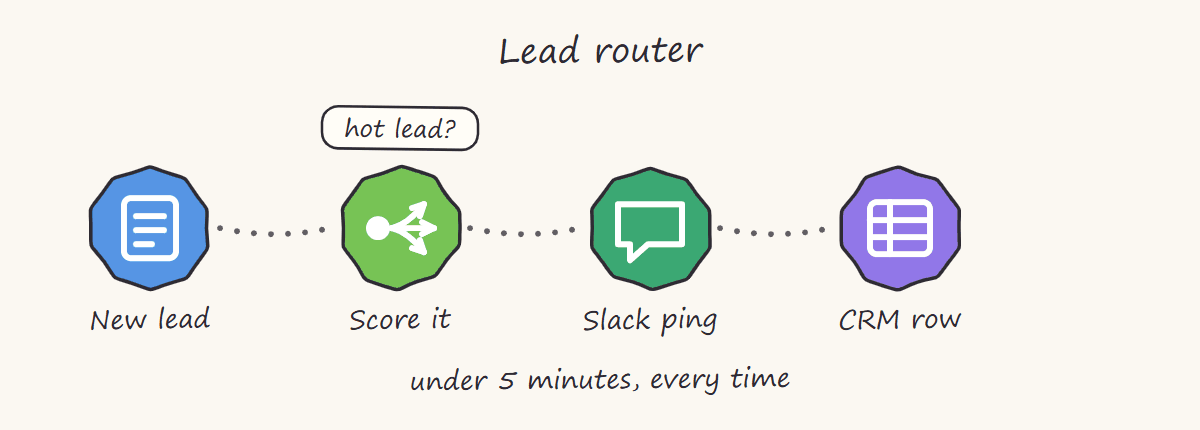
The shape is always the same: score first, then split. Hot leads interrupt a human immediately, everything else is filed without one. Roughly a four-hour build once the webhook is live.
The automation:
GHL form submitted → Make webhook fires
↓
Router: lead source / service type / location
↓
[Branch A: High-value lead]
  → Send personalised WhatsApp (via WATI or Interakt)
  → Create Slack alert with lead details + suggested opener
  → Add to Airtable CRM with full form data
  → Create GHL task for follow-up call

[Branch B: Standard lead]
  → Send automated email via GHL (trigger GHL action via API)
  → Log to Google Sheets
  → Slack notification to team channel
Response time goes from 30-90 minutes to under 60 seconds. This single automation typically improves lead conversion rates measurably for any agency running paid traffic.
2. Pipeline Stage Change → Client Notification + Internal Action
The problem: When a deal moves to a new pipeline stage in GHL, your team needs to take action: send a contract, schedule an onboarding call, update the client. All of this happens manually.
The automation:
GHL opportunity stage changed → Make webhook
↓
Router: which stage was it moved to?
↓
[Proposal Sent]
  → Generate PDF proposal from Google Docs template
  → Send via email with PDF attached
  → Set GHL follow-up task for 48 hours

[Won]
  → Generate contract from template
  → Send DocuSign or PandaDoc for signature
  → Create onboarding folder in Google Drive
  → Send welcome email to client
  → Notify accounts team on Slack
  → Create invoice in QuickBooks or Zoho

[Lost]
  → Add contact to GHL nurture sequence
  → Log reason to Airtable for reporting
  → Send team Slack notification
Every stage transition triggers the right actions automatically. The deal moving in your pipeline IS the trigger for everything that follows.
3. Appointment Booked → Full Preparation Flow
The problem: A prospect books a call in GHL. You manually send a reminder, prepare context on the person, update your calendar notes and notify your team. Three to four manual steps per booking.
The automation:
GHL appointment booked → Make webhook
↓
HTTP module: fetch LinkedIn or company data via Clay or Apollo API
↓
OpenAI/Claude module: generate call brief (company overview, likely pain points, suggested opening)
↓
Slack: post call brief to team channel 30 mins before call
↓
Email: send confirmation + prep material to prospect
↓
Google Calendar: add appointment with notes
↓
Airtable: log appointment with contact details
The AI-generated call brief is the part that surprises agencies most. Before the call, your team sees a structured summary: who the prospect is, what their business does, likely automation pain points based on their industry and suggested opening questions. This took 15-20 minutes of research per call. Now it takes zero.
4. GHL Payment Received → Automated Onboarding
The problem: A client pays through GHL's payment system. You manually create their onboarding folder, send welcome materials, set up access and create their account in your project management tool.
The automation:
GHL payment received → Make webhook
↓
Extract: client name, email, service purchased, amount
↓
Google Drive: create client folder from template structure
↓
Notion/ClickUp: create new client workspace with standard tasks
↓
Email: send welcome email with onboarding checklist
↓
Slack: notify account manager with client details
↓
QuickBooks/Xero: create client record + payment record
↓
GHL: add tag "Paid" + move to Onboarding pipeline stage
Payment is the trigger for everything. From payment to fully provisioned onboarding in 90 seconds.
5. AI-Powered Lead Qualification + GHL Pipeline Update
The problem: Not all leads are equal. Your team wastes time on leads that were never going to buy. You need a way to score and route leads before a human gets involved.
The automation:
GHL form submitted → Make webhook
↓
Claude/OpenAI module: score the lead based on:
  - Budget mentioned
  - Industry
  - Urgency signals
  - Company size
  - Specific pain points described
↓
Router: score threshold
↓
[Score ≥ 80: Hot lead]
  → Update GHL contact: tag "Hot" + assign to senior rep
  → Instant Slack DM to rep with AI summary
  → Book priority call slot automatically

[Score 50-79: Warm lead]
  → Standard follow-up sequence
  → Add to nurture pipeline

[Score < 50: Low intent]
  → Add to long-term nurture
  → Log for monthly review
Make calls GHL's API to update the contact record, adding tags, changing pipeline stages, assigning to a rep, based entirely on AI scoring. Your team only sees leads that are worth their time.
6. Reputation Management: Auto-Request + Monitor Reviews
The problem: After a service is delivered, someone has to manually follow up and ask for a Google review. It gets forgotten half the time.
The automation:
GHL opportunity moved to "Delivered" stage → Make
↓
Wait: 24 hours after delivery
↓
GHL API: send SMS via GHL messaging
  "Hi [Name], we just wrapped your project. If you're happy with the results,
  a quick Google review means the world to us: [review link]"
↓
Wait: 48 hours
↓
If no review yet: send follow-up email with same link
↓
Log in Airtable: review requested, date, channel
This one integration consistently generates more reviews within 30 days than most agencies get in a year of manual asking.
Calling the GHL API from Make
Beyond receiving webhooks from GHL, Make can also call GHL's API to take actions inside GHL: creating contacts, updating opportunities, adding tags, sending messages and more.
GHL has a REST API at https://rest.gohighlevel.com/v1/ (v1) and https://services.leadconnectorhq.com/ (v2).
Auth: Use Make's HTTP module with Bearer token authentication. Get your API key from GHL: Settings → API Keys.
Common GHL API calls via Make HTTP module:
Create/update contact:
POST https://rest.gohighlevel.com/v1/contacts/
Body: { email, phone, firstName, lastName, tags, customField }

Update opportunity stage:
PUT https://rest.gohighlevel.com/v1/opportunities/{id}
Body: { pipelineStageId }

Add tag to contact:
POST https://rest.gohighlevel.com/v1/contacts/{contactId}/tags
Body: { tags: ["tag-name"] }

Send SMS:
POST https://rest.gohighlevel.com/v1/conversations/messages
Body: { type: "SMS", contactId, message }
For v2 API (recommended for newer builds), use https://services.leadconnectorhq.com/ with OAuth 2.0 or agency API key authentication.
Error Handling in GHL + Make Builds
GHL's API is generally reliable but has rate limits and occasional downtime. Every GHL + Make scenario I build includes:
Retry logic on HTTP modules: GHL API calls set to retry 3 times with 15-second delays. Handles transient timeouts without losing data.
Error route on webhook trigger: If the payload is malformed or missing expected fields, the error route fires a Slack alert with the raw payload so I can diagnose without losing the event.
Webhook response: I always set the Make webhook to return a 200 OK response immediately, even before processing is complete. This prevents GHL from treating a slow scenario as a failed delivery and retrying the webhook, which would process the data twice.
Try Make Free for 1 Month: Pro Plan
If you're building GHL integrations and haven't used Make yet, here's how to start without paying:
Sign up at this link: make.com/en/register?pc=prime
You get the Pro plan free for 1 month, worth $18, with 10,000 operations included. That's 10x more than the free plan's 1,000 operations. Enough to build and test your full GHL integration before committing to a subscription.
The Pro plan also gives you access to Make's AI features: Maia (Make's AI builder that helps you construct scenarios from plain language), AI-powered document parsing, quick data extraction from unstructured text and natural language assistance inside the scenario builder. Worth trying before you pay.
I'm a verified Make.com Solutions Partner. You can find my profile at Make's Solutions Partner directory.
Want This Built For You?
If you'd rather have a GHL + Make.com system built properly, with error handling, AI integration, documentation and a Loom walkthrough, rather than spend a weekend figuring it out:
- Fiverr (scoped builds, fixed price): fiverr.com/s/pdQDRDp
- Book a scoping call: free 30-minute consult
I build GHL + Make integrations regularly and can scope your specific use case within 24 hours.
FAQ
Q: Does Make have a native GoHighLevel integration?
A: Make doesn't have a dedicated GHL app module, but it doesn't need one. GHL's webhook system sends event data directly to Make's custom webhook URL, and Make's HTTP module handles all GHL API calls. This approach is actually more flexible than a native integration. You can call any GHL API endpoint, not just the ones a pre-built module exposes.
Q: What GHL events can trigger a Make scenario?
A: Contact created/updated, opportunity created/stage changed, appointment booked/confirmed/cancelled/no-show, form submitted, payment received, task created, conversation message received and more. In GHL workflows, you can also add a Webhook action that fires at any point in any workflow, giving you granular control over exactly when Make gets triggered.
Q: Can Make update contacts and pipeline stages in GHL?
A: Yes. Make's HTTP module calls GHL's REST API to create contacts, update contact fields and tags, move opportunities between pipeline stages, send SMS messages, create tasks and more. Every action available in GHL's API is available to Make via the HTTP module.
Q: How do I handle GHL's API rate limits in Make?
A: GHL's v1 API has rate limits (100 requests per 10 seconds per location). For high-volume scenarios, add a sleep/delay module between API calls to stay under the limit. For bulk operations, use Make's built-in scheduling to spread calls over time rather than firing them all at once.
Q: Is it better to use GHL's native workflows or Make for automation?
A: Use both. GHL native workflows are excellent for sequences that stay entirely within GHL: email drips, SMS follow-ups, tag-based actions, internal notifications. Use Make for anything that needs to cross into external tools: Google Sheets, Slack, invoicing, Airtable, AI, custom APIs. The right architecture uses GHL for marketing automation and Make for the operational layer that connects GHL to the rest of your business.
Q: How much does it cost to build and run a GHL + Make integration?
A: Make's Core plan handles most agency-level GHL integrations. Existing Core subscribers keep it; new signups see the same entry point sold as the Make plan with a credit slider, where $9 a month buys 5,000 credits and $16 buys 10,000 on annual billing, read from Make's own pricing page on 10 September 2026. If you're processing high volumes, including thousands of leads or appointments per month, the 20,000-credit step at $29 a month or higher is worth it for the headroom. Start with the free Pro trial linked above to test your scenario before committing. Build cost depends on complexity. Contact me for a scope.
Q: Can I use AI inside GHL + Make workflows?
A: Yes, and this is where it gets powerful. Make has native modules for OpenAI, Anthropic (Claude) and other AI providers. You can pass GHL contact data or form responses to an AI model for lead scoring, call brief generation, personalised email drafting or document parsing, all within the same Make scenario that's connected to GHL. The AI output then flows back into GHL as a contact note, tag or message.
Related guides
Want this GoHighLevel + Make system built for your agency or service business? Book a free consult to scope the exact workflow. For a fixed-scope build, the Make.com automation gig on Fiverr is a fast starting point. To trial Make first, sign up with this link for a free Pro month.