You can automate TradingView alert delivery to Telegram channels, Discord servers and Slack workspaces using Make.com's webhook module. The system receives the TradingView webhook JSON, enriches it with stock metadata, calculates stop loss and take profit levels, generates a branded image and routes the alert to the correct channel based on asset class. No code. No VPS. No monthly bot subscription. Under 2 seconds from alert trigger to message delivery.
I built this exact system for a SEBI-registered analyst running paid signal channels. His team was manually forwarding TradingView alerts to 5+ Telegram channels, creating branded images for each alert and selecting the right channel by hand. In fast markets, alerts were delayed by 2 to 5 minutes or sent to the wrong channel entirely. The automated system replaced all of that with a single Make.com scenario that handles everything from webhook receipt to multi-channel delivery in under 2 seconds. See the full case study here.
I am Prem Patel, a Make.com Level 5 Expert (top 1% globally) with 1,200+ automations built for 210+ clients. This guide walks through the complete architecture for building a TradingView alert distribution system for signal communities, trading educators and analysts.
[!TIP] Start with Make.com Pro for free: Sign up using this link to get the Pro plan free for one month with 10,000 operations. That is enough to handle hundreds of alerts per day while you build and test.
Who This Guide Is For
This is not a guide for building automated trading bots. This is a guide for people who run trading signal communities and want to deliver their TradingView alerts faster and more professionally.
If any of these describe you, this guide is directly applicable:
Signal service operators running paid or free Telegram channels where you share TradingView-based trade ideas with subscribers. Trading educators and mentors who teach via live signals and need those signals delivered instantly to student channels. SEBI-registered analysts, financial educators and prop firm signal providers who distribute alerts across multiple channels organized by asset class. Community managers running Discord servers or Slack workspaces where trading signals are a core feature.
The system does not execute trades. It does not provide financial advice. It delivers your signals to your audience faster and more consistently than you can do manually.
Why Manual Alert Forwarding Breaks at Scale
Every signal operator starts the same way: TradingView alert fires, you see the notification on your phone, you screenshot the chart, you type a message in your Telegram channel. It works when you have one channel and 5 alerts per day.
It breaks when any of these happen:
Speed kills manual delivery. In volatile markets, 3 to 5 alerts fire within the same minute. By the time you forward the first one, the third alert's entry price has already moved. Your subscribers act on stale data. A 2-minute delay in a momentum trade can be the difference between a profitable entry and a bad one.
Multi-channel routing is impossible manually. If you run separate channels for equities, options, crypto and futures, you have to read each alert, decide which channel it belongs to and post it there. Under pressure, alerts go to the wrong channel. An options alert in your equity channel confuses subscribers and erodes trust.
Branded images take too long. Professional signal channels include formatted cards with the ticker, entry price, stop loss, take profit targets and direction. Creating these manually for each alert is the single biggest time sink in the workflow.
You cannot be available 24/7. Markets move while you sleep, travel or eat dinner. If your system depends on you being at your phone within seconds of an alert, you will miss signals. Your subscribers notice.
The Complete Architecture: TradingView to Multi-Channel Delivery
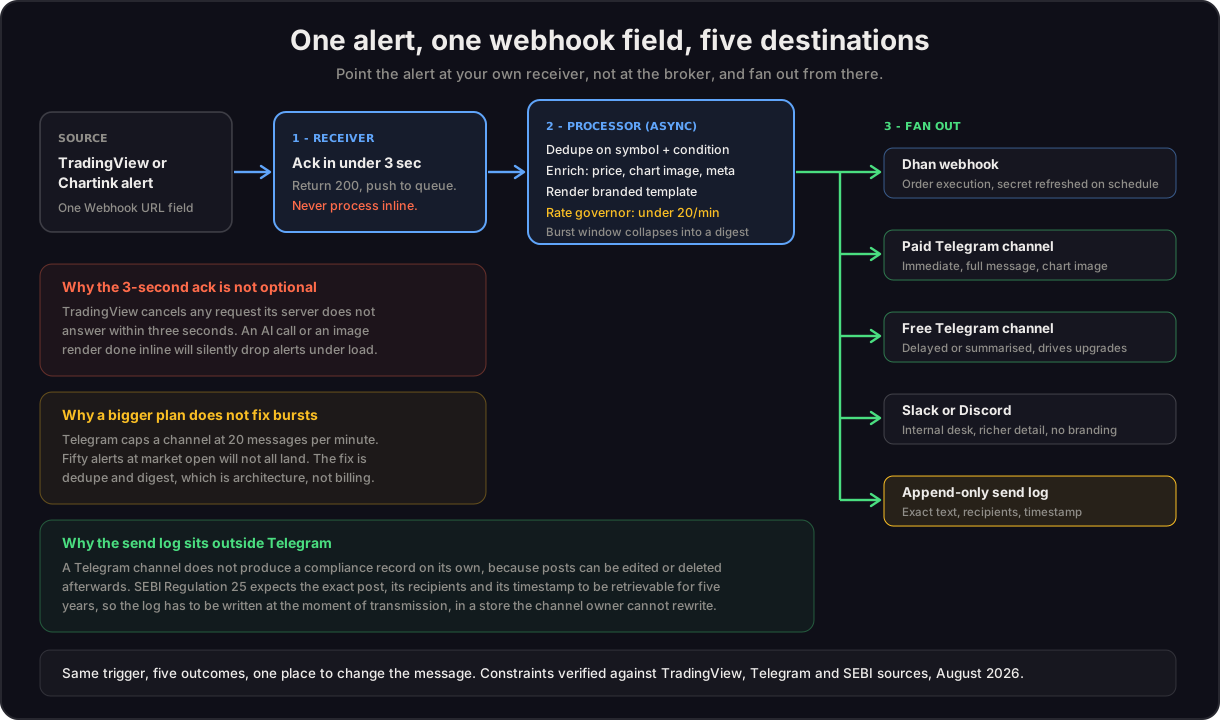
Here is the full pipeline from TradingView alert trigger to subscriber delivery. Every step runs inside a single Make.com scenario.
Step 1: TradingView Webhook Fires
TradingView sends a webhook POST request to Make.com's Custom Webhook URL. The alert JSON payload contains everything the system needs.
Example TradingView alert payload (copy this as your alert message):
{
  "ticker": "{{ticker}}",
  "exchange": "{{exchange}}",
  "price": "{{close}}",
  "interval": "{{interval}}",
  "time": "{{time}}",
  "direction": "LONG",
  "strategy": "breakout_v3",
  "signal_type": "equity",
  "sl_pct": 1.5,
  "tp1_pct": 2.0,
  "tp2_pct": 4.0,
  "tp3_pct": 6.0
}
The double-brace placeholders (ticker, close, exchange, interval, time) are TradingView's built-in variables. They auto-fill with the actual values when the alert fires. The custom fields (direction, strategy, signal_type, sl_pct, tp1_pct, tp2_pct, tp3_pct) are values you define based on your trading system.
Important: TradingView webhooks require a Pro plan or higher. The free plan does not support webhooks. If you are on the free plan, you can use email-based alerts as a workaround, but webhook delivery is significantly faster.
Step 2: Make.com Receives and Parses the Payload
Make.com's Custom Webhook module generates a unique URL. Paste this URL into TradingView's alert webhook field. When the alert fires, Make.com receives the JSON instantly.
The scenario's first module parses the payload into individual fields: ticker, price, direction, timeframe and your custom parameters. These fields flow through the rest of the scenario as variables.
Step 3: Alert Meta Calculation
This is where the system adds intelligence that manual forwarding cannot match.
Stop loss and take profit calculation: Using the entry price and your percentage parameters from the payload, Make.com calculates exact SL and TP levels. If the alert says LONG on RELIANCE at 2,850 with sl_pct of 1.5% and tp1_pct of 2%, the system outputs: SL = 2,807.25, TP1 = 2,907.00, TP2 = 2,964.00, TP3 = 3,021.00.
ATR-based dynamic levels: For more sophisticated systems, you can fetch the current ATR (Average True Range) from an exchange API and calculate SL/TP based on volatility rather than fixed percentages. This produces tighter stops in low-volatility conditions and wider stops in high-volatility conditions.
Risk-reward ratio: Automatically calculated from the SL and TP levels. A trade with SL at 1.5% and TP1 at 2% has a risk-reward of 1:1.33. This gets included in the alert message so subscribers can make informed decisions.
Stock metadata enrichment: An optional HTTP module fetches additional data from a market data API: the day's high/low, trading volume, previous close, percentage change from open and sector/industry classification. This context transforms a bare alert into an insight.
Step 4: Branded Image Generation
Instead of sending a plain text message, the system generates a professional signal card.
The image includes: ticker name, current price, direction (color-coded green for bullish, red for bearish), entry level, SL level, TP1/TP2/TP3 levels, risk-reward ratio, strategy name, timeframe and a timestamp. Your brand logo or watermark is embedded in every image.
This can be done with Cloudinary's text overlay transformations, a custom HTML-to-image service or Make.com's built-in image generation modules. The image is generated dynamically per alert. No templates to update manually.
Why branded images matter: They look professional to subscribers. They carry your attribution when screenshots are shared. They prevent competitors from reposting your signals without credit.
Step 5: Conditional Channel Routing
This is the core differentiator of using Make.com vs a simple webhook bot. Make.com's Router module with filter conditions handles complex routing logic.
Route by asset class: The signal_type field from your payload determines the destination. Equity alerts go to #equity-signals. Options alerts go to #options-signals. Crypto alerts go to #crypto-signals. Futures alerts go to #futures-signals. Each filter checks the signal_type value and routes accordingly.
Route by signal type: Scalp alerts (5-15 minute timeframe) go to a dedicated scalping channel. Swing alerts (daily/weekly) go to a swing channel. Positional alerts go to an investment channel. Subscribers follow only the channels relevant to their style.
Route by subscriber tier: Premium subscribers get instant alerts. Free subscribers get the same alert with a 15-minute delay (using Make.com's Sleep module). This creates a natural upgrade path without maintaining two separate systems.
Route by platform: The same alert fires to Telegram, Discord and Slack simultaneously via parallel branches in the Router. Each platform module formats the message slightly differently (Telegram supports Markdown, Discord uses embeds, Slack uses blocks) but the content is identical.
Adding or removing channels: Because routing is filter-based, adding a new channel means adding one new branch to the Router. No scenario rebuild required. You can go from 3 channels to 10 channels by cloning branches and updating the filter condition and channel ID.
Step 6: Delivery and Logging
The alert is delivered to all matching channels simultaneously. Telegram, Discord and Slack modules send the branded image with the formatted message text.
Every alert is also logged to Google Sheets or Airtable with: timestamp, ticker, direction, entry price, SL, TP levels, which channels it was sent to and (optionally) the outcome when you close the trade later. This log becomes your performance tracking database over time.
What You Can Build on Top of This
The base system handles alert intake, calculation, routing and delivery. These extensions add more value without rebuilding anything:
Daily market insights digest. A scheduled scenario (separate from the alert webhook) runs every morning before market open. It fetches index levels, sector performance, FII/DII data (for Indian markets) and your previous day's alert results. It compiles this into a formatted morning message and sends it to your channels. Subscribers get market context before your first alert of the day.
Performance tracking dashboard. Using the alert log in Google Sheets or Airtable, calculate win rate, average risk-reward achieved and streak data. Share weekly performance summaries with your community. This builds trust because you are transparent about results.
Subscriber management automation. For paid channels, connect your payment system (Razorpay, Stripe) to Make.com. When a subscription expires, automatically remove the user from the premium Telegram channel. When they renew, add them back. No manual admin.
Multi-format delivery. The same alert data can generate a Twitter/X post, a WhatsApp message via the Business API and an email newsletter update. One webhook trigger, five platforms served.
The three platform limits this design has to respect
Re-verified against TradingView and Telegram documentation on 18 August 2026. These are the numbers that decide whether an alert bridge survives a busy open.
| Limit | The number | Why it matters here |
|---|---|---|
| TradingView webhook timeout | 3 seconds, then the request is cancelled | The scenario must acknowledge fast and do slow work afterwards. An AI call or image render done before responding will drop alerts under load |
| Telegram group or channel rate | 20 messages per minute | A burst of signals at open will not all land. Deduplicate and aggregate into a digest instead of firing each one |
| Telegram single chat rate | About 1 per second, then 429 errors | Rapid sequential posts to the same chat need spacing |
TradingView additionally requires two-factor authentication on the account before webhook alerts are permitted, accepts only ports 80 and 443, and publishes four allowlisted source IPs worth allowing through any firewall in front of your receiver.
What This System Does NOT Do
This needs to be completely clear.
This is not automated trading. The system does not connect to any brokerage. It does not place orders. It does not manage positions. It delivers your trading alerts to your community channels. What your subscribers do with those alerts is their decision.
This is not financial advice. This article is a technical guide for building an alert distribution system using Make.com. The examples use trading terminology (SL, TP, risk-reward) because that is the domain. The system is agnostic to whether your signals are profitable.
You are responsible for compliance. If you are running this in India, the message format itself now carries obligations: since February 2026 SEBI requires the registered name and registration number at the start of each securities-related post, and Regulation 25 expects a five-year retrievable record of what was sent, to whom and when. We cover both, plus why a Telegram channel cannot be that record, in the Dhan to Telegram alerts guide. If you are a SEBI-registered analyst in India, an SEC-regulated advisor in the US or operate under any other financial regulatory framework, your compliance obligations apply to the signals you send regardless of whether they are sent manually or automatically. The automation makes delivery faster. It does not change your regulatory responsibilities.
FAQ
Q: Can Make.com receive TradingView webhooks? A: Yes. Make.com's Custom Webhook module generates a unique URL. Paste this URL into TradingView's alert webhook field. When the alert fires, Make.com receives the full JSON payload instantly and processes it through your scenario.
Q: How fast is the alert delivery from TradingView to Telegram? A: Under 2 seconds in production. This includes webhook processing, SL/TP calculation, image generation, channel routing and message delivery. The bottleneck is usually image generation (300-500ms). Without images, delivery is under 1 second.
Q: Can I route different TradingView alerts to different Telegram channels automatically? A: Yes. Make.com's Router module with filter conditions routes alerts based on any field in your webhook payload. You can route by asset class (equity vs options vs crypto), by signal type (scalp vs swing), by subscriber tier (premium vs free with delay) or any custom criteria you define.
Q: Does TradingView's free plan support webhooks? A: No. TradingView webhooks require a Pro plan ($14.95/month) or higher. The free plan supports email and app notifications but not webhooks. If you are serious about running a signal service, the Pro plan is a necessary cost.
Q: Can I calculate stop loss and take profit levels automatically from TradingView alerts? A: Yes. You can include percentage parameters in your webhook payload (e.g. sl_pct: 1.5, tp1_pct: 2.0) and let Make.com calculate exact price levels from the entry price. For dynamic levels, you can fetch the ATR from a market data API and calculate volatility-adjusted SL/TP within the same scenario.
Q: Can this system send alerts to Telegram, Discord and Slack at the same time? A: Yes. Make.com's Router module supports parallel branches. The same alert triggers simultaneous delivery to Telegram (via Bot API), Discord (via webhook or bot) and Slack (via incoming webhook). Each platform gets its own formatting while the content stays identical.
Related guides
- What is Make.com? Complete Guide for 2026
- Trading Signal Automation Case Study
- What to Look for When Hiring an Automation Expert
- TradingView webhook documentation
Want this system built for your signal community? Book a free consult and I will scope the exact architecture for your channels, asset classes and subscriber tiers. | Fiverr gig for fixed-scope builds